Modern Barn Lighting Question
 beachlegs
Posts: 531
beachlegs
Posts: 531
in The Commons
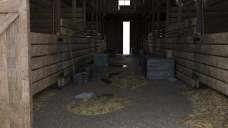
I bought Modern Barn and I would like to know how to light my barn like the promo images here https://www.daz3d.com/i13-modern-barn-environment?srsltid=AfmBOopUQUEeWTcJjjdKQEfvb_mZ1FQriC2AEWL2NZJIompv4Bon9nzV my image looks nothing like it.
barn.png
1934 x 1087 - 5M

Daz 3D is part of 
Connect
DAZ Productions, Inc.
7533 S Center View Ct #4664
West Jordan, UT 84084
Licensing Agreement | Terms of Service | Privacy Policy | EULA
© 2026 Daz Productions Inc. All Rights Reserved.
Comments
I had a quick look and the Ready to Render scene does look like your attachment. Someone with more historical knowledge can probably give you a good reason why but I imagine that some defaults/values in Daz Studio or Iray have changed significantly since that product was released (December 2016). I know the change to ghost lights "broke" a lot of environments but I don't think there are any used in that scene (unless that is what the "Sun Dial" is?).
As a quick suggestion to get you a little closer, you can ramp up the Tone Mapping -> cm^2 Factor to around 8, enable Filtering -> Bloom Filter and change the Envinronment Tint to something a little more warm. You'd need a separate VDB/Godray product/solution to complete the look tho which is out of scope for that product.
There are probably several other ways to do it tho, including adding in new lights.
Thank you so much, I had no idea it was that old. I will go and have another play with it and hopefully figure it out. :)
Well, it's meant to use the Sun and Sky but it is set to Dome and Scene and (old bug) the default environment map is applying and overriding the SunSky settings. However, removing the map doesn't help so ... There are certainly no emissive surfaces on the props, so it isn't a Ghost Light issue. Uping the exposure does help, somewhat, but I am not sure where the steam is coming from.
Hello Richard, I think Epic Godrays and Volumetric Light was used. I still can not get mine to look as good which is a shame, I will keep on trying :)
Hello. I’m a hobbyist/dabbler and have been playing/exploring in Daz Studio since early 2008. I have i13 Modern Barn Environment and played with it for a while to see if I could approximate the lighting in the main promo image on the store page. First let me say this – Many years ago, I realized that I would almost never be able to recreate a store promo image unless the vendor packed all of the resources to do so in presets in the product.
Using some of the suggestion already made, I changed the Environment to Sun-Sky only, set the Environment Tint to an orangish color, adjusted the Tone Mapping to brighten the scene. I noticed in the promo image that there appears to be additional light entering the barn from the viewer’s right; notice that the pitchfork is casting a distinct shadow on the wood planks that it is leaning against. So, I added a spotlight off camera pointing at the pitchfork. That didn’t seem to do much, but then I realized that perhaps the near end of the barn was turned off; so I did that and it brightened the barn interior near the now open end of the barn.
The attached render is not intended to exactly duplicate the promo image but to demonstrate that one can get close to it with enough time, experimentation and patience.
The promo does suggest that volumetric lighting, Godrays and dust particles have also been used. I have ThePhilosopher’s Epic Props: Godrays & Volumetric Light for Iray which can add those effects but I did not explore using ThePhilosoper’s product with the barn scene. Epic Props: Godrays & Volumetric Light for Iray is definitely worth having; put it on your Wishlist if it isn’t already there. I got it at a very deep discount ($3.99) last summer and I didn’t have any tokens or Daz membership to use.
In SunSky a spotlight won't do anything, to mix sun/sky and lights you need Dome and Scene mode with no map assigned to the environment.
Thank you for your help, the screen shots are useful. I have Godrays and volumetric lighting it is a wondeful product for sure. I will have more time tomorrow so I will have a good play and see what happens.
Yeah, I realized that later.