ZBrush Displacement Maps Help!
 RevokedRevenant
Posts: 47
RevokedRevenant
Posts: 47
Greetings,
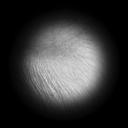
a friend of mine (another DAZ hobbyist) gave me a couple of displacement maps, exported from ZBrush, that i want to use to add some detail to one of my figure. I know how to create and use displacement maps in DAZ, but these (coming from ZBrush) are basically black and white: the attached image is one of the maps.
From what i know, i must create an RGB base of 128, 128, 128 (actually 127.5, 127.5, 127.5 but we can't in photoshop), and then each shade tending to white is positive displacement, and tending to black is negative.
Can someone explain to me how can i use these ZBrush displacement maps? I guess i must convert them, how can i do it?
Thank You in advance!

Daz 3D is part of 
Connect
DAZ Productions, Inc.
7533 S Center View Ct #4664
West Jordan, UT 84084
Licensing Agreement | Terms of Service | Privacy Policy | EULA
© 2026 Daz Productions Inc. All Rights Reserved.
Comments
Displacement moves the mesh within the minimum (black) - maximum (white) values according to the tonal value - so when, as they are by default, the minimum and maximum are equal and opposite mid grey is indeed neutral. However, if you are displaying only incised or only raised detail then one of the values can be 0, and all sahdes of grey will give some degree of movement. You presumably know what the limits are - in mm - so just set those values, set strength to 100%, and apply the map.
The attached image is a displacement map ... ?
I did wonder.
Thank You @RichardHaseltine for your answer! I've never thought of that: if i set the minimum displacement limit to zero i am basically considering the positive (white) values only, and viceversa, so i can use a black and white map with no grey areas... clever!
Yes, it is a displacement map, i too was unsure at first!
It's quite annoying to deal with "standard" grey displacement maps, though, since even if i create them as greyscale, 16 or 32 bit, png, i still have the seams problem in DAZ
the mind boggles what it's for, I can think of a couple bits of anatomy depending on the UV mapping
Ah... probably.
And seam issues may come from the different displacment settings on surfaces across the seams... if the maps were correctly baked.
The attached image looks more like a screenshot of a shaderball than a proper map.
Ummm, this is a zbrush alpha map. For a zbrush BRUSH.
If you dont understand sculpting in Zbrush or baking out displacement or normal texture maps for Daz figures, you can learn that process from start to finish, and then your question will be answered during the process.
I thought too but they seem to be using it as a map on something
They want to use it as a map on something.
That doesnt mean it actually does relate to a Daz figure UV map (it doesnt, not even what you intimated).
I suppose one could potentially use it as a LIE within Daz Studio, supposing one wanted to waste time positioning it, playing with multiple different settings and blend modes, etc instead of just using it like it was intended as an alpha mask for a sculpting brush in ZBrush/Blender etc. I dont want to lead a new user astray by saying to use it as a LIE, so i will make clear i dont think you should do this.
Also, wondering if an alpha mask should usually be a 8bit jpg? I can see banding on the edges of that jpg in the image...
To acutally give a productive answer for new users who want more high res detail in their figures, dont bother learning to create your own displacement maps until you have checked out the 8K normal maps from G9, and existing HD morphs you can buy on store.