Removing an old path from Modify Assets save out dialog??
 RAMWolff
Posts: 10,393
RAMWolff
Posts: 10,393
in The Commons
Removing an old path from Modify Assets save out dialog??
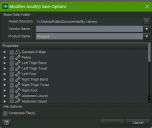
I made some needed changes to a character morph and saved it out to an old path. Took me forever to figure that out. SO I'm asking how does one go into the settings, wherever they are, even into RegEdit if I need to to remove this old path? It's annoying and messed me up for a little while this morning.
DS Modifier.png
900 x 760 - 215K

Daz 3D is part of 
Connect
DAZ Productions, Inc.
7533 S Center View Ct #4664
West Jordan, UT 84084
Licensing Agreement | Terms of Service | Privacy Policy | EULA
© 2026 Daz Productions Inc. All Rights Reserved.
Comments
That path is automatically read from the directory of data folder where the DSF files of the selected Item locate... when you save a Modifier Asset ~~
It cannot be "removed" unless you re-install the product to one of you "new Daz Libraries"... (and delete the folder/files in the old path if you manually install the product)
If you couild modify it then you would either end up with two copies, not necessarily loading the modified version, or it would need to remove the original and save the new, which for a product would break uninstalling and might end up with dupliate files after an update.
OK, thank you. Seems there should be an extra bit added to this dialog to remove these old paths. Thanks again!
I don't know if it'll apply to your situation but you can also manually move the morph file into another library, as long as you're respecting the relative path.
I'm regurlarly making morphs to adjust a piece of clothes to a character's shape and I usually place them in a special library (to make it easier to have a backup), localed to '[drive]/Morphs' but sometime, I forget to change the path, so some of them ended inside 'My DAZ 3D Library':
'[drive]/My DAZ 3D Library/data/[name of the PA]/[product]/[piece of clothes]/Elor/Base/[character]_body_bs_Body.dsf'
I just moved it inside my Morphs library:
'[drive]/Morphs/data/[name of the PA]/[product]/[piece of clothes]/Elor/Base/[character]_body_bs_Body.dsf'
And it worked.
On the subject of this UI element, is there a reason why the product name defaults to 'Product' when PAs usually use 'Base' instead ? And is there a way to change the default value ?
Last question: is there a way to easily select the morph I just modified when I wants to save ? Because browing all the hiearchy to end in [Product Name]/Actor/Full Body/People/[Feminine/Masculine]/ was already tedious the first time :o