Questions about makeup / eyebrows colors
 qweretrretet
Posts: 27
qweretrretet
Posts: 27
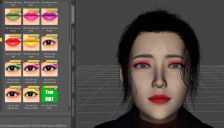
- I’m making a scene with the “GN Lian Hua” model and I’d like to add some dark makeup (eyeshadows and lipstick). My problem is that I have only these 5 colors and even if I work in the “Surface” panel I can’t change them. Is there a guide on how to export/edit/import again a new colored material? For example, I’d like to add a “GN Lian Hua Lips Black” in that list.
- Is there a reason sometime makeup materials can be selected but don’t appear on a character? Always working with the “GN Lian Hua” model but most of the makeup materials I own don’t appear when I try to select them. Is there a way to force them anyway?
- Can I change the color of the character eyebrows? I can change materials for the hair but I don't get how I can make the eyebrows the same color.
Thank you

Daz 3D is part of 
Connect
DAZ Productions, Inc.
7533 S Center View Ct #4664
West Jordan, UT 84084
Licensing Agreement | Terms of Service | Privacy Policy | EULA
© 2026 Daz Productions Inc. All Rights Reserved.
Comments
Product link: https://www.daz3d.com/gn-lian-hua-for-genesis-81-female
I don't have her, but usually the makeup are made by changing the Base Color texture (for the face).
I am not aware of any tutorials.
But in essence, you would take the Face Base Color texture into an image editor. I would suggest using the neutral face as base. Then add a paint layer on top and paint your make-up.
When done, save your texture with a new name, potentially in the same folder as the original.
Then in Daz Studio, in Surface Settings, you left clcik the image and select browse and locate your new image. And try to render. It will probably be some trial and error.
You could try using one of the makeup as base, by select by color, and then modyfi that. The process is the same but different.
Alternatively there are some products in store that uses LIE, and therefore can be used on all characters, e.g. https://www.daz3d.com/extreme-closeup-smokey-rebel-makeup-for-genesis-3-and-8-female-s
You don't export it, it is in your Runtime folder.
If you right click an image and select 'browse' it will open in the folder where the image is.
You can also see the path when hoovering over it.
Then when you know where the image is, open it from your image editor of choise.
Oh, I think I get it. I see that in the texture I have yes, eyebrows and lips, so one way is to color everything the way I want. I just need to find how I can add it in the left tabs so I don't have to browse the folders every time.
After you have made the image(s), you can save it as a material preset.