I can't find this product
 dannagiusy64
Posts: 477
dannagiusy64
Posts: 477
Hi guys. I can't load this product because I can't find it. I can't even see the preview.
https://www.daz3d.com/50-hdris--movie-maker-iray--metropolis-night_Dreamlight
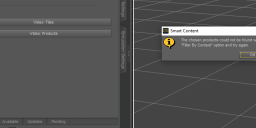
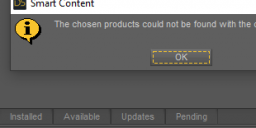
whether I select the filter or deselect it, it doesn't load. Can anyone help me? Thanks
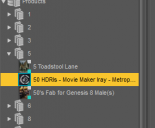
1.png
285 x 235 - 13K
3.png
1236 x 353 - 47K
4.png
690 x 155 - 14K

Daz 3D is part of 
Connect
DAZ Productions, Inc.
7533 S Center View Ct #4664
West Jordan, UT 84084
Licensing Agreement | Terms of Service | Privacy Policy | EULA
© 2026 Daz Productions Inc. All Rights Reserved.
Comments
Did you install it via Daz Connect? Maybe it doesn't work that way? I have it installed via DIM and I get 54 items coming up under Files when searching for it. All items I have clicked on seem to load as expected.
The product thumnail in your Content Lib is grey out, that means it was uninstalled. Just reinstall it via DIM or Daz Connect.
I also installed it with DIM and I have already made some renderings with this product. But now it is not visible anymore
Are you logged into your account in Daz Studio? If so then perhaps you have accidentally partially installed it with Daz Connect? If that exists then it will take priority over the DIM version. Try right-clicking on it under products and if there is an uninstall option then select that and then re-install via DIM to see if that fixes it.
I uninstalled and reinstalled it with Install Manager. I also did it manually. In the folder > Runtime > textures > Dreamlight > Iray > Movie Maker Iray > Metropolis Night > there are 50 HDR files.
Everything seems to be fine. Since I installed the new version of Daz I have many problems
Here is the screen that is inside the product
If you installed the product manually then there would be no Product or Assets under Smart Content unless you specifically created them. So it looks like you have a bad install and you'll need to uninstall that before it will work again. Right-click on the Product and select Uninstall to remove any Daz Connect version - this is VERY important as if you do have a broken Daz Connect version then nothing else you do will matter. After that you can try reinstalling with DIM.
Sorry for my ignorance, but I thought DIM was Install Connect. I've always used this. Where can I find DIM?
Ahh, I see you are using a translator so perhaps something is lost :(
DIM is referring to "Daz Install Manager" - that is the application you sent a screenshot of in the recent reply.
"Daz Connect" is a different and incompatible installation method that is built into Daz Studio itself. This is what is used if you are signed into your account within Daz Studio and install or update any products from there. It is possible to have a product installed by both methods which will always mean that the DIM version is ignored in favour of the Daz Connect version and that also means the product is taking up twice as much space.
Therefore, if you can find the product within Daz Studio and right click on it there should be an option to "Uninstall" in the drop-down menu. That is the way to remove any Daz Connect version of the product. If you can do that then you can go to DAZ (Daz Install Manager) and re-install the product which will hopefully fix the issue.
I hope that translates properly since I don't speak any Italian.
Thanks for your kind reply. I uninstalled as you suggested, but I see that on DIM they are still in the menu of installed products. I tried to remove them from there and reinstall it but nothing. It seems to be present but I can't find it on Smart Content, Content Library or the products folder. I also see that this error is given to me on other products
While installing the various product packages
Hi, yes, if you uninstalled the product from within Daz Studio itself (Daz Connect) it will not affect the installed status within DIM. This is because they are two very different install methods and they save to different locations. Daz Connect will by default install under a "cloud" folder and installs products into their own folders using the product ID in the folder name. DIM installs by default into a "Library" folder and merges the folders together into a common heirarchy.
Therefore, what you were seing in your first reply is what I would expect and so you were correct to then try the reinstall within DIM.
For the second reply where you are getting the download failure (Retry Message). Don't worry too much about that, I think some of the Daz servers are having issues as I had the same thing with a different product last night. Once the others are done, click the retry button and they should start downloading, if not give it 15 minutes (or longer) and try again. They should eventually download.
I have done everything but the products are not visible. This is very frustrating.
If you tried re-importing metadata but you still couldn't find the workable product in Smart Content, the metadata DSX file might be problematic. You better check the DSX file.
If I uninstall Daz and reinstall it could it help? I have at least 4000 products and I don't want to find myself having to install them all, many of which were purchased on renderesity and installed manually
I don't think re-installing Daz Studio itself will fix any issue.
When you are searching Smart Content Products for the product do you have "Filter by Context" unchecked?
It should come up like this when using: "50 HDRIs - Movie Maker Iray - Metropolis Night
(adding the quote at the beginning treats the whole thing as one string rather than 7 individual words)
EDIT: After downloading all parts in DIM, have you actually re-installed it or are any of the parts still listed under "Ready to Install"?
Yes, I also tried deselecting the filter, I put a screenshot at the beginning with that too and the error message is different.
I really like this product. I hope I can solve it
I'm a fan of installing things manually. All of this set can be downloaded and installed manually.
Possibly if downloaded and moved into one of those folders that DIM reads, it could install them too.
Anyhow, if one unzips the 5 to one folder, then move the "Light Presets" to the main "Light Presets" folder in the huge collection folder, then under the Content Pane {does not use meta data} one can find them manually. {and of course move the Runtime folder in as well to the huge collection folder of content}
End result: "only one" Content OR My Library > Light Presets ... and again "only one" Content OR My Library > Runtime ...
If one runs the Content Manager to reread the meta data, it should pick up the Support files however I don't do that so don't know how well that works these days.
oh yes: Close D/S before manually adding content ;-)