Unwittingly hit some strange key combo and Daz went crazy (solved)

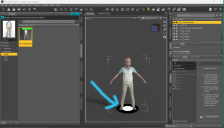
Still a newbie. Just know enough to create and render basic scenes. Was working on a scene in Daz Studio and all of a sudden it started rolling off the screen. It just rolled and rolled until it disappeared. Hit the reset view button, and it would reset the scene. Then immediately start rolling again. Could not figure out what keys or commands to enter to get it to stop. I assume that somehow I gave the animate command or some such thing. The only way out was to exit. Lost a lot of work. Now, when I reopen any of my scenes, there is this circle that appears at the bottom of the screen under my figures. The circle’s outer parameter is black and inner part it white. Like a big pie divided into four parts. I hope someone knows how to reset back to normal. Any help anyone can provide would be appreciated.

Daz 3D is part of 
Connect
DAZ Productions, Inc.
7533 S Center View Ct #4664
West Jordan, UT 84084
Licensing Agreement | Terms of Service | Privacy Policy | EULA
© 2026 Daz Productions Inc. All Rights Reserved.
Comments
That's the Start Circles from aniMate2 tool as you by chance hit Alt Shift + A. Look at that button with "M icon" on toolbar which is highlighted in yellow... Just hit Alt Shift + U (or T, R) to be back to the routine tool.
So, if you see something strange in Viewport, better first off check toolbar or Tool Settings pane, you can quickly find out why ~~
Thank you.