How to fix G8 mouth abnormality(Resolved)
 AsuCafe
Posts: 560
AsuCafe
Posts: 560
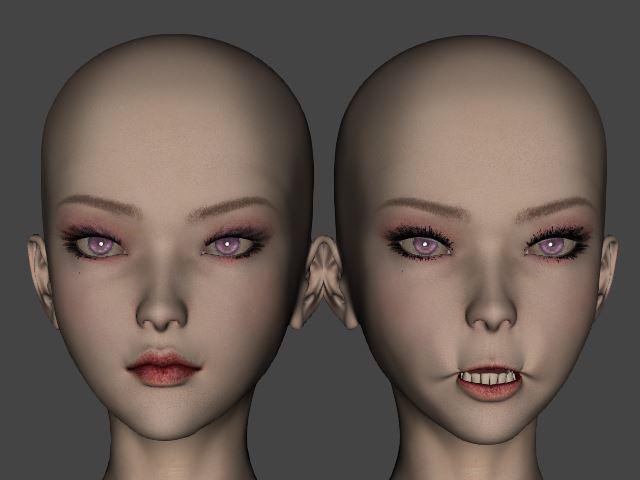
Some G8 Figures will appear strange on the mouth when applied on G8.1, For example, like "CO Reine and CO Reine Hair for Genesis 8 Female(s)", the left side is the original G8.0, and the right side is applied in G8.1, how to fix it?
pro00000.JPG
640 x 480 - 26K
Post edited by AsuCafe on

Daz 3D is part of 
Connect
DAZ Productions, Inc.
7533 S Center View Ct #4664
West Jordan, UT 84084
Licensing Agreement | Terms of Service | Privacy Policy | EULA
© 2026 Daz Productions Inc. All Rights Reserved.
Comments
Please check the Currently Used parameters of Genesis 8.1 Female and remove any interfering morphs.
For CO Reine, set the following four morphs to 0%.
Because the character was designed for G8F and the controller expression properties ( at 2nd Stage in ERC link... ) for some of the corrective morph of this character are blocked by G8.1F as default.
I'd recommend a once and for all solution: remove the dummy blockers by checking this post: https://www.daz3d.com/forums/discussion/comment/8833706/#Comment_8833706
Then reload G8.1F, the corrective morphs won't be auto-dialed.
It works, thank you.
I will try, thnak you.