Iray Render through Window Weirdness
 Melissa Conway
Posts: 590
Melissa Conway
Posts: 590
I attempted a forum search to see if anyone else had encountered this problem, but didn't find anything. If the topic has already been discussed then I apologize.
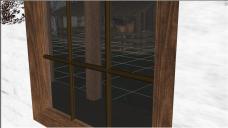
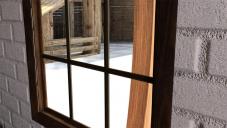
I've been having issues with iray renders where the view is looking in or out a window shaded with DAZ Uber glass. My props don't look the same in the render as they do from the Studio workspace (it's like they are magnified), and some of the textures don't show up at all. I've attached a screenshot of the workspace and one of the render itself. Any suggestions? Thanks. 
M.

Daz 3D is part of 
Connect
DAZ Productions, Inc.
7533 S Center View Ct #4664
West Jordan, UT 84084
Licensing Agreement | Terms of Service | Privacy Policy | EULA
© 2026 Daz Productions Inc. All Rights Reserved.
Comments
Which glass are you using? The thin glass would be the one for windows if I recall correctly.
Well, what do you know? I had no idea there was a difference between the glass shaders, but I probably should have figured it out. Thanks, Khory, the barn is now where it should be. Unfortunately, the textures on the ground prop are still MIA...
Edited because the first attempt at attaching the .jpg didn't take.
Two things to try.
Change the Tone Mapping so the camera sees less light. This will make the inside darker too.
or
Dim the Dome Lighting.
is it a ground texture or a ground shader?
It depends on the glass, fyi... some windows are a simple flat plane with no depth, so you want 'thin' glass. Other windows are very thin cubes, so I think you use the regular glass shader for them.
If you don't care about shading/coloring the glass, it can be regular or thin-walled glass. Like Will says, you'd use a thin-walled option with a glass geometry that has no polygon thickness. If the glass has a thickness (it's made from a cube rather than a plane, for example), turning thin-walled off will get better results.
Anywho, the magnification and image displacement is likely from the refraction index dialed for the glass you are using. The higher the index, the more of a magnification and distorted effect you'll get. For the purposes of Iray renders, regular pane glass can have low index of refraction.
The missing textures could be from too much light; the image outdoors looks blown out. Try setting the correct light and exposure for outdoors first. If the interior is then too dark, you can try adding some lights to the inside portion, and/or activate the Architectural Sampler filter in the Iray render panel. This filter provides a "hint" to D|S that the primary light source for the interior is indirect. As in real-life photography, balancing light for both indoors and outdoors is about the toughest of all.
I tried it with the original texture (it's the Creepy Hollow terrain) and with a ground shader applied. Same result.
I'm using an HDRI. I went into the Render Settings editor and reset it to default, then reapplied the HDRI and all seems well now. Must have gotten corrupted? Anyhoo, thanks for the suggestions, guys!
I'll note that in a lot of cases I'm finding it preferable to not even use refraction for windows. Maybe it's not 'accurate,' but cutout opacity works just fine enough for the effects, 9 times out of 10.
Agreed, as long as I don't need a reflection.
Pro-tip: set metallicity to 1, and your surface acts like reflective glass (or water).
Ah. Took me a few to realize what you meant. I created a new scene, added some terrain and an HDRI, then added a primitive plane to which I applied DAZ Iray Uber shader. I set metallicity to 1 and then lowered cutout opacity. The plane now looks like a window in render. Right?
Yep. Now, it doesn't do blurry windows... for that you probably still want Refraction, though I'd probably just go Index of Refraction 1 and not worry about 'accurate refraction.'
Also note, if it matters, that if you shut off 'share glossy inputs' it gives you the ability to set refraction color and roughness separately from Glossy color and roughness. (Otherwise it just uses glossy for both)