M4 Elite Textures
 Kev914
Posts: 1,143
Kev914
Posts: 1,143
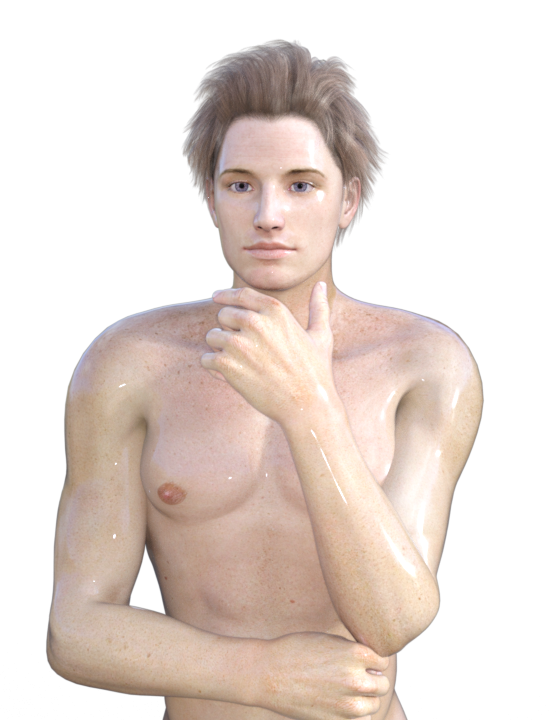
I have the M4 Elite textures. In the picture I have a attached, I converted the texture to G2M. But why is he so shiny? I'm pretty sure if I apply the materials to M4 directly, I get the same effect. Are these textures suppose to be this shiny? I have never used them much because they didn't look right to me. I suppose you could add some drops and he would look wet. Is the the reason he looks so shiny is because the glossiness is set to 97%?

Jeremy M4 to G2M.png
556 x 720 - 375K
Post edited by Kev914 on

Daz 3D is part of 
Connect
DAZ Productions, Inc.
7533 S Center View Ct #4664
West Jordan, UT 84084
Licensing Agreement | Terms of Service | Privacy Policy | EULA
© 2026 Daz Productions Inc. All Rights Reserved.
Comments
Which M4 elite texture was this?
It looks like you might be using the Poser rather then the DS material preset ? Assuming you are using DS.
The figure below in red uses the DS preset the other in blue uses the Poser preset.
Both in DS 3DL both strait from the box and need playing with.
Edit: this is the M4 Elite Lee. I don't have the one you are using.
This was the Jeremy M4 Elite texture. It probably was the Poser Material. I didn't know there were two sets. I found it under the Pose folder in the content library. The Daz studio presets are somewhere else?
I can see the difference in your image, packmaster1958.
I think I found them. I looked under the Daz folder and not the runtime. When I did a test render, they looked much better. Thanks.
Yes there are DAZ Studio and Poser Material Presets for Jeremy M4 Elite.
You should find the DS Mat in Content Library>Daz Studio Formats>Which ever R/T you installed it in>People>Michael 4>Textures>Mat Elite
Edit: Oops, cross posting. My slow typing.
You may want to change Lighting Model from Plastic to Skin in Surfaces Tab and shift Gloss up some. (if you are using 3DL, for iRay see Havos below)
Glad to hear you have sorted this out. I also have this skin (M4 Elite Jeremy), and was seeing the same effect as you with the default poser shaders. I will post my fix anyway, in case you have issues with any other skins and do not have DAZ shaders to use as an alternative. Look at the image below. The one on the left is using the Poser shaders, and obviously looks the same as yours. For the one in the middle I converted the Poser shaders by applying the default alternate iRay shaders for G2M that comes with the shader packs that are part of DS4.8 and later (in Smart Content, look under Materials/Iray/Skin). The middle looks much better, but IMHO still a bit glossy. In the final version on the right I adjusted the Glossy Refectivity down slightly to 0.25, and the Glossy Roughness up to 0.6.
Thanks, Havos. I'm going to save your instructions so I can use them later if I need to.
The glossy skin would be really great if I wish to model an alien.