DIM nagging to install Daz and Content?
 3dOutlaw
Posts: 2,481
3dOutlaw
Posts: 2,481
in The Commons
I was getting nagged by DIM with this popup? Anyone else seeing that today? Took about 10 "cancels" to make it go away.
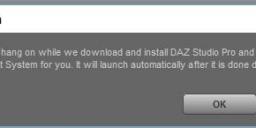
nag.jpg
509 x 145 - 20K

Daz 3D is part of 
Connect
DAZ Productions, Inc.
7533 S Center View Ct #4664
West Jordan, UT 84084
Licensing Agreement | Terms of Service | Privacy Policy | EULA
© 2026 Daz Productions Inc. All Rights Reserved.
Comments
Dunno, I'm not seeing it. Does DIM think Studio isn't installed?
I have no idea...???
...but it seems to work after I cancelled out after those 10 times.
Did you install a fresh copy of DIM? Or did you register with a fresh account?
We have DIM setup to automatically download the "base" content in order to help new users start with a working system, people who have been here a while know about needing to install "Default Lights And Shaders" and the Genesis bases, but there were a lot of problems with new users not understanding what was necessary and so were stumbling more than necessary early on.
I installed DS 4.9 to test it, on a USB drive a few days ago, maybe it refreshed it...?? Not sure if I used DIM since.
Wait...
I may be doing a re-image on my computer soon. I will reinstall 4.8. I have a backup of its installer already. Does downloading DIM fresh from the site now cause it to automatically install 4.9 and stuff I may not want?
Thats why I hit cancel like 10 times, I was saying "no, no, no....!!!" LOL
This happened to me. I have 4.8 and 4.9beta. As soon as I fired DIM up, it started to download 4.9. I, too, had to hit "cancel" multiple times.
I've made another purchase since then, and it hasn't happened again.
So far...
Dear DAZ; DON'T MESS UP DIM. I liked that it was a simple download and install utility that only did what I told it to do.
Wait, are you guys saying that it started downloading 4.9 (and accompanying files) automatically? DIM is a download manager, it should never attempt to automatically install anything, that's invasive and an overstep. I haven't had DIM attempt this with me, and I have absolutely no interest in 4.9 - more than 'no interest', I'd actually be livid if it ended up on my machine. So does anyone know what exactly is causing these download attempts from DIM? And is there a way to disable it other than frantically hitting cancel and hoping it never comes back?
There is quite a history of DIM downloading and INSTALLING stuff without it being told to do so ...
http://www.daz3d.com/forums/discussion/comment/993114/#Comment_993114
I really don't know. Usually, when I use DIM, i"m downloading 50 to 100 products, so I start DIM running, turn off the monitor, and do other things. I almost had 4.9 installed against my wishes. I'm really beginning to dislike the Daz Experience!
It's not enough that I have to watch for Sudden Price Change syndrome, math mistakes in Checkout (that always inflate the price, never deflate it?) encrypted content, now I have to watch while DIM runs? What the hell, Daz, what the hell?
This whole Daz Experience thing is swirling the bowl as we speak type.
Way back when people wher pushing for zip files instead of the old installer I suggested DAZ build their own utility to download and install them. I also suggested that it have two modes of operation, a basic mode for people that where use to installing with zips and a 'wizard' mode to guide new users through the process. Please DAZ give the wizard idea some thought and leave us cranky old farts to our own devices (or vices).
I have not selected it, but it is showing up in my DIM as a "update" and if one isn't careful, it could accidently "Get Approved" for download. To be Honest, It is really starting to feel like Daz is taking lessons from Windows 10 and forcing this update to happen. The thing is, I probably would have updated to both Windows 10 and Daz 4.9 by now if they didn't make such a forceful "You Will Update Now, Please" feeling about it. I've even had a couple "updates" to plugins that have broken my 4.8 plugins, almost forcing me to update. The more this happens, the more resistant I'm becomming. I have most of what I need/really want at this point, I could easily walk away and be happy without spending another dime... and if Daz keeps this direction, it's likely what I'm going to do.
There's nothing unique to 4.9 in this - DIM has always shown the current versions of DS, as it does of content, and if that's newer than the installed version it has always appeared as an update.
As for plug-ins, if they are 4.9 versions and you still have 4.8 that might well cause them to cease functioning.
I think since 4.9 shows up in Product Updates it's possible to accidentally get it going. I didn't install it and after a couple of days (there's been a lot of updated products lately) I right-clicked and hid it.
What threw me when reading this thread I decided to check again and found 4.9 in my installed column but the install date was for 4.8. The filename had simply changed...but the wierd thing was that it was hidden too! I've never hidden studio before.
But my installed Studio is still 4.8.
I've still got it hidden in updates because I'm not installing until I know for sure what the relationship between DIM and 4.9 is at install time. I have a lot of missing metadata (on purpose so as not to clog the db) and also several runtimes worth of files I moved out of DIMs install library to elsewhere.
if DIM is automatic installing 4.9, then that may be my Problem in this topic Do Over . . how to uninstall so I can reinstall 4.9 , thought I had the problem solved, but it reverted back to where I didn't want it to install.
I did notice it doing that once, and stopped it. but if I have multiple downloads selected, noticing it may not be so easy and lost in the other loading bars . Odd thing is, I had manually installed 4.9, it was the only way to get 4.9 on the right drive, but I noticed that 4.9 is still showing in DIM, when it shouldn't any more
Even though I had set the path for where to go, it seems determine to keep moving it back into the drive I don't want it on
after a break from this mess, I will be uninstalling and cleaning the reg. and try again installing, but I think I'll stay with manual installing. To me DIM seems broke and uncooperative, doing it's own thing and not what it's set up to do
DS 4 64 is a single product, so if you hide the update you hide the installed version.