Does this mean it's encrypted/DRMed?
 nicstt
Posts: 11,715
nicstt
Posts: 11,715
in The Commons
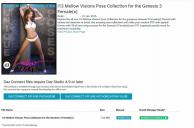
It has Daz Connect offline and authorisation package and file.
So as the title asks, does this mean they are encrypted when downloaded via that method?
encrypt.jpg
1234 x 816 - 183K

Daz 3D is part of 
Connect
DAZ Productions, Inc.
7533 S Center View Ct #4664
West Jordan, UT 84084
Licensing Agreement | Terms of Service | Privacy Policy | EULA
© 2026 Daz Productions Inc. All Rights Reserved.
Comments
It means it's available via DAZ Connect. The product page says it"s not encrypted. The "download" and "download & install" still refer to ZIP and DIM respectively.
Well, if its not encrypted, why does it need an offline authorisation file?
I don't see anything that says, not encrypted, on this or the Ly Amorette item I purchased.
The offline authorization file would be so you can move another authorized machine not connected to the internet. That machine would have to log in once, but after that all files can be installed without being connected to DAZ Connect. But the file isn't encypted since it has DIM and manual installers.
Again, please do read the Connect FAQ, these questions are all answered there http://www.daz3d.com/forums/discussion/65509/daz-connect-faq/p1
That one is on the 2nd page
TY
Just about all new stuff is available in the encrypted version but some stuff is also available as a standard DIM or manual install as well. You only need the offline authorisation file if you decide to use the Daz Connect offline package (which is encrypted). If you use the mnual download or DIM download and install you can ignore these.
Right, so I'm just trying to get my head around something. I've read the FAQ Page 2 where it talks about offline use but I'm still not clear on one thing.
Are you saying that unencrypted DAZ Connect content can only be installed on a machine that has been authorised by logging into DAZ Connect? So, the encryption (if present) is one layer of protection, but also the content archive itself is locked to a specific machine, making a second layer?
I must have missed that "feature".
There are a few new products which have been released as encrypted, to test the waters.
Do not confuse Connect with encrypted. Connect is another content delivery system.
The products that have been released as encrypted have been released either as completely free or at highly discounted prices, to allow people to have a chance to see how the system will work.
Encrypted products can only be downloaded using Connect, but Connect can also be used to download non encrypted products.Notice the difference in the store page install types for this New product http://www.daz3d.com/ly-amorette and this one http://www.daz3d.com/detective-poses-and-props
The first can be downloaded using Connect, or DIM, the 2nd, can only be downloaded using Connect, as it is encrypted.
Yes, I get that.
I'm referring to the presence of an authorisation file on the Product Library page of a non-encrypted product. What does that authorisation file do if the product itself is not encrypted? Does it "bind" the unencrypted archive in some way to the machine on which it is downloaded? And, if so, how does it do that?
To clarify that a bit more. An authorisation file would be expected to contain some kind of cryptographic token; the token being used to derive a decryption key or something, but if the archive is non-encrypted what is its purpose?
It has been explained several times that a machine needs to connect once, in order for Connect to be registered on that machine. Just like you needed to donwnload DIM once to download using DIM.
Yes, I know. I said as much myself in my first post.
What I am trying to establish is exactly what the Authorisation File does in that context. If the installation package archive is not encrypted then it would appear to be superfluous.
[EDIT: I know all these questions are a pain, but you seem to think that saying something has been explained makes it so. It's DAZ who are to blame for these questions, not the customer!]
How do I install Daz Connect products using Offline Packages?
On the computer that the Offline Package(s) will be downloaded to:
On the computer the Offline Package(s) will be installed to:
*Note: The *.sep and *.sea files for a given product will be removed from the ./data/cloud/install directory as that product is installed.
Well, I've tried asking three times and I'm getting nowhere here. It doesn't help showing me the FAQ that I have already read several times.
So let me try a different tack. If an unencrypted product has been downloaded to machine X using this mechanism, are the content files normal .duf files etc. ? If they are, why can't they then just be copied to a different machine. That authorisation file must DO something for unencrypted content, or it wouldn't be there in the first place.
It's so you don't have to log into connect on that machine everytime you want to install products. You authorize once, then that file is used in place of logging in subsequent times by copying it in where it says in the instructions. The file isn't encrypted, but still has to follow the installation process for Connect to be able to set it up in DS.
Right, so the fact that it gets deleted after installation (see FAQ) means that DS must store this info in the PostGreSQL database. That I can understand. What I don't understand is what is then protecting the content that was installed by this process. If it isn't encrypted, how do you stop somebody from copying it off to another machine?
This question is important, even though it seems to be being dismissed, because there are many users who do not like Connect because it interferes with their ability to sync content across multiple machines (Composing and Rendering boxes for example) and this goes to the heart of why they can't.
You would copy the scene file over and connect would install what's missing on your destination machine. It's probably more streamlined that copying everything over. It installs what you need so you don't fill up that destination machine with things you haven't used.
If you have other content that's not Connect, you just copy those files over to the same spots like you normally do. I have a external drive with a backup of my things but it takes far longer to sync those drives than to just install what I need for a scene.. syncs can take hours depending on the size of those libraries.
I think I know what you are trying to ask, acanthis.
Since the offline Connect file is a .sep, it needs a .sea file to authorize it, even though the model/asset isn't itself encrypted. For those using offline authorization, this is likely the preferred workflow.
Now, your actual question: does the asset become unencrypted when it is installed? I am not sure, as I do not use Connect. I would assume that people would probably also download the manual file as backup (in case of Connect hiccups).
If there is a manual download available then the content is not encrypted in the first place. Connect is a content delivery system. Dim is a Content delivery System Manual download is a Content delivery system. If there is a choice of delivery systems then it means the content is not encrypted.
It's been an exhausting exchange trying to get to the bottom of this. You have picked up on where I was going with my question: If the only purpose of the SEA file is to allow the SEP file to be installed, and the content in that SEP is ordinary, common-or-garden .duf, .dsa etc., then, after that installation process is complete, what's to stop somebody copying the just installed content across to another machine without the need to use the offline package route?
Anyway, I'm giving up now.
Remember when you install something with DIM, who still have to log in to do this, using a user name and password. So one could argue you are authorising the download in this case aswell, even though the file you receive is unencrypted. The connect authentication file is in a sense replacing this need to log in, since you maybe installing on a machine with no internet access.
Yes, I understand all of that. When you do that in DIM, and you choose to install a product, you end up with a handful of .duf, .dsa, .jpg etc. etc. splattered all over your content folder. And you do what you like with those unencrypted files, including manually copying them to another machine (although it would be easier to use the install ZIP file for that unless you're doing a folder sync).
So, with Connect, the SEA file is doing the login part, or is involved in authenticating in some way; whatever. Now DS installs the files that are in the SEP file (whatever format it is). These don't get splattered all over the place, they get shoved in a folder cloud/SKU_nnnn or something. IF they are a bunch of unencrypted .duf, .dsa, .jpg etc. files what is to stop the user then copying them to another machine - WITHOUT having to authenticate?
In other words, how does the presence of the SEA file stop somebody copying those unencrypted files manually? If it doesn't, then why bother with it in the first place?
I think since the original question was answereed and it's swinging back to the encyptied debate, it's probably time to merge these threads again:
http://www.daz3d.com/forums/discussion/70624/you-ve-been-heard-response-re-4-9-and-encryption#latest
Essentially the two threads are different, so should stay separate.
According to what Chohole said, in this instance, what DIM is doing is exactly what Connect is doing.
There are quite important differences in the way that DIM and Connect install content. DIM downloads ZIP files containing all the assets of the product stored in the target folder structure. These, of course, are unencrypted and you can manually install them straight from the ZIP—all you need is a standard file (un)compressing utility.
The SEP file is not the same as this. (Note that I am talking about all SEP files, not just those for the few encrypted products available). It's a compressed archive, but if you open one you will not see the various asset files (e.g. duf) in folders as you do above. Instead there's a column of files of various sizes with hashed filenames all ending in .enc (e.g 3fc4d561fdb08ad788fdbba2fb825a97_d6b805.enc). I don't think you have to have a very suspicious mind to imagine this is short for "encrypted". It's the same file extention used for the assets in encrypted packages (e.g. Dragon Queen). Obviously, you can't install these yourself manually—they will have to be installed by Connect inside Studio.
Also, products installed via Connect don't have the same user-facing files as the equivalent ones installed via DIM. The don't appear in your Content Library view other than under the 0-Z Product section and in Categories.
The Daz Connect offline instalation files are available for every product which can be installed through Daz Connect. It consists of two different packages, an offline package (.sep) which is encrypted, and the offline authorization file (.sea) which contains customer specific authorization for Connect to install it. The reason behind it, even if the product isn't an daz connect only product (encrypted) is this.
Part of the goals with Daz Connect is to get faster download times for customers. Our delivery all comes from our core servers, which as you can see from time to time, gets very bottlenecked. I download files from home on a gigabit connection but can only, on average, get around 5MB/s, and sometimes less than 1, largely because our outbound pipes are fairly taxed (we do a massive amount of traffic). Those .sep files go through a transparent CDN so they get cached on edge servers and will often mean that they will download much faster and not consume bandwidth for our core infrastructure (includes the store, forums, gallery, DIM, etc.).
However, because they are on the CDN, we can't do a check before someone downloads it of "do they own this." If you try to download a file for manual download or DIM either through the store or through DIM that you don't own, it gets the chance to check "did they buy this" and sends the file down or errors out depending. With CDN content, we can't do that check. So we have an encrypted .sep file that we can put out there and allow, literally, anyone to download it, and then only have to check ownership before generating and allowing a download of a .sea file (which is less than 1k I believe in size).
Once you get both files and install them, it installs just like any other product through Daz Connect, meaning it gets organized the same to prevent duplicate files from overwriting each other and the other reasons I outlined in a previous post why they are structured that way (largely to do with decreased complexity, which means less guess work and ultimately bugs or issues, with automated installing, per file updating, deletion, and eliminating dependency conflicts which exist when two different products provide the same file, but different versions of the file which happens more than you would think).
That those files are there show only that it is a product available through Daz Connect. You need to go to the product page to check to see if it is DC only or not for the encryption status.
To assuage any lingering doubts, I have conducted a test.
I installed an unenencrypted product offline via daz connect. (as the OP was asking about)
I found the files on my hard drive and created a .rar backup. this was easy as all products are stored in seperate runtimes.
I then uninstalled the product.
I took the rar that I had created and extracted it to my main runtime, as though it were a product I had downloaded the old fashioned way.
It showed up in my content libray as any product would.
From this it is pretty safe to say that once installed the files work just like non-connect products, they are not encrypted and you can easily transfer them to another computer.
Only downside was that there was no metadata with this method
[<<< EDIT: I can't get rid of this rogue quoting and I'm sick of battling with the abysmal forum editor. Sorry.]
Thanks. That's EXACTLY what I have been talking about.
So, sans metadata, it would be possible to use traditional file syncing methodologies between machines, without going the Offline Authorisation File route, for UNENCRYPTED DAZ Connect content. That might be an important mechanism for some users who work in this way, always assuming that they don't mind losing the metadata - but maybe that could be exported from one system, then imported on the other. Anyway, I don't want to speculate about this process because it is clearly not a recommended way of doing things (and it hasn't changed my decision not to upgrade to 4.9 at this time).
That said, DAZ_John's explanation gives a valid technical explanation for the Authorisation File for unencrypted content that, surprisingly, makes sense.