3DL: Skin Shaders-Can someone explain what I'm looking at?
 Scavenger
Posts: 2,677
Scavenger
Posts: 2,677
So from a discussion I had on Facebook, I started concidering the shader base for the figure I'm using. Other than doing Iray conversions, I've never given it a thought, and even there, I have no idea what I'm doing, just clicking what a tutorial told me to click.
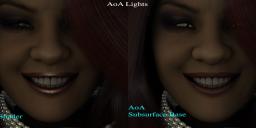
SO, in this picture, It's using AoA lights. The figure is a V4 (by Sabby) converted to G2F. By defaul it has OmUberShaders (left side). Right side is using the AoA Subsurface base (cmd clicked to apply it, clicking ignore to keep my mats).
There's a visible difference here, but I have no idea what I'm looking at or what I've done.


Daz 3D is part of 
Connect
DAZ Productions, Inc.
7533 S Center View Ct #4664
West Jordan, UT 84084
Licensing Agreement | Terms of Service | Privacy Policy | EULA
© 2026 Daz Productions Inc. All Rights Reserved.
Comments
Well, Subsurface handles SSS better, though you have to set the scale fine enough for the effect you want.
The big difference seems to simply be the lip gloss (ha ha). Cmd-click will keep maps, but it doesn't keep any of the settings. What I would do is make a copy with the omUberSurface and look at the glossy/specular values and compare.
Hmmm..maybe more basic...What is this subsurface base?
The tought process behind trying it wasn't much more than "hmm AoA made this, they made they lights...CLICK
Light hits your skin, part of it is absorbed, the rest is reflected...the absorbed part is bounced around through the various layers of your skin before exiting (yes, a tiny portion is totally lost, but lets not worry about that). That portion is the 'scatter' part.
A regular surface shader just deals with that reflected part. Both the omniUber and AoA have ways of calculating that scatter part...and since it is below the surface where that scattering takes place...it's 'subsurface'.
That's where the similarities end. They both use different means of doing those calculations and have different features turned on, by default. The AoA shader has a small amount of 'velvet' turned on, by default...that's probably why the lips are losing their gloss.