• Daz 3D
  • Shop
  • 3D Software
    • Daz Studio Premier
    • Daz Studio
    • Install Manager
    • Partnerships
    • AI Training data
    • Exporters
    • Daz to Roblox
    • Daz to Maya
    • Daz to Blender
    • Daz to Unreal
    • Daz to Unity
    • Daz to 3ds Max
    • Daz to Cinema 4D
  • 3D Models
    • Genesis 9
    • Genesis 8.1
    • Free 3D Models
  • Community
    • Gallery
    • Forums
    • Blog
    • Press
    • Help
  • Memberships
    • Daz Premier
    • Daz Plus
    • Daz Base
    • Compare
  • Download Studio
ADVANCED SEARCH
  • Menu
  • Daz 3D
ADVANCED SEARCH
Add image
  • Shop
  • 3d Software
    • Daz Studio Premier
    • Daz Studio
    • Install Manager
    • Partnerships
    • AI Training data
    • Exporters
    • Daz to Roblox
    • Daz to Maya
    • Daz to Blender
    • Daz to Unreal
    • Daz to Unity
    • Daz to 3ds Max
    • Daz to Cinema 4D
  • 3D Models
    • Genesis 9
    • Genesis 8.1
    • Free 3D Models
  • Community
    • Our Community
    • Gallery
    • Forums
    • Blog
    • Press
    • Help
  • Memberships
    • Daz Premier
    • Daz Plus
    • Daz Base
    • Compare

Notifications

You currently have no notifications.

Loading...
    • Categories
    • Recent Discussions
Daz 3D Forums > 3rd Party Software > Cinema 4D Discussion

Eyes texturing issue in Cinema 4D with Octane. Please help.

dydgnsska81dydgnsska81 Posts: 0
October 2024 in Cinema 4D Discussion

Hello, I’m importing the Genesis 9 figure from Daz into Cinema 4D and texturing it with Octane, but I’m having trouble with the EyeMoisture showing up black. I don’t know how to fix it. When I separate the Polygon Selection Tags for the Eye and EyeMoisture, the textures apply correctly, but when they overlap, they appear black. If anyone knows how to solve this issue, please help.
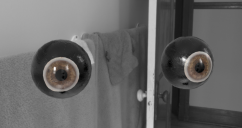
12.png
1339 x 709 - 760K
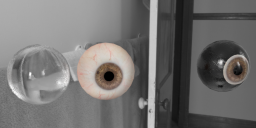
13.png
1507 x 735 - 923K

Comments

  • pixel8tryxpixel8tryx Posts: 7
    March 16

    Ambient occlusion?  I don't use Octane, but I tag that off in C4D for eye moisture.  There was one other thing but it escapes me at the moment.  

  • TannimTannim Posts: 45
    October 5

    If I recall reading somewhere at one point,.. just scale it ever so slightly the objects are just too close so thats what I think is causing it

Sign In or Register to comment.
Adding to Cart…

Daz 3D is part of Tafi

Connect

DAZ Productions, Inc.
7533 S Center View Ct #4664
West Jordan, UT 84084

HELP

Contact Us

Tutorials

Help Center

Sell Your 3D Content

Affiliate Program

Documentation Center

Open Source

Consent Preferences

JOIN DAZ

Memberships

Blog

About Us

Press

Careers

Bridges

Community

In the Studio

Gallery

Forum

DAZ STORE

Shop

Freebies

Published Artists

Licensing Agreement | Terms of Service | Privacy Policy | EULA

© 2025 Daz Productions Inc. All Rights Reserved.
