Misfiring corrective morphs
 Gordig
Posts: 10,822
Gordig
Posts: 10,822
A couple of @JoeQuick characters, Demos and Manticore, have infected my G8.1 base with morphs that kick in when the jaw is open. They don't show up in Currently Used with the jaw closed, but once I've opened the jaw a bit, they start deforming the mouth. I've tried dialing them out , but when I do that, closing the jaw puts at least one of them at -100. How do I edit the morphs so that they are only active when their respective characters are dialed in?
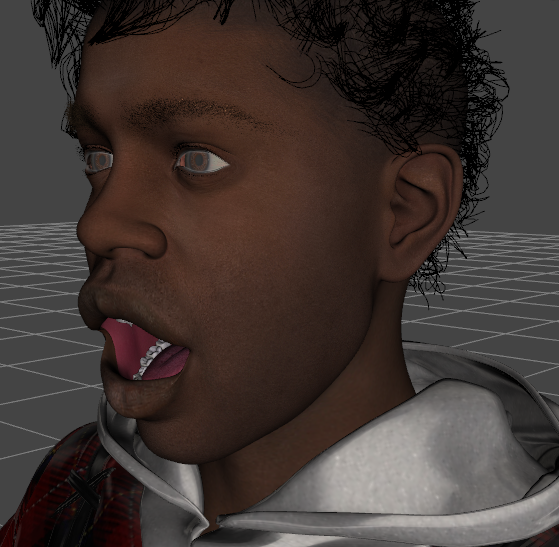
manticoreteeth.png
559 x 547 - 394K
Post edited by Gordig on

Daz 3D is part of 
Connect
DAZ Productions, Inc.
7533 S Center View Ct #4664
West Jordan, UT 84084
Licensing Agreement | Terms of Service | Privacy Policy | EULA
© 2026 Daz Productions Inc. All Rights Reserved.
Comments
Turn on Edit Mode in Parameters pane, right-click on a problematic morph > Show in Property Hierarchy. Then locate the respective character's morph (Head Morph...) in Parameters pane, drag it to Controllers > 2nd Stage... of the problematic morph in Property Hierarchy ... see if that works.
Here's what that looks like right now. Would the Manticore's morph being in 1st stage rather than 2nd explain this?
Yea, I think that seemed to be a "wrong dragging" ~~ fbm_manticore (or maybe there should've been an fhm_manticore...) should've been at 2nd stage.
Ok. So, waking the zombie thread... I got the Manticore and I see the same thing @Gordig found above. I dragged the offending parameter to Second Stage. That solved the problem for the loaded figure. Now, how do I save this out so that it never troubles me again?
If you installed manually or with DIM then you an just use File>Save As>Suport Assets>Save Modified Assets (modified, not modifier). You can do that if you installed with Connect, but then you would have to move the saved .dsf fle to the /data/cloud/ directory for the product to overwrite the origiinal. Either way, any will overwrite your fix do keep a copy in case you need to replace it.
Thanks Richard. I installed the Manticore with DIM. So, do I save the Manticore that way or do I save the base G8.1 figure? I'm thinking the manticore, but better safe than sorry.
Save Modofoed Assets, with the corrected figure selected, wil list everything not in its base state (which will probably be multiple items). Deselect everything but the fixed morph (actually you need to open it in the Property Hierarchy pane and make a note, under the attributes for the link, of which property it is set to save with) and make sure that the morphs are zeroed (or you will save them with a non-zero default, which means they will be applied on load).
Thanks Richard. I will give this a try.