This is what drives me bonkers using iray. Help please! (solved)
 Bobvan
Posts: 2,653
Bobvan
Posts: 2,653
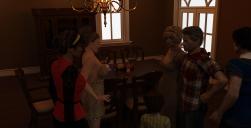
The way it refuses to let one render until they are satisfied. In spite of cranking the settings the render stops incomplete (ie the noise on the blonde female character and the wine bottle...
Any tip or suggestion would be welcomed..
17.jpg
1860 x 950 - 301K
33be351d7e1fd2bc88f9d1e6dc604e.jpg
359 x 299 - 18K
Post edited by Bobvan on

Daz 3D is part of 
Connect
DAZ Productions, Inc.
7533 S Center View Ct #4664
West Jordan, UT 84084
Licensing Agreement | Terms of Service | Privacy Policy | EULA
© 2026 Daz Productions Inc. All Rights Reserved.
Comments
My tip would be to crank up the lighting inside significantly. Get it so that it looks like a well-lit daytime room, and then adjust in post.
That should help it render much faster and look a lot better... render quality above 3 should never be necessary!
So there is no way to make it endlessly run like the luxrender too bad...I wanted the dark mood lighting but thanks
I agree about increasing the light. You could easily make the image darker again in a 2D image program.
Like with PS thanks guys or post work the noise out like I have been doing...
Lux lets you run it till its gone I was just used to working that way thanks alot!!
You can set time to 0 to take it out of consideration.
I think I tried that last time I was asking along with other suggestions, did not really work will try again for the heck of it. This time I had an illustrated example to show what I was referring to.
The thing is, darkening in PS is easier than correcting noise, because in the first case you are going from More information to Less information, and in the second case you are trying to go from Less to More... which means a blurry and less optimal image.
And if you are used to removing noise, changing tone should be pretty easy. Curves gives you a lot of control over how things darken -- uniform, darken the bright bits more while leaving detail in the shadows, or whatever.
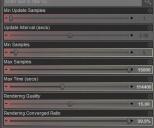
Render Settings > Progressive Render (click on the cog) > Parameter Settings
Change Max Samples and Max Time to something high, then have converge ratio at at least 95% and quality at about 5.
I'm not saying it's a good idea, only that if you do that, you can force your graphics card to cry like a baby for hours on end.
This would be my suggestion, as well.
Also, it looks as if you've set the lights of the chandelier to emissive. If so, and the bulbs aren't going to be in the image, turn those off, and use a spotlight instead. I read somewhere in the forum that the more surfaces an emissive object has the more calculations Iray has to perform and the slower the render.
Based on other things I've read, I'd suggest trying to put a plane above the visible scene, below the ceiling, and make that emissive. Just set the plane to 1 division when you create it and adjust the x and z scale to fit inside the walls. This will give you a nice even light throughout the scene, and you can make it as bright as you need.
I'm partial to Levels, myself.
render it twice as big and then blur out the noise, I do that for animation
This is true. I noticed this a few years ago with some recent horror movies. I had accidentally cranked up the brightness and everything looked perfectly lit - bright as day. They just stopped it down in post. Same way they used to do night scenes in old movies and TV shows, which were shot in the daytime!
I usually start with levels, but for intelligently darkening a shot, I suspect the extra detail of Curves (specifically to keep a good range of tone at the low range while bringing down the mids and mid-upper range) might be necessary. Otherwise the shadows tend to turn just black.
Kevin: Thinking it over, I think what you'd want to do is aim for a more even illumination, to simulate the fact that individual lights aren't as significant. Maybe something like a fairly even fill (like the ceiling plane mentioned above, which I've done in a lot of stuff) combined with some point lights (set to sphere) around light sources that are off-camera.
The fill can be made dimmer, bluish. The light sources can be warmer, yellowish. The contrast of color might help convey what you are going for.
One of the most critical tips about physically accurate rendering... there is a strong urge to simulate. To set up everything EXACTLY like it would be in real life -- have every light bulb turn into an emissive surface, set up every object, set light levels appropriate, and so on.
F*k reality.
Photographers and film-makers manipulate sets all the time. For example, the color palette of a film is often manipulated to produce a desired effect -- you might have harsh lights and bluish tone for a scifi bit, or warmer, muted colors for a Western, or... etc.
And let me be clear I'm not being patronizing or dismissive -- I struggle with this constantly.
It's called painting with light, and I struggle with it, as well.
I dont care about longer render times what pisses me off is the render will end sooner then I want it too no matter what settings. No matter what its NEVER lux slow...
I always tweak in PS following a render
I had posted this above I cranked it all but it still ends it refuses to run until I want it too. You gotta give lux its props where it deserves it...
This isn't one of those times.
Which of the criteria is it hitting?
How would I find that out?
The log should give time elapsed and number of iterations at least.
Rather than waiting forever for small parts of your scene to clean up, stop it when most of it is good, then do small spot renders for the bad bits.
Skin and poorly lit areas are notorious for noise so I often render these later as spot renders, which are very quick, and then paste them onto the original.
Ha render then as PNGs quite combersome if lux gets its act together I may go back will see
The best way I found to create a nice low-lit atmosphere is to reduce your gamma from 2.2 down to 1, then up the lumens of your lighting. The default gamma of 2.2 seems to be only optimal for daytime shots, where you need a neutral tone without darker shadows. But for creating an intimate low-lit shot, 2.2 gamma seems too sterile and washed out for me.
Here's a comparison shot of using 1 gamma instead of 2.2 to create more intimate lighting. Albeit, it is not very lowlit, but just for demonstration purposes.
k thanks the tonemapper forgot about that
You can get the same effect of the lower gamma by changing the color temperature of the lighting.
Just wanted to share this in case it may help someone else. I appreciate all the tips, however most of them did not provide a resolution. 1st making the lights brighter only had the render stop sooner whith much more noise left. 2 I did not like the effect of replacing the chandelier's lights by adding a plane had on the metal part of the chandelier that was showing. I found changing the gamma changed too much the lighting effect. How did I resolve it? Crank Quality up to 50 so it does not stop..
I like your solution! lol
Everything suggested should have "helped." But in the end, we do what we have to, to get the results we want/need.

LOL It will still end in some cases but for the most part the renders look more completed. As you say whatever works. Thanks alot for trying to help everyone. Best community on the net bar none!