calf colliding with thighs too early on Genesis 9
 moing_machine
Posts: 0
moing_machine
Posts: 0
in The Commons
Hi all,
I'm all out of ideas as to how to fix this; an issue where the thigh changes too early when the leg is bent about half way on a Genesis 9 female model. I've check all the morphing Anyone else encountered this problem or know how to fix it?
moing
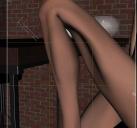
calf-thigh collision.jpg
876 x 816 - 467K

Daz 3D is part of 
Connect
DAZ Productions, Inc.
7533 S Center View Ct #4664
West Jordan, UT 84084
Licensing Agreement | Terms of Service | Privacy Policy | EULA
© 2026 Daz Productions Inc. All Rights Reserved.
Comments
This looks a lot like there's a JCM (or CBs as they became on Genesis 9) that is not correctly linked to its parent morph; are you *sure* you've checked all the morphs, including all hidden ones?
That looks like a corrective morph, designed to improve the bends when another shape is applied, kicking in when it isn't needed. Apply the minimum pose needed to show the issue (e.g. bend the shin) and in the Parameters pane option menu (the lined button in the top corner or right-click the tab) and enable Preferences>Show Hidden Properties, then go to the Currently Used group and look for any greyed-ourt sliders (correctives ar usually hidden). With luck that slider will have a name that tells you which character it is from, check to see if that has any updates and if not report it.
If you have a Smart Enhancing system, this can be fine tuned to eleviate this issue.
Oh yeah, I've had that one happen more than a few times times on G9. My usual fallback is to unload the most recent characters I've loaded into DS and see if it undoes the problem. Eventually, it usually does, but for whatever reason, G9 seems to be far more prone to bizarre issues like this...
Look for JCMs on the shin. Don't recall exactly which one it is that fixes that. The Rauko youtube channel has a vid on this issue
The fix for this that I use is to select the G9, then click on Currently Used. Next, filter for the deformed area. This is where I would always get confused. In the OP example, it's actually the shin that's causing the thigh to distort; filter for "shin". It's often one of the "...cbs_shin_x...r or l in the OP example. A similar approach can be used for arm distortion as well.
I know this isn't a permanent fix, but I've gotten so used to this, I can almost anticipate when I'll have to make one of these adjustments. Basically it's the thighs (triggered by the shins) or the upper arms (triggered by the forearms).