Anyone actually have any working bridges? 2022LTS - update - working URP Bridge!
 plj1225
Posts: 39
plj1225
Posts: 39
HDRP looks the best for the most part but the skin is way too shiny with no controls to fix it.
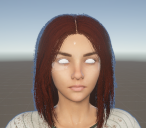
URP has better skin but broken eyes and no amount of material editing seems to fix it.
Builtin has silver textures/mats for everything.
About ready to give up on Daz and look elsewhere.
Screenshot 2024-01-23 095834.png
706 x 619 - 532K

Screenshot 2023-10-12 190654.png
819 x 1015 - 270K
Post edited by plj1225 on

Daz 3D is part of 
Connect
DAZ Productions, Inc.
7533 S Center View Ct #4664
West Jordan, UT 84084
Licensing Agreement | Terms of Service | Privacy Policy | EULA
© 2026 Daz Productions Inc. All Rights Reserved.
Comments
Closest i've gotten with URP eyes but you can still see problems with the lids and shape in general. Not sure what to do.
Yes, it is not so easy, but Daz 3D contents is huge, so it is up to your decision.
Hi - It's working (mostly) fine for me (URP) - try exporting a different model?
When you export, does it show a material error in the console? Could be that your using an unsupported material.
Try reinstalling Daz URP to unity. Maybe it's corrupted?
What Gen are you exporting?
Certain clothes etc, can break the exporter - try exporting naked.
If you want great looking eyes, and don't want body morphs, you can export to character creator and replace the eyes, and re-export from there. That's what I do with my static (non changing) characters.
Alternatively you can buy eyes in the unity assets store and use them - Something I've gotto test myself one day.
Going to do a complete system reformat this weekend, something went janky with Windows this week.. I'll do some more testing and update results.
EDIT - - I take it back, only works for Genesis 9. If I figure out Gen 8 I'll update.
!FINALLY! Fixed the URP eyes. Very simple 3 step process.
1. Get rid of the Tears node (if in Daz it must be deleted, otherwise just disable in Unity prefab hierarchy).
2. Edit the uDTU URP.Transparent shader in shadergraph. The Render Face option is set wrong - make sure it's set for Render Face: Front. Save the shader asset.
3. Change your Eye materials (Left and Right) shader from uDTU URP.SSS to uDTU URP.Transparent.
Genesis 8
Same as above...
1. Edit the uDTU URP.Transparent shader in shadergraph. The Render Face option is set wrong - make sure it's set for Render Face: Front. Save the shader asset.
2. In the prefab, select Eyelashes.Shape and expand Materials. Remove the EyeMoisture_1 material. (Just setting to none doesn't work, Pink material)
This next step depends on the character you're using - lots of different names, but they are all the same objects.
3. Pupils material needs to be set to uDTU URP.SSS. All other eye materials need to be set to uDTU URP.Transparent - Cornea, EyeMoisture (not _1), Irises, Sclera. You'll recognize which based on the material preview. If it has an eyeball diffuse texture, it needs to be URP.Transparent, except for Pupils.
Step 4 - maybe.. if the corneas are solid white, apply the diffuse eye texture to it.
Step 5 - also maybe, this depends on your Gen and model.. if you had to apply the diffuse Cornea eye texture, scroll to the bottom of the material and ensure you have correct looking offsets. (gen 9 seems to be fine, gen 8 needed fixes about half the time in my experiments). Set to 0.5, 0.5 otherwise you're getting the back part of the eyeball texture.
That's it.. hope this helps someone else, this has been driving me nuts for quite a few weeks if not months. One less thing on my to-do list of fixing game annoyances!
Great findings, Thanks for the sharing these solutions.
It's really rare for me to run into the issues your experiencing - I did have those sorts of issues with free models etc. from non-daz stores - I have suspected that paid Daz content is of higher quality, So I am am curious if you are using a free model/ different site model? I could be wrong of course.