Store needs better product titles
 AJ2112
Posts: 1,417
AJ2112
Posts: 1,417
Many of us make a purchase, only to realize. Oops need to purchase required product to. Example, I purchased Saba'a Alkair Iray. Cause of the title, I was led to believe it was new prop for Iray. Didn't even think to look at required products or details. Which was my fault, but title should have been something like Iray textures for Saba'a Alkair. Just sayin.
http://www.daz3d.com/sabaa-alkair-iray
Post edited by AJ2112 on

Daz 3D is part of 
Connect
DAZ Productions, Inc.
7533 S Center View Ct #4664
West Jordan, UT 84084
Licensing Agreement | Terms of Service | Privacy Policy | EULA
© 2026 Daz Productions Inc. All Rights Reserved.
Comments
I always look at the required products, I assume it's why it is there instead of the title. I haven't had an issue with getting the wrong product before.
I'm going to side with Daz on this, it's pretty clear.
I read these things like a dozen times before I shove my money down the disappear hole in my computer.
Thanks for replies. Yes, titles work for experienced buyers. But there are those not so experienced...... Daz is fabulous working support tickets. Just sayin, if title had more clarity, will reduce the amount of support tickets.
Things like this happen every now and then. To all of us, I guess.
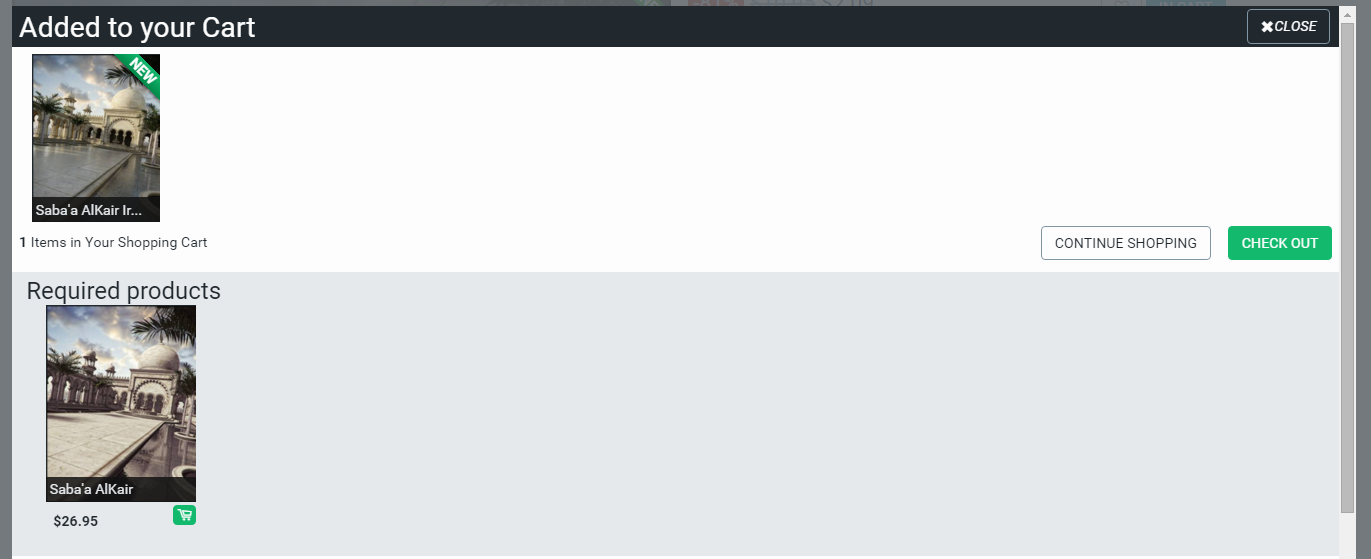
DAZ tries to do its best: the requirement is not only listed on the product page, but when you put it in the cart, it specifically tells you, that there is a required item:
There's only so much you can do. There is always going to be human error.
I made the same mistake more than once and now I stop, take a deep breadth, and read the description.
My problem was, I was trying to take advantage of 80% off V4/M4 products, so paid more close attention to 80% sales products, not new release. Simple mistake, we all learn from mistakes. But titles can still be modified to clarity.
Look at the bright side, one day Saba'a AlKair will go on sale and you will be set, LOL. It's actually in my wishlist, so here's hoping on my part also.
It can all be confusing when you're new to the hobby. I remember when I started, I had products for Bryce and Carrara in my wishlist, not realizing they weren't for DAZ Studio. Thankfully I figured it out before I could afford to buy them!
It doesn't help that there are so many add-on products that do include the name of the required product. Colors for [name of hair] come to mind immediately. Not to mention all the hair and clothing with a unique name followed by the figure(s) they are for. I can see how easy it would be to make an assumption like the OP did.
LOL I knew I didn't have Saba'a AlKair when I bought Saba'a AlKair Iray. I checked it out first, put it in my wishlist and put the Iray product in my cart. So I'm with you, hoping it shows up in Fast Grab!
I wouldn't so much side with the "need better names" because I've made mistakes but because it's a huge time waster... You see something that looks like a prop or model or clothing item and of course after marveling at how cool it is you look to see if there is a "required" and you find out it's a texture or preset... Grrr. Some products do say that, and I'm glad to see that... I suppose it's more of an annoyance, but unless it's a really long item name, would it kill ya to be more specific and add texture or presets to the name... Still I check required product no matter what.
I actually did do that. I purchased Country Lane (I believe that was the name for it) because I wanted the overgrown dirt road for a scene. Didn't realize that there were other products in the store than just for Daz Studio :(
I also somehow managed to buy a zombie pack twice. I had bought it weeks before and thought I was buying something new. After adding the item to my cart, I realized I wasn't logged in so I did, and purchased it. Needless to say, I already had it :O Oh well, more support for the vendors!
At the time I didn't know there was a return policy. I figured since they were digital items that I had already downloaded, they weren't going to give money back on something that took blind faith that I would delete the item from my pc.
At some point, I may or may not have Cararra so I may or may not get to use it at some point.
The Required Products field sometimes temporarily disappears from different products at random. Don't know if it has been fixed now but the problem dates back to 2013 or earlier AFAIR. Here's some screenshots I took in may 2015 from the same pages at different times:
And it's simply missing from others, e.g. this one which I noticed yesterday:
http://www.daz3d.com/crazy-times
Are you sure you were properly logged in when you saw the products not saying you owned them? I have found this to be the case when I've seen that in my products.
I've since purchased both Bryce and Carrara. I actually got Bryce for free, between the discounts and my monthly DAZ coupon ($6 of DO for PC+ members.)
I think I paid about $65 for Carrara. But I haven't had the time to dive into either one. I've had Carrara open once, I think. Maybe twice. Then turned tail and ran, figuratively speaking. I'm sure I can learn them both, I just need to have a block of time where I don't have to do anything else... lol
Even people who have been here a while make that mistake......I just did this weekend when I bought materials for the Attica outfit, and did not have the actual outfit.
Now I bought that outfit too...was not a big deal. Sometimes we just rush and don't pay attention. It is not the stores fault, they try as best they can to make it as visible as possible.
Whether I'm logged in or not shouldn't make any difference for the "Required Products" field as this is a general public field, it should only affect the "owned" field which is a private field that only the logged in user can see.
Edit: test comfirms this:
I have definitely noticed the 'required products' bug before. I had all kinds of trouble early on figuring out what I needed for a product to work and what I did not. It would change if I navigated away from a page and back again. I haven't noticed it as much recently, but it definitely does happen.
Nah, not a mistake, you were simply planning ahead- buying the materials when you got a good deal! If I see materials on sale, I've often seen the outfits come up soon thereafter, or vice versa. I do agree with the OP that some of the titles could use a revamp, particularly those that rename the product completely (like a "Dark Night" product (made that up, hope it's not a product, there's Darkest Night though. Anyway, not intended to be a real example, nor is the next one) for a "Bright Night" outfit, but not saying Dark Night for Bright Night and only putting the first two words.
It hurts the vendor's sales if the required products aren't correct, there's definitely going to be returns, but I've seen very quick responses for page fixes anytime I report one.
As for the required products, I still have some items that I need to get another item to use, but I know I will eventually. I've actually gone through my prduct library and make sure I do this with every item I purchase, I look for required products and if I don't have them, I wishlist them so I know I need them.
Yes, I've also noticed that navigating away from and back to the page may trigger it (though it may possibly also happen in other contexts).
Hey,
I tried to make it as clear as possible, without having a really long product name.
Yes, the required items are sometimes a little hit and miss, which is why I always put it in the description too at the top.
But yea, if you purchased it thinking it would be the full thing, then please feel free to contact CS for a refund.
Cheers!