M7 Missing Files on Loading... How to fix?
 MKeyes
Posts: 474
MKeyes
Posts: 474
in The Commons
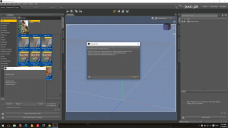
This is so strange, I went to open M7 in DS 4.8 and I got an error message below in the image post.
It said, this one and two others were missing.
/data/Daz 3D/Genesis 3/Male/Morphs/Daz 3D/Base/PHMMouthRealismHD.dsf...
PBMNavel.dsf & Genesis3Male.dsf
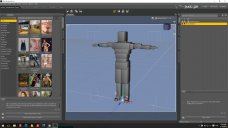
And when I clicked okay and it loaded, this is what he looks like.
I had no problem bringing him into DS 4.9 - so I'm not sure why this is happening in 4.8
Screenshot 2015-11-18 12.42.39.png
1920 x 1080 - 292K
Screenshot 2015-11-18 12.49.00.png
1920 x 1080 - 456K

Daz 3D is part of 
Connect
DAZ Productions, Inc.
7533 S Center View Ct #4664
West Jordan, UT 84084
Licensing Agreement | Terms of Service | Privacy Policy | EULA
© 2026 Daz Productions Inc. All Rights Reserved.
Comments
Have you installed the G3M starter essentials? You will find it in DIM or your product library.
Did you install the updated Genesis 3 Starter Essentials, which has the G3M files and also updated G3F files
Yep I did... it came in and loaded just fine with DS 4.9, but now with 4.8 - really weird.
Looking at your post you say you can load him in 4.9 so if you have installed the starter essentials do you have DS 4.8 pointed to where you installed it?
I believe so... everything has been going to the same place. I see him and everything with him but it just didn't load right and said those three were missing.
Amended: Well, you guys were right. I found the essentials package for M7 and reinstalled it again. This time, it went into DS 4.8 and M7 loaded right. Thanks!
I have a similar problem, caused by that I'm missing for the file Genesis3Male.dsf. Can anyone help me locate it. It's supposed by the error message to be in /data/DAZ 3D/Genesis 3/Male/Genesis3Male.dsf but its not.
That is where it should be, and it is there in my library folder.
Did you install Genesis 3 Male Starter Essentials using DIM, if so, it installs to C:\Users\Public\Documents\My DAZ 3D Library by default, is that where you put it? If you are trying to use M7 without G3M being installed it wont work, M7 is a morph of G3M.