Zeroing Part of a Weight Map
 Scavenger
Posts: 2,677
Scavenger
Posts: 2,677
I've discovered a problem with some boots I'm using (from another place).
When the foot bends, the toe area bulge at the bottom. (pic 1)
After going thru a number of attemps to fix thru posing, I've found the problem is that there is no "toes" bone in the boot, so the toe area is controled by the foot bone in the weight map (pic 2)
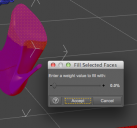
I've tried to take that portion of the boot and 0 out the foot bone's influence (pic 4) but it doesn't work..
(I'm assuming it needs to actually be 100% to somethnig else?)
Is there a way to do what I need to do here?



Daz 3D is part of 
Connect
DAZ Productions, Inc.
7533 S Center View Ct #4664
West Jordan, UT 84084
Licensing Agreement | Terms of Service | Privacy Policy | EULA
© 2026 Daz Productions Inc. All Rights Reserved.
Comments
Weight maps are "normalised" - as you say, you can't zero a map for a joint without assigning the weight elsewhere so that the total influence across all bones for that axis adds up to 100%. Realistically a boot like that would not bend, the sole would be pretty solid.
So any thoughts on how to achieve the desired results?
I would suggest assigning those areas to the foot bone at 100%. That should clear any influnece from the toes. Then don't pose the toes.
....
As said in the first post...there are no toes in the boot.
So that area is controlled by the foot...so when the foot bends, it warps.
I'm trying to prevent that.
Try assigning it 100% to the shin. That way, the boot should move with the leg but not with the foot.
Grumble...In a test set up, that worked great.
Trying to apply it to the existing scene..not so much..but I think I've gotten it at least good enough that I can hit it with photoshop after to clean it up so I can move to the next problem :)