File acting stupid ...
 WillowRaven
Posts: 3,787
WillowRaven
Posts: 3,787
I never know what I am looking at when trying to figure out what is wrong with a file, so I'm hoping ya'll can help. Every time I try to either open or merge the file, it tells me 'the following items can't be loaded', then Daz (4.7) crashes.
From past experience, I know the log file notes what's wrong, so I deleted my log file then tried again so the file would only represent what this particular problem is.
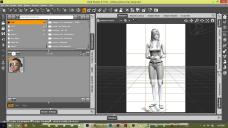
Then, I tried to open the file again, after deleting the last log file, and it loaded like this (attached).
Any help will be appreciated.


Daz 3D is part of 
Connect
DAZ Productions, Inc.
7533 S Center View Ct #4664
West Jordan, UT 84084
Licensing Agreement | Terms of Service | Privacy Policy | EULA
© 2026 Daz Productions Inc. All Rights Reserved.
Comments
You have your "Rule of Thirds" filter on your camera.
I'm not sitting in front of DS at the moment, but the rule of thirds add on is in a drop down menu in the top bar. You can toggle it on/off.
And that's causing the problem? I always have it on, lol.
Hmm, that's what it looked like to me. Then I looked at your log files.
But, I'm also seeing this line in your second startup of DS
"cannot be loaded because it requires a newer version of DAZ Studio.Make sure that you have the latest version of DAZ Studio installed. dzoptitexclothcontrol.dll"
Your first startup had a lot of "can't find" statements.
so, I'm no longer sure :)
Did you open a ticket and give them those log fiies? I'm seeing a lot of warnings and missing components. What is the SDK doing? Have you installed a beta plugin?
I haven't done anything. I hade the file and for whatever reason now it's loading all white.
Also ... what up with the foreign letters?
I'm not seeing foreign letters in either your program window or the text files (attached).
If you are, there's a greater issue than DS, methinks.
Have you done a hard reboot (shut down the computer and start from power-up)?
No ... should I?
Ah! I see them
Not sure. That should be a tool tips line IIRC.
I think language settings got changed somehow :( How do I change them back?
Control Panel
Region and Language Settings
I use Win 7 at work, so the exact text may vary.
I was looking through that log file you uploaded,,good job btw :) ,,,and I see what might be a cause for the crashing , not sure about the change in localiztion yet)still looking)
...looks like your plugins got updated but your Studio didn't.
I don't want to update studio, lol ... I just got comfortable with 4.7, lol.
Since I doubt your plugins can be rolled back. I'm betting it's time to learn 4.8. You won't find too many differences IMO.
Ugh! I really wish Daz would quit interfering in my work schedule by forcing me to relearn software!