What the heck did I do.. or did I? Content Item Aftermath by The DigiVault
 rampart_1576840087
Posts: 504
rampart_1576840087
Posts: 504
I bought this awhile back, just got around to it this morning...
http://www.daz3d.com/aftermath
It is a great looking prop with all kinds of doors, and junk to build out scenes.
Everythiing is set in stone. I thought it consisted of a number individtual props, including opening doors and such you could work with.
The core or constructed building looks great, but it appears everything is consolidated into one single prop and a single materials duf.
------------------------------------------------------------------
Now, maybe I've missed something.
This is worthless for what I need. I was planning to build variations of the scene.
I can still use it, if there is a way to separate this one prop into multiple prop items?
It appears to be duf, pp2, obj
I am wondering, if i can export or save out in some way and have it separate into component items?
----------------------------------------
Maybe there is a way to ungroup/un attach it or something along those lines in daz3d studio or other daz application?
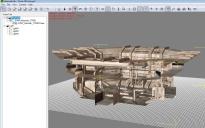
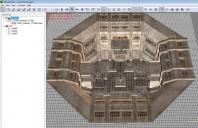
If you see it in 3dxchange you would see a alot of detail with floors and doors, etc.
It is complex content item with many possibilities, not counting the trash items scattered in the scene.
It is identified as a single prop, but it appears to be an unftragmented scene
Obviously, it was designed for purposes similar to my needs.
If I can fix this, it should work very well for my purposes.

Daz 3D is part of 
Connect
DAZ Productions, Inc.
7533 S Center View Ct #4664
West Jordan, UT 84084
Licensing Agreement | Terms of Service | Privacy Policy | EULA
© 2026 Daz Productions Inc. All Rights Reserved.
Comments
Hi rampart.
Aftermath is designed as a one piece set because making all of the differant elements as seperates items would have taken an age to put together in the DAZ Stidio content folder.
But you can import items seperatly into Carrara and iClone and free things up that way. Several people have done this to my sets and it works very well.
Hope this helps
Pete
I believe you should be able to separate different components using Blender as well.
Is it a solid thing, or is it one piece, with the different parts as bones?
It's many parts consolidated into one.
Thanks for the Carrara tip. I have a few different items like that that I was disappointed to find all glommed together.
can you break the group apart in ds?
in poser you could use the grouping tool, but if you dont zero the prop before saving it, rotate will spin it out into the universe
doh, despise the all in one. thanks for the h.u.
Greetings,
I have to admit, sadly, that I've passed up several awesome looking sets for that exact reason. If it can't be configured, personalized, adjusted, it becomes a lot harder to justify. Sometimes I just need *that* strut over *here* instead of where it is.
I totally get that it's a huge pain to do, so I understand the choice not to, and I'll sometimes keep an eye on sets like that, that I really love the look of, to pick them up on steep discount.
-- Morgan
I am not sure what is meant by breaking apart in IClone or Carrara.
Maybe someone that has done it would share...how to do it.
In 3dxchange for exporting to iclone the aftermath is listed as one item, in FBX or obj format.
I haven't gotten Carrara to work either.
I can get the one complete item to load in IClone, but no way of separating into components
Regardless of the content item, there are many offered in the daz3d shop that are the same... a consolidated item, that was originally many component parts.
I suspect this problem couild be a negative for buying prop content items...at least for me it will be hereon.
If a viable solution is available, it should help to sell more prop content items as well.
I have sevearal other rather expensive prop items that have this problem, which I haven't mentioned.
I'm not knocking the developer by any means.
If there are solutions or software we need, I will be glad to go there.
It seems to me there has to be a way to ungroup a large obj or fbx file into it's component parts - similar to breaking out the layers in photoshop.
While I do the majority of my work in Poser, I believe the polygon selection tool in DS works on the same principle as Poser's grouping tools. In Poser, you select the polys, spawn a prop and assign materials. In the old forums there was at least one tutorial on how to use it. I'd check the wiki and the documentation on the polygon selection tool set.
DS is slightly backwards - select the polygons you want, hide the reset (right-click menu option) and then delete hidden; load a new version of the base and repeat for the next item you want to split.
Thanks, Richard. I kept getting stuck on what to do after I selected the polys.
Some sets...rooms..I have have everything set up as One object with bones..but it was still posable and moveable..select the "desk bone" and move it across the room, select the "computer bone" and move it to a different table.
Is that not a universeal ability of these kind of set ups?
(which I guess heads to my thread of Multi Objects vs boned objects. http://www.daz3d.com/forums/discussion/62339/many-objects-vs-many-bones-is-there-a-difference#latest