Aranging Panes In same Pannel

I'm not sure I'm uaing the right terms for all this...
Basicly, I'd like to take picture 1 and make it into picture 2 (which is photoshoped).
I'd like to have them in the same...window? tray?
I CAN arrange them so it's close (Picture 3), but they're free floating panes, and I'd rather them be locked together if possible.
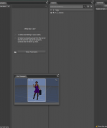
Screenshot 2015-09-24 18.45.56 copy.png
848 x 1018 - 86K
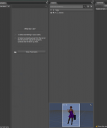
Screenshot 2015-09-24 18.45.56.png
848 x 1018 - 67K
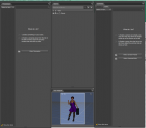
Screenshot 2015-09-24 18.54.49.png
1214 x 1065 - 149K

Daz 3D is part of 
Connect
DAZ Productions, Inc.
7533 S Center View Ct #4664
West Jordan, UT 84084
Licensing Agreement | Terms of Service | Privacy Policy | EULA
© 2026 Daz Productions Inc. All Rights Reserved.
Comments
Just grab the Aux Viewport and drag it to the bottom of the Scene pane. A yellow line will aopear, drop it there. That is what I did in the image below, is that what you mean?
Make sure yu don't have Window>Workspace>Lock Docking/Undocking checked, and that the pane isn't set to be undockable in its option menu (lined button in the top corner, or right-click the pane's tab).