• Daz 3D
  • Shop
  • 3D Software
    • Daz Studio Premier
    • Daz Studio
    • Install Manager
    • Partnerships
    • AI Training data
    • Exporters
    • Daz to Roblox
    • Daz to Maya
    • Daz to Blender
    • Daz to Unreal
    • Daz to Unity
    • Daz to 3ds Max
    • Daz to Cinema 4D
  • 3D Models
    • Genesis 9
    • Genesis 8.1
    • Free 3D Models
  • Community
    • Gallery
    • Forums
    • Blog
    • Press
    • Help
  • Memberships
    • Daz Premier
    • Daz Plus
    • Daz Base
    • Compare
  • Download Studio
ADVANCED SEARCH
  • Menu
  • Daz 3D
ADVANCED SEARCH
Add image
  • Shop
  • 3d Software
    • Daz Studio Premier
    • Daz Studio
    • Install Manager
    • Partnerships
    • AI Training data
    • Exporters
    • Daz to Roblox
    • Daz to Maya
    • Daz to Blender
    • Daz to Unreal
    • Daz to Unity
    • Daz to 3ds Max
    • Daz to Cinema 4D
  • 3D Models
    • Genesis 9
    • Genesis 8.1
    • Free 3D Models
  • Community
    • Our Community
    • Gallery
    • Forums
    • Blog
    • Press
    • Help
  • Memberships
    • Daz Premier
    • Daz Plus
    • Daz Base
    • Compare

Notifications

You currently have no notifications.

Loading...
    • Categories
    • Recent Discussions
Daz 3D Forums > 3rd Party Software > Cinema 4D Discussion

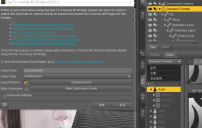
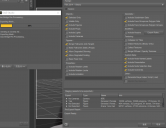
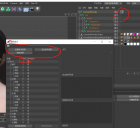
After Cinema 4D imports DAZ characters, there is a problem with the bone name, screenshot, thank you

364888487364888487 Posts: 7
May 2023 in Cinema 4D Discussion

The character definition extracts the bone, the name does not match, and cannot be extracted. Perform bone spur extraction, and then do animation angle analysis? This problem has stumped me for a long time. Now
Exported to C4D through the daz plug-in, and then C4D changed the name of the spur. After extracting the skeleton information through the person definition, it is really time-consuming and laborious to change the name.
Thanks
 

81477c421d951f53d681b544f92b57.png
1129 x 716 - 304K
513dd320f4531044ab9639349b07dd.png
1392 x 1075 - 288K
ef3663b40c4f0b32a8e4ba628b7226.png
1306 x 1192 - 263K

Comments

  • GordigGordig Posts: 10,597
    May 2023

    I'm not understanding the problem you're having. Have you already renamed the joints in your C4D screenshot? The Character Definition tag lets you define your targets, so you shouldn't need to rename anything. Once you're defined your Character Definition once, you can save it as a preset for future use.

  • huangxinyaohuangxinyao Posts: 0
    September 2023

    C4D bones system has its own name of each skeleton, thus you need to rename the import DAZ model's skeletons name to auto-matching in C4D. I've been struggling with the bridge GO C4D for long and finally decide to animate in DAZ, then export in Alembic format, import the ABC file to C4D, etc.  if you tried import FBX model to C4D with the genital, the shape of the model will become funny.

Sign In or Register to comment.
Adding to Cart…

Daz 3D is part of Tafi

Connect

DAZ Productions, Inc.
7533 S Center View Ct #4664
West Jordan, UT 84084

HELP

Contact Us

Tutorials

Help Center

Sell Your 3D Content

Affiliate Program

Documentation Center

Open Source

Consent Preferences

JOIN DAZ

Memberships

Blog

About Us

Press

Careers

Bridges

Community

In the Studio

Gallery

Forum

DAZ STORE

Shop

Freebies

Published Artists

Licensing Agreement | Terms of Service | Privacy Policy | EULA

© 2025 Daz Productions Inc. All Rights Reserved.
