Real Hands for G3F is messing up the teeth and tongue [SOLVED]
 barbult
Posts: 27,631
barbult
Posts: 27,631
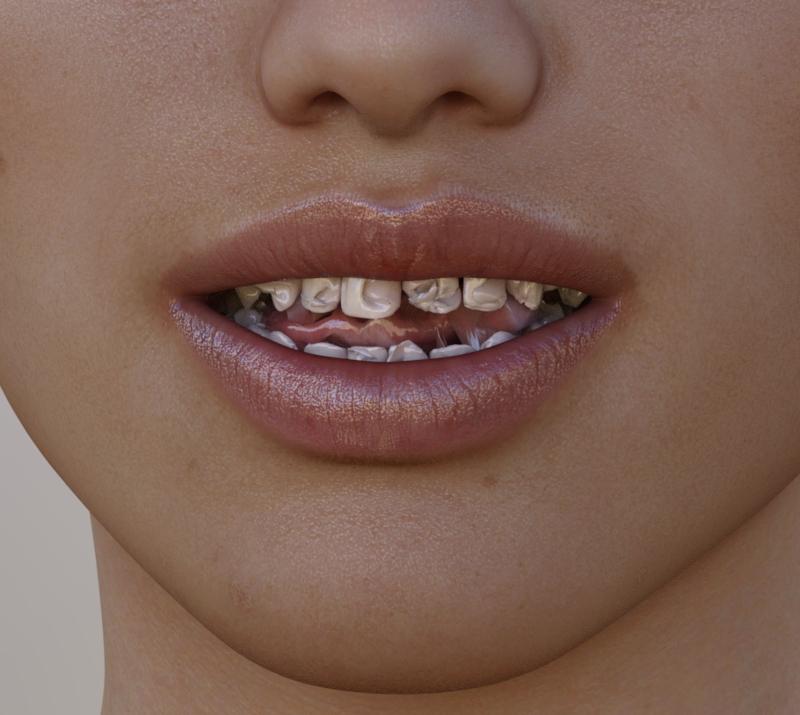
Real Hands for G3 Female is messing up the teeth and tongue. Since I bought this during the Rev Up sale, it is not returnable. I will write a ticket, but I will be upset if this isn't fixed and I can't get a refund for a broken product. I am posting before and after pictures of V7.
Edit: What forum bug is preventing these attached images from showing? When I edit this post, they still show as attached. I've seen this in other threads, where images in the first post of a thread just don't show up. Sometimes they appear if you link to the thread in one way but not in another. Bizarre. Maybe after editing the post they will show up?????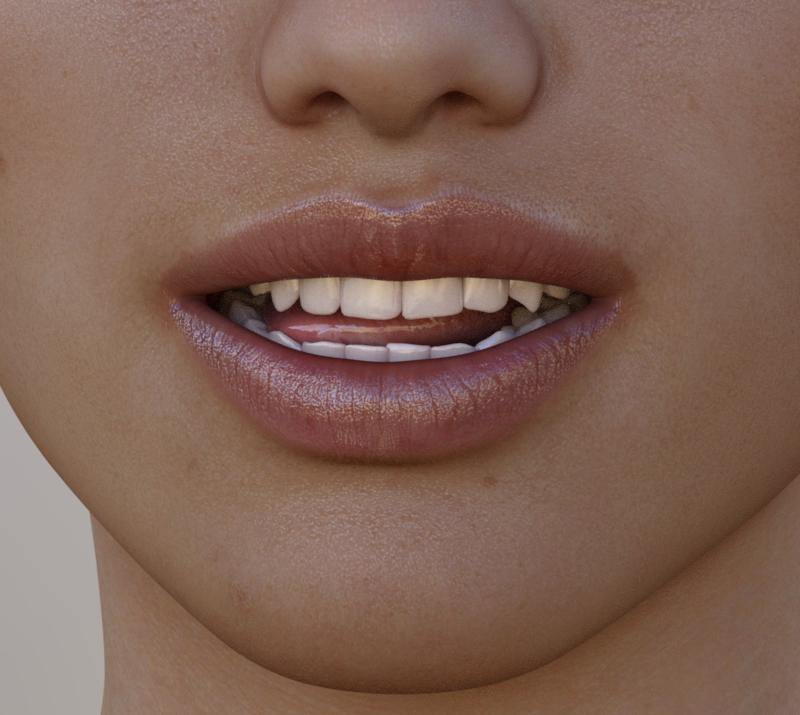

Daz 3D is part of 
Connect
DAZ Productions, Inc.
7533 S Center View Ct #4664
West Jordan, UT 84084
Licensing Agreement | Terms of Service | Privacy Policy | EULA
© 2026 Daz Productions Inc. All Rights Reserved.
Comments
Oh my, that is AWFUL!
Is it present in all the morphs individually, or just one? Looks like someone forgot to turn off the "Mouth HD" morph prior to exporting. While you're at it, check the navel with the morphs on and off. That one's also on for G3F by default.
If that was the case, QA should have caught it, but since hand morphs don't usually suggest "check the mouth and navel," I can see where they might have missed it.
Seems like it was their first morphkit for G3F as well-- that issue drove me nuts until someone pointed out those morphs loading at something other than zero
Yes, it is bad! It gets even worse if she opens her mouth! I dialed all the Real Hands dials here to show how bad it can get. None of those hand morphs should affect the mouth at all, of course. I have submitted a ticket.
The Navel doesn't seem to be affected by the Real Hands product. Most of the individual Bend Morphs pose controls affect the mouth. The Morph Details pose controls don't seem to cause the problem.
Why are these morphs in Pose Controls and not under Actor/Hands? It took me awhile to even find them.
Have you filed a support ticket? They can't fix what they don't know about, and they don't look for that sort of issue in the forums. A technical support ticket should get that addressed.
Yep...it's the Mouth Realism that's doing it...
We have reported that this is happening. I will add the phone part to the report. In the meantime, try going to edit post, selct the text and then just click edit, don't do anything else. see what happens then
OK,I tried that, but it didn't reduce the font size.
Strange, it works for us, but not for you. Are you still using your phone?
Thanks, will pass this all onwards.
Posing her hands gives her tooth decay, I KNEW IT!
Just kidding. Okay, I'll be quiet now and let people smarter than me fix the situation...
I'm so glad I'm not the only person to have really odd things happen when doing G3F related stuff...
Indeed. I occasionally have an issue where the eyes don't want to cooperate (as in, instead of Up-and-Down commands working as intended, her eyes move to the side). It can be quite scary lookin'!
iPad does it sometimes too
the big text
and more so if I use the bullet points
This HAS to be fixed asap. This is not just a minor QA oversight, its lazyness from the creator since this is stuff you need to make sure when creating those morphs. How can this be missed? Do you not test your own morphs for errors?
Anyone know if it's fixed yet? I mean, the update should be listed in the DIM. I don't have the product or ever intend to use G3F, I'm just incredibly curious.
I am not one for bashing products and I have a number of products from Predatron but did anyone notice in the main promo image that the morphs don't line up with the texture. Does it that do it all the time with every texture?
The morphs look universal, so would be hard to line up the details with different texture details. I don't think it's possible unless the morphs were designed for a specific texture set.
I didn't notice that. I also have lots of Predatron products that i like very much. I thought a Predatron product would be a safe bet. This particular one is disappointing, though. None of the morphs apply automatically when the hand or fingers are bent by a pose. You have to manually dial each of many morphs and try to figure out what the proper setting for the dial should be. I would return this one if I could, but alas, the Rev Up sale does not allow that.
Yes I also wished it had an option to auto dial the morphs in relation to the hand pose. Doing it manually kinda takes away from it. Hopefully a feature like that gets added in an update later down the line.
That would definitely turn a lemon into lemonade, along with the required fix to prevent the mouth distortion. As is, I don't see this product getting much use in my runtime.
Did you notice that a few of the morphs in the 200 Plus morphs pack also have the mouth distortion problem? I wrote another bug report on that one and, to let users and potential buyers know, another forum thread. I love that product, so I hope those few problems get fixed soon.
Pretty sure the HD mouth issues on those products will be fixed.
Thanks for that explanation Zev0, this is not my expertise but I did think they could have done a better front promo.
yeah the non returns policy put me off buying anything.
Looks like a great way to get crack addict teeth though....