• Daz 3D
  • Shop
  • 3D Software
    • Daz Studio Premier
    • Daz Studio
    • Install Manager
    • Partnerships
    • AI Training data
    • Exporters
    • Daz to Roblox
    • Daz to Maya
    • Daz to Blender
    • Daz to Unreal
    • Daz to Unity
    • Daz to 3ds Max
    • Daz to Cinema 4D
  • 3D Models
    • Genesis 9
    • Genesis 8.1
    • Free 3D Models
  • Community
    • Gallery
    • Forums
    • Blog
    • Press
    • Help
  • Memberships
    • Daz Premier
    • Daz Plus
    • Daz Base
    • Compare
  • Download Studio
ADVANCED SEARCH
  • Menu
  • Daz 3D
ADVANCED SEARCH
Add image
  • Shop
  • 3d Software
    • Daz Studio Premier
    • Daz Studio
    • Install Manager
    • Partnerships
    • AI Training data
    • Exporters
    • Daz to Roblox
    • Daz to Maya
    • Daz to Blender
    • Daz to Unreal
    • Daz to Unity
    • Daz to 3ds Max
    • Daz to Cinema 4D
  • 3D Models
    • Genesis 9
    • Genesis 8.1
    • Free 3D Models
  • Community
    • Our Community
    • Gallery
    • Forums
    • Blog
    • Press
    • Help
  • Memberships
    • Daz Premier
    • Daz Plus
    • Daz Base
    • Compare

Notifications

You currently have no notifications.

Loading...
    • Categories
    • Recent Discussions
Daz 3D Forums > 3rd Party Software > Cinema 4D Discussion

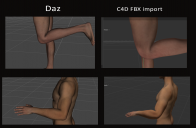
Elbow and joint weight deformations on Genesis 9 characters imported into C4D don't look good

jshand029jshand029 Posts: 1
February 2023 in Cinema 4D Discussion

Hey Daz crew just thought I'd voice a fustration im still having with FBX character imports from Daz3d to C4D having quite nasty deformations on elbow and leg joints when posing them.

I know this is an old issue which probably some have had. Though a bit surprised to find the new advanced Genesis 9 character rigs having the same issue and kind of has me scratching my head a bit.

I've attached image comparisons of Daz viewport vs C4D import of the same character to diagnose.

Is there any export settings or workarounds which are ideal to fix this?
Without resorting to Alembic exports

I really like DAZ3D characters and to find them unsuitable for realistic joint articulation in other 3D software is a bit disappointing 

Any tips would be much appreciated
bad joint deformations daz to c4d.png
1294 x 847 - 475K

Comments

  • Richard HaseltineRichard Haseltine Posts: 107,857
    February 2023

    In daz Studio there are morphs linked to the bends - I think the links have been lost in the move to C4D and so you see the raw bend. I don't know enough about C4D to advise on reinstating the links, assuming the moprhs (JCM... generally) were transfered..

  • jshand029jshand029 Posts: 1
    February 2023

    Thanks heaps for the info, I believe it has something to do with the high poly morphs no doubt not transferring over. interesting.
    i'll dig a bit deeper then respond here if I find a solution 


    cheers

Sign In or Register to comment.
Adding to Cart…

Daz 3D is part of Tafi

Connect

DAZ Productions, Inc.
7533 S Center View Ct #4664
West Jordan, UT 84084

HELP

Contact Us

Tutorials

Help Center

Sell Your 3D Content

Affiliate Program

Documentation Center

Open Source

Consent Preferences

JOIN DAZ

Memberships

Blog

About Us

Press

Careers

Bridges

Community

In the Studio

Gallery

Forum

DAZ STORE

Shop

Freebies

Published Artists

Licensing Agreement | Terms of Service | Privacy Policy | EULA

© 2025 Daz Productions Inc. All Rights Reserved.

