More screwiness -- still trying to recover
 JOdel
Posts: 6,322
JOdel
Posts: 6,322
Well, I'm still in the suburbs of computer hell and Studio no longer seems to be recognizing my content libraries.
Or, rather, it doesn't recognize them when it needs to.
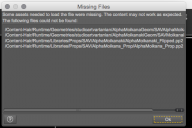
It's bad enough that it sendsme to locate texture files for up to or over an hour before opening a saved scene (admittedly, a rather complex scene with a *lot* of props), but it also will seem to open up a scene and then throw me an alert; *nanner, nanner* message like this one below and load things as grey blocks.
Only, the paths that it claims the items are not to be found in, are the correct paths and the items are right there where it claims that they aren't. So what gives? It's annoying enough when its a hair prop, or a hand prop, or a garment and you have to go and find it and replace it. But sometimes it's the figure itself, and then you lose the figure, and the pose, and everything else.

Daz 3D is part of 
Connect
DAZ Productions, Inc.
7533 S Center View Ct #4664
West Jordan, UT 84084
Licensing Agreement | Terms of Service | Privacy Policy | EULA
© 2026 Daz Productions Inc. All Rights Reserved.
Comments
Have you gone through and done what Totte suggested in the other thread?
External drives on Macs are subject to some pretty stupid errors due to the way Mac OS works. The drive in question may look like it has the same path info...but it does not. So, yes, Studio can't find the stuff because, while the human readable path info looks the same, the actual drive name/location has changed (and that's what the computer reads)!
Also check for case-letters..
THIsFilename <> ThisFILEname
In some instances. (I have not had that issue with folders, only files...)
Content-Hair/Runtime/... Doesn't look right to me... "Runtime" can't be used as an actual "folder name", can it? (Doesn't the system replace that word "Runtime" with "C:/SomeDirectoryPathToYourRootLocation/"... or where-ever it expects the "Runtime" {base directory} contents to be located.)
Isn't that one of the "can never use names", like "null" or "hell"... I can never get it to do to hell and find things... and it refuses to go into "/My bedroom/", like most of living humanity.
I pretty much gave up on it. Find the textures if it wants me to point it at the textures, and the stuff that comes in as blocks I just replace with the same thing. None of the paths have changed from what they were last week. In a character rough, which is what I'm currently working with, it isn't that big a deal. It's going to be hairy when I get to actual scenes.
Parented props are easy. Just unparent them and do the copy/paste in the parameters to get the replacement into place, parent that one and delete the other.
I'll make a copy of Totte's instructions and see whether that fixes anything. But I'm not sure he was using terminology I recognize.
I'm coming in late and no idea if this applies, but Mjc mentioned Mac's and externals, which I know a little about :).
On a Mac, IF you keep your content on an external, and you start Daz without the external mounted, AND invoke something.. a previous scene, a character, who's assets (some or in part) are on the external, Daz won't find it, BUT it will create a folder in your /Volumes/ folder. If you THEN plug in the external, it will mount and appear that everything is good, BUT the computer will now think of it as "drivename 2" rather than "drivename".
Daz will still not find stuff on it.
You fix this by quitting Daz and then unplugging the external. Then in the terminal navigate to the /volumes folder (from your home directory cd ../../volumes . List the contents of the direcotry and you'll see the external drive name. Then just remove that directory "rmdir name". Replug in the drive, and restart Daz and away you go.