Adjusting parameters tab

Hi everybody,
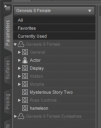
So I've installed a bunch of different stuff and some of it added new categories to my parameters tab.
I feel like I will be using Pose Controls a lot, so I'd like them to stay in this easily accesible place, but hameleon, Mysterious Story Two and Morphs definitely aren't something I will be needing on day to day basis. Is there any way to move them into some new category/folder, let's say "Misc", so in the end I'll have only General, Actor, Display and Misc in this tab?

Daz 3D is part of 
Connect
DAZ Productions, Inc.
7533 S Center View Ct #4664
West Jordan, UT 84084
Licensing Agreement | Terms of Service | Privacy Policy | EULA
© 2026 Daz Productions Inc. All Rights Reserved.
Comments
Well, ultimately it would be desirable for the creator to change them. However, you can do it yourself - for an individual slider click its gear icon and open Parameter Settings, then edit the path. If you want to chnage a bunch to the same thing, right-click to put the Parameters pane in Edit mode, select the sliders using standard multi-selection modifiers, and right-click to get a menu including setting the path. If you work on a base figure (the dev load version for Genssi 8 and 9) you may be able to use File>Save As>Support Assets>Save Modified Assets to update the original morphs.
Hi Richard,
Thanks for your reply!
It seems like you can also drag and drop properties into different groups to change their path. But whichever way I do it, changes seem to only be temporary, and as soon as I restart DAZ all folders and properties get reverted to their original path. Any chance you have solution for this as well?
I edited "group" parameter in .dsf file, and it changes the path permamently, but I don't think my will is strong enough to do it for every single file I'd want moved.
This is the drawback, the path seems to get refreshed from the original asset in many cases and the chnage made doesn't override that. I am not sure if this is the indended behaviour or a bug - it might be worth a report to see what Daz says.
Well, tough luck. Thanks for your time!
This is very frustrating, you go to the effort to put in edit mode, cahnge the parameter settings, the colors etc to make it much easier to find and you save it. But its not saved! Daz should fix this. What is the use of the edit mode if it won't stick?
It won't save in the scene? If you want to have the changes apply to al freshly loaded characters using that figure you will have to save the asset file for the property, but remember that any reisntall will overwrite the modified version; using a new character/persona preset to load the modified version of the figure is probably more reliable (you can then aply shaping and materials presets to get a particular character).
This is very frustrating, you go to the effort to put in edit mode, cahnge the parameter settings, the colors etc to make it much easier to find and you save it. But its not saved! Daz should fix this. What is the use of the edit mode if it won't stick?
Did you mean to reply to my reply, rather than repeating the original post unmodified?