
Daz 3D is part of 
Connect
DAZ Productions, Inc.
7533 S Center View Ct #4664
West Jordan, UT 84084
Licensing Agreement | Terms of Service | Privacy Policy | EULA
© 2026 Daz Productions Inc. All Rights Reserved.
Comments
I got h3 for it's demon horse kit. Maybe the horse is just not that popular in DazLand?
My 2-cent thoughts:
1) Horses are just not that necessary to many/most Daz users. Look at what sells*: skimpwear, future/sci-fi/dystopian future, contemporary urban ... not much call for horses in those genres. (*Guessing, based on what a lot of new stuff coming into the store seems to be.) I would posit that people who like to do art for traditional fantasy/medieval settings and people like me who are interested in pre-modern/pre-industrial historicals are the main market for horses and horse-related objects.
2) The small and specialty horse market is further split into multiple camps. Daz Horse 3 has to compete not just with its predecessor Daz Horse 2, which was around for years and has a lot of stuff for it, but also with Harry and LoRez Horse 2. I'm not looking to get involved in the Horse Wars; I have my opinions and preferences, but that's not the point here.
DH3 is the current base Daz horse and I have personal interest in improving what's available for it. I have done my part to support it, having bought pretty much every DH3 asset that has been released. The recent arrival of the minions is a great thing, allowing usage of all the horse poses one has on hand, and I would love to have access to the vast array of textures I have for Daz Horse 2. While I'd love to also be able to use the large collection of fancy Mill Horse textures I've bought elsewhere (there is, or at least was, an available workaround to use those on Daz Horse 2), I have tempered my pleas in that regard.
I'm sorry that you were correct. I bought most of the DH3 gear hoping against hope (and history) that this time would be different. This was the last chance to get it right.
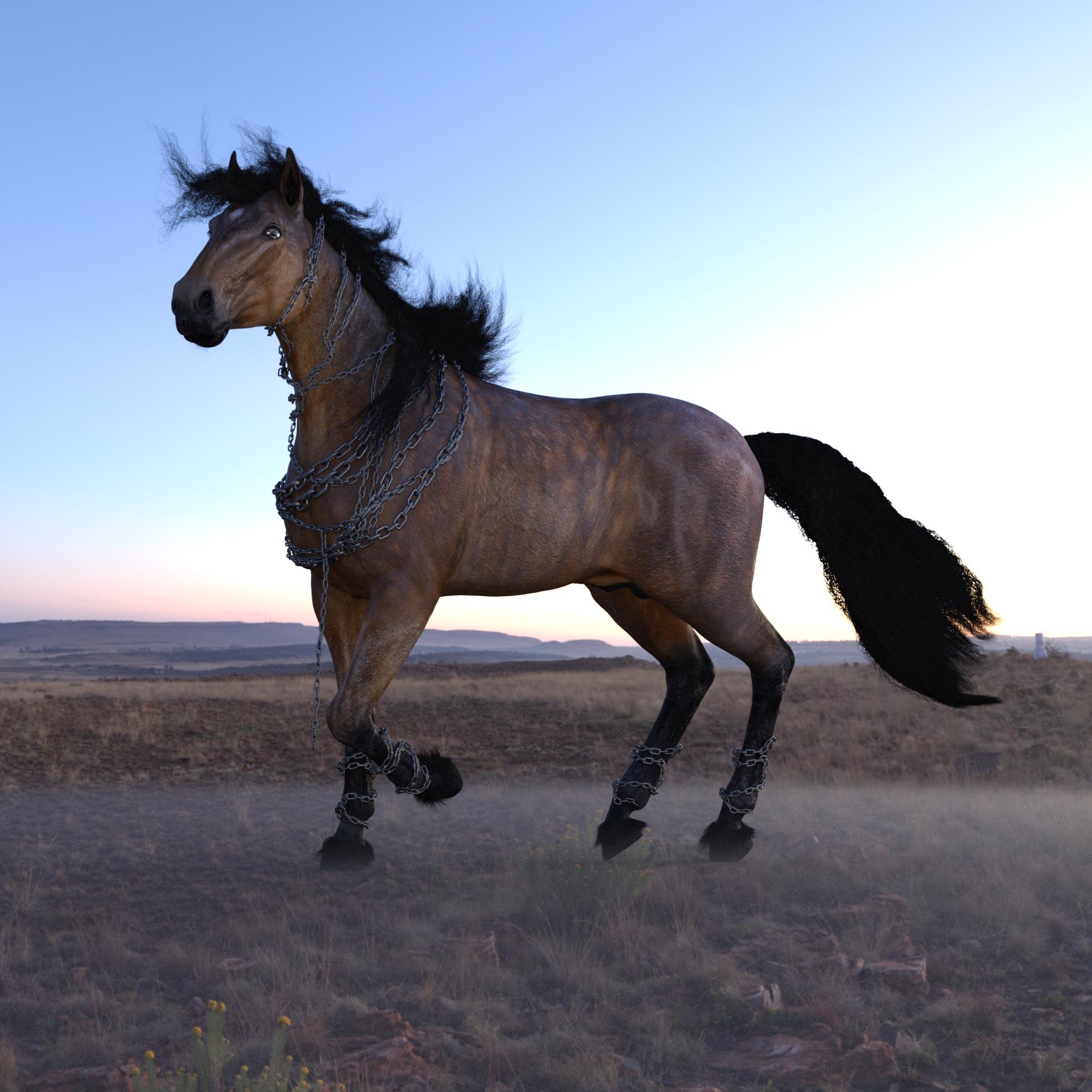
One thing I noted when I was shaping Horse 3 to have a Horse 2 shape (as part of making a clone that could get assets between Centaur 8 and Centaur 8) was that Horse 3 feels really rather cartoony in comparion.
Horse 2:
Horse 3:
Horse 3 shaped to look like Horse 2:
I will be the first to admit that the Horse 2 geometry is a nightmare. Very few clean edge loops, very uneven topology, just a pig to work with. There's even places where the UV seams aren't the same on either side.
However, I definitely prefer the shape. Possibly H3 has been approached like G9, in terms of creating an "average" shape that's not really supposed to be used itself but makes for a better starting point in general, but that's the kind of thing that relies quite a bit on getting the support to make it into actual breeds.
I really like the look of that morph. DH3 shaped as DH2 is exactly the sort of thing I've been hoping for (I like the offerings for DH3 better, but not the shape). Do you have any plans to sell the morph? I would be extremely interested!
Anything like that would have to be sold through Daz with their consent, as the shape is obviously directly derivative on their Horse 2 figure. Still, should I get accepted by Daz as a vendor (something I am trying to work towards), then I would certainly consider floating them the idea of a Horse 2 compatibility pack for Horse 3. How it would have to be handled on a technical level is something I've not yet fully looked at (ideally I'd like to be able to give H3 full compatibility with H2 textures, but there's differences in the topology flow that make matching UV seams difficult), so I'd have to take some time to see how viable it is.
That's not top priority right now, though. I have a large number of half complete projects around I have been procrastinating over for years, but right now I'm focusing on a centaur centric one in the hope that "Daz won't be interested in centaur stuff for long" finally lights enough of a fire under my butt to actually get me to finish something.
(That said, there are obviously overlaps between the horses and centaurs, so some of what I'm working on for that may be useful down the line).
I have been looking at a few things for Horse 3 at the moment, so I will have a look over this again and see what were the main issues that brought it to a stand still previously. I have a feeling it was to do with the way the materials would be applied, as Horse 3 has different surface areas than Horse 2, but I think I have a way around this now.
Nice work with this Horse 2 to Horse 3 morph shape it's looking great!
I agree about Horse 2 Geometry, it always made sculpting with Horse 2 pretty tough...
I totally understand! I would love to see you become a vendor, the only reason I don't use centaurs that often is because of lack of compatibility. There just aren't that many things out there for them, and I don't have the skills (at all!) to make regular stuff work with them. Anything for centaurs would be welcome! (In the interest of full disclosure, I don't have Centaur 9 yet, too strapped for cash right now, but it is on the grab-as-soon-as-I'm-able list. I have DH2, DH3 and the G8 and 8.1 centaurs.)
You're probably right about the market. Hope you get to use your textures. Wanted you to know I saw your reply here, too. Beyond that, it occurs to me there is not just one kind of horse. There are small ponies and massive Clydesdales with plenty of variations in between. No idea how well those are covered.
The plan, at least for the immediate future, is that any clothes I'm working on will be released for both G8 and G9 - I still extensively use G8 myself, but recognise that G9 is where the market is now.
And depending on what I think makes sense for the centaur stuff I work on, you'll likely see alternatives for either the base Genesis figures or the Horses as appropriate.
Of course, whether anyone else thinks my centaur projects make any sense is another matter. Case in point:
I disagree.
Buff skimpy workout horses for everyone!
To second the others here, I'm also one who's much interested in this project. I have lovely horse 2 textures that I would like to try out with the new model. If more possibilities and variants, like the recent deer, keep coming out, horse 3 can be made really useful I reckon. And we're still hoping for a goat.
Oh, that sounds wonderful!!! I frequently mix generations in my renders, so that would be perfect ^_^
I would buy too. As well as any of the DAZ Horse 2 morphs you transferred to the DAZ Horse 3 Horse 2 Morph! If that's how it worked.
Hey everybody...
https://www.daz3d.com/da-horse-2-uvs-for-daz-horse-3
Yup yup straight into my cart !!
@DA I'm having problems getting it to work not sure what I'm doing wrong
oops sorry double post
Nevermind figured it out ,my bad THANK YOU very much !!
sorry my lighting sucks
Hey everyone, I hope this fits the reqs — I was pretty happy to see it all come together into a final package. Sorry for the slightly quirky setup with the secondary figure, but I needed a way to match surfaces across figures to maximize compatibility between Horse 2 and Horse 3 (solving this was what had the project on hold for a while). If you run into any issues or have any questions, feel free to drop me a DM or ask here.
OK, I have to admit, I have not figured out how this works. What are the quick steps to follow?
Go to the Horse 3/Characters/DA Horse 2 UV for Horse 3 Base Figure / and load it , then in the Characters folder ,open DA Horse 2 UVs for DAZ Horse 3 ,and open the script ,DA Load Horse 2 MAT from Library ,which will open a window ,you scroll to where your Horse 2 materials are and pick one .
Basically it's a seperate figure that has the Horse 2 UV's as well as it's own Horse3 , I think .......
oh and you can just load Horse 2 MATs ,by double clicking on them but then you have to change the UV base in the surface tab
Hmmm. Clearly I am not doing something right. I can set the UV and successfully apply the DH2 textures if I do it manually (or, much faster, apply them to an actual Daz Horse 2 figure in the same scene and copy/paste the relevant surfaces from DH2 to DH3 and set the UV back on DH3) but I get "invalid hierarchy" errors trying to either use the DA Load Horse 2 MAT from Library or directly apply the mat file.
I can make it work - just have to figure out the click I'm getting wrong, which will save a bunch of time.
Okay, here is a little break down, yes as @carrie58 mentioned there is a specialised preset loader for the customised Horse figure with dual UV's, this carries the altered surface information. It functions as Horse 3 with only the difference in surface names, so all loaded morphs etc will work as normal.
So firstly load that into your scene. DA Horse 2 UV for Horse 3 Base Figure.duf (In the characters folder)
Now there are two ways to apply material presets.
Method 1 ------------------------------
If you look in the main product folder there are 3 Script Presets:
DA Load Horse 3 Mat from Library
DA Load Horse 2 Mat from Library
DA Dforce Hair Convert Horse 3 to Horse 2 UV Parameters
The first allows you to select and apply a Horse 3 Mat preset to load, the second Horse 2, the 3rd corrects already applied Horse 3 Dforce hair for use with the custom figure base altering the Dforce hair structure to suit Horse 2 UVs.(Because Dforce hair uses maps and if the UV doesn't align to those maps it may cause issues)
Method 2 -------------------------------
Load the base figure as before.
Load a Horse 2 Mat preset direct from your content library by double clicking a Horse 2 mat preset.
Then Load Change UV on all surfaces — Apply after Horse 2 Mat.dsa or (Or for Horse 3 mat preset use - Copy Horse 3 Surfaces to Horse 2 Surfaces.duf)
You will find these in the folder marked scripts in the main product folder. This will populate everything into the correct placement for the UV set and surface settings. If you prefer this method you can right click and select "Create custom action" to add it to the script dropdown bar for easier access. Alternatively you can also just directly change the UV setting in the surface tab after applying a Horse 2 mat if you prefer (Horse 3 mats are a little more complicated so its best to use the script). Sorry, I have to admit naming some of these presets was tough to convey enough info. I'll add a detailed description of each included after this post. Let me know if this helps. I was aiming for multiple methods to use the UV hoping that would make things easier...
Descriptions of the preset from Product page:
DA Horse 2 UV for Horse 3 Base Figure.duf
This figure is designed for use with the base Daz Horse 3 figure and applies the DA Horse 2 UV transfer and modified surface areas to enable compatibility with textures originally made for DA Horse 2. (Surface names and geometry selection aligned to Horse 2 with Daz Horse 3 figure compatibility.)
DA Load Horse 2 Mat from Library.dsa
This script loads the original Daz Horse 2 material onto the custom Daz Horse 3 figure using the compatible UV and surface settings.
DA Load Horse 3 Mat from Library.dsa
This script applies the original Daz Horse 3 materials to the custom Daz Horse 3 figure using the custom UV/surface setup.
DA dForce Hair Convert Horse 3 to Horse 2 UV Parameters.dsa
This script adjusts the dForce hair material parameters to better match the DA Horse 2 UVs on the custom Horse 3 figure.
DA Iray Horse 2 Iray Converter Coarse.duf & DA Iray Horse 2 Iray Converter Glossy.duf
Apply an Iray conversion to pre-applied Horse material presets, mainly used for updating older 3Delight materials to Iray compatibility. Two variations: glossy or coarse fur settings.
(Utility) dForce Hair Converter to Horse 2 UV.duf
Base material preset for use by included script "DA Dforce Hair Convert Horse 3 to Horse 2 UV Parameters.dsa."
(Utility) Change UV on all surfaces — Apply after Horse 2 Mat.dsa
When applying a Horse 2 material directly to the custom base figure, this small script applies correct surface settings to convert the preset to display correctly. This is an optional utility script for select use cases, such as loading Horse 2 presets directly without the script helper.
(Utility) Copy Horse 3 Surfaces to Horse 2 Surfaces.dsa
When applying a Horse 3 material directly to the custom base figure, this small script applies correct surface settings to convert the preset to display correctly. This is an optional utility script for select use cases, such as loading Horse 2 presets directly without the script helper.
Hmm, I'm not exactly sure what is going wrong here, but give it a try as I described above and let me know if that works or the "invalid hierarchy" issue still persists.
Edit: Just looking into this further. It could relate to specifically using Hieararchical Material presets, which are not directly supported. Hierarchical presets are dependent on each component being definite. Eg. Horse 2 with Horse 2 Hair, without specifically Horse 2 being the target they will fail to load. You can still use these, either as described above by just copying and pasting from Horse 2 or load onto Horse 2 and save out a base material preset containing just the Horse 2 part to load directly.
OK, for me the problem was that, out of habit, I was selecting the mat choices from among the IDG Iray Essentials set. Those seem to produce the hierarchy errors. Items in the Daz Horse 2/Materials folder work as expected.
As I suspected, just something silly. Never mind me.
It's all good, glad you worked it out. Let me know if anything else comes up.
Edit: The partials for the body should work directly in IDG Iray Essentials set, it looks like the main presets are hierarchical from the description "16 full body presets that will apply to the coat, mane and tail"
Awesome, I've very glad to see this product in the store.
...well, this thread helped me make up my mind about Horse 3
Today (04-02-26) there s a special discount deal on al; DO content in the MM artists stores. A number of DH3 items (including the base model) are deeply discounted. The base Horse 3 model discounts to 5.60 USD, with a gold star tpo 3.92 and with a New Release 98¢. All DO Horse 3 add on content (such as the Pro Material Set) is also steeply discounted
Tempting indeed (as I already get the 30% gold star discount), However seeing Matt Castle's comparison between the two generations above and reading what is mentioned here, I think I'll stick with Horse 2 as I already have all the extra content that I need for it.