my criticim on daz studio 4.8
 cosmo71
Posts: 3,609
cosmo71
Posts: 3,609
One of my criticim on daz studio 4.8 and also on all new versions but in daz studio 4.6 it was possible to make the side panes a bit narrower
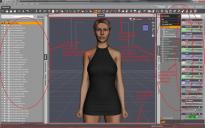
daz studio look.jpg
1680 x 1050 - 396K
Post edited by cosmo71 on

Daz 3D is part of 
Connect
DAZ Productions, Inc.
7533 S Center View Ct #4664
West Jordan, UT 84084
Licensing Agreement | Terms of Service | Privacy Policy | EULA
© 2026 Daz Productions Inc. All Rights Reserved.
Comments
Try using City Limits Lite if you can't adjust that layout. I don't have any problem changing the size of the panes unless I grab the wrong thing.
Even when I do grab the wrong thing, it's easy to reverse.
You can use Shift + F11 to make the Viewport the full size of your monitor if necessary.
helps a bit but the whole look of is much to strange, I don`t like it much, other thing, how can I make that the backroundcolor gets rendered?
well it will take a time to get used to 4.8 I think a log time
with the city limit look it is better, so maybe I will get used do ds 4.8 someday
the thing is, I do not need the Iray stuff and also not the next generation figures because I still use v4.2 and m4 and 3d-light, I do not see me buying a new machine with more ram and a new graphic card just to use Iray or this hd stuff and the new generation figures, well, have tried to create my character Dixie new with genesis and then with g2f and the results never reach the cr2 version, so I do not need these new figures and I have tons of clothes for v4.2 and m4 and the converters work but not good enough so...I will work with v4.2 and m4 in future and use 3d light technology
The side panels have been like that since at least mid 4.6, each TAB has it's own preset minimum width, so which ever TABs you have docked means your stuck with the widest for all of them, haven't checked in a long time as I refuse to allow the CMS on my machine and the (not so) smart content plugin is the first thing I delete after an update, but that TAB used to be 5 thumbnails wide.
well I was able to reduce the width of the right pane as I need it so I have it real narrow right now :) it is good so. just had move the render settings tab to the left pane. now the right pane is just "two icons" wide :)