DAZ 4.8 installation error
 cosmo71
Posts: 3,609
cosmo71
Posts: 3,609
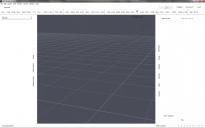
I wanted daz studio 4.8 and just get an update for it and after installing it and starting daz studio 4.6 I got this error message and my daz studio looks like:

neu-2.JPG
637 x 476 - 80K
daz_studio_after_update.jpg
1680 x 1050 - 147K
Post edited by cosmo71 on

Daz 3D is part of 
Connect
DAZ Productions, Inc.
7533 S Center View Ct #4664
West Jordan, UT 84084
Licensing Agreement | Terms of Service | Privacy Policy | EULA
© 2026 Daz Productions Inc. All Rights Reserved.
Comments
and now??????????
nearly everytime a new daz software comes out I have problems. It seems typical for daz
other question, is there just a 32bit version for daz studio 4.8?
I want my daz studio 4.6 64bit pro work again...so´what do I have to do? uninstall daz studio 4.8 32bit? and reinstall 4.6 64bit pro?
DS has 32 and 64 bit versions. The white interface is usually the result of installing while DS was running, closing and reinstalling should fix it.
Reinstalling what?
4.8 64 bit? or 4.6 64 bit pro?
reinstalling what
where do I find daz studio 4.8 64bit???????????
Slowly but surely have enough of this stuff
Which ever you have installed.
In your Product Library in your store account...both versions (32 and 64 bit) are there.
Or in the DIM (may need to adjust the filters).
and...it was not running....so...
I want daz studio 4.6 64bit pro work again that is all and second thing, where do I find daz studio 4.8 64 bit at the shop? tell me, the new shop desing is totally confused.
in the dim there was just the 32bit version shown
Please don't keep bumping your post. Both 4.6 and 4.8 had 32 and 64 bit versions. reinstall DAZ Studio with the application closed.
Then you need to check the download filters in the DIM, to make sure that you have it set to look for both versions.
Gear icon in upper right hand corner > Downloads > make sure both 32 and 64 bit for your OS are enabled (checked).
And also check the Ready to Install tab to make sure it isnt' waiting to be installed.
Do you have 64 bit checked off in your Downloads Tab in DIM
have found it in the product library but I have a simple question. Why can`t daz don`t do something to be used quick and easy? The shop isn`t easy to handle if you search something and the dim seems to be not easy also.
DIM is very easy to follow. It's a lot better then going to pack by pack in your product library to download everything. With DIM you even get all the updates to packs and programs that you would never know about going through the product library. It takes a few basic setup steps in DIM and everything installs to where it was designed to go. If you set up custom categories afterwards that's up to you. As long as you have the right setting checked off in DS you will get almost everything.
just 30 minutes and I have enough of daz studio 4.8 I want back my daz 4.6 64 bit pro. Was a big mistake downloading and installing it...damn
so and back to daz 4.6 64bit pro