Clothes appearing in reflection...body is not. (3Delight)
 Scavenger
Posts: 2,677
Scavenger
Posts: 2,677
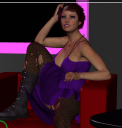
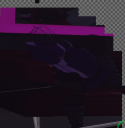
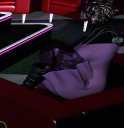
Ok, here's a puzzler.. I have a scene with a large mirror and characters off scene who show up in the reflection. One of them (pic 1) isn't showing up, but her hair and clothes are.(pic 2)
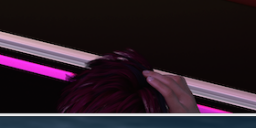
Further weirdness, an instance of the character who CAN be partly seen in the scene, does render. (pic 3)
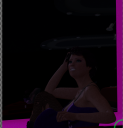
with a camera pointed at the figure, she renders normally. (pic 4)
She doesn't show up in another mirror in the scene (that's usually only seen in the reflection of the other mirror) [brightness enhanced in photoshop] (pic 5)
So...no idea what's going on here.

Daz 3D is part of 
Connect
DAZ Productions, Inc.
7533 S Center View Ct #4664
West Jordan, UT 84084
Licensing Agreement | Terms of Service | Privacy Policy | EULA
© 2026 Daz Productions Inc. All Rights Reserved.
Comments
What's your maximum ray trace set to?
It's set to the default, 2. While I grant I don't know much about that setting, I don't see how the clothes on the figure and items behind the figure could show up in the mirror and the figure itself. And pics 4 & 5 above are using a camera right in front of the figure and the mirror in that one.
ALSO, closing and reopening Daz did NOT change things.
Try bumping max ray trace to 4, although I would expect the hair not to show up, unless it's non-transmapped. What shader is the figure's skin using?
Max Ray Trace Depth set to 4, still not working in the mirror close to the figure. I assume it still doesn't in the far mirror too.
oh and she's using the daz studio default shader.
is she a vampire?
The irony is that I wanted this very efffect to happen in Iray for a differnt picture.
Well various experiments have failed to figure out what's going on, so I'll just leave the data here for mjc1016 to eventually solve it :)
I loaded up another one of the same character, copied the pose from the 1st to the new, put her in the exact same place over the first one, and that works like it's supposed to.
So I have no idea what's going on with this.
If I decide to try an iray conversion of this, it'll be interesting to see what happens there.
In parameters tab of the figure make sure that Visible in render option is on.
In surface tab, if you have Fantom option make sure its off and if you have Raytrace option make sure its on.
You say "instance" - do you mean that the figures without reflections are Instances or parts of an Instance Group? If so, this is a problem with 3Delight that I reported already: (request number 194523)
I'm guessing your figure is above Base Resolution? Try setting it to Base Resolution and I think the reflections should appear (of course the figure will be a bit blockier)
I think if you use Duplicate rather than Instance it will work too (but needs more RAM) The clothes and hair appear because they are already Base resolution - some clothes are higher res and those also go missing in reflections. Same problem with shadows too (that was actually the nub of my bug report)
Iray renders seem to work perfectly in my experience.
@Melaniel - No, I'm afraid you misunderstood what I said.
in picture 1, is a the character. Just a regualr G2F with skins and morphs applied. This is a Screenshot of viewport
In picture 2, is where she's supposed to show up in the final piece, as a reflection in a big mirror. She is otherwise off stage. She herself vampires, and doesn't show in the mirror, yet her hair and clothes do. (if you enhance the brightness of it you'll see that). this is a render.
In picture 3, an instance of the character, as in an instance, who is seen "on stage" renders.you can see her hand, which the reflection of the character does not have. This is a render.
In picture 4, using a different camera with the same settings pointed at the character. She renders fine. there is no reflection in this pic.
In picture 5, with the previous camera repositioned to get the reflection off a that is placed right behind the character, she same problem with her body not rendering is shown. This is a render.
Picture 6 (in a later response), I have place a new copy of the character, not a "Duplicate" or an "instance", but a new copy from the content library, with the same settings, skins, and pose in the same position as the 1st version. The 1st version is still left visable so that the instance (from picture 3) will still be visible). Her reflection works like it should.
@Scavenger - sorry, I misunderstood. I'm afraid I have no idea what's happening, I hope someone can help you get it sorted out
It might just be "one of those tings"...
I remember with an earlier pic I did, an entire plane with a jpg on it wouldn't render.. but if I just made another plane with the same jpg..it worked fine.
So in this case, I worked around the problem.. be nice to figure out what's going on, but it's more or less academinc now :)
Something similar that happend with me. Check your render settings and make sure the 'render motion blur' is not checked. I have found that if this is checked and there is no actual motion in the sceen then random skins don't render.
May not be your problem but worth checking.