Objects coming over through DazToMaya bridge displaced
 tam_c3df5332fc
Posts: 151
tam_c3df5332fc
Posts: 151
Hey guys,
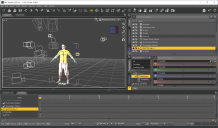
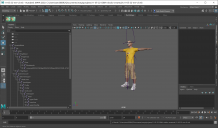
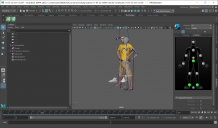
When I send the character from Daz3d to Maya, via the bridge, the objects (shoes and glasses) are displaced. I place them in their correct places.
Even after the retargeting process, the objects are where they are supposed to be, but once the animation starts, then the objects are once again displaced from where I would expect them to be.
See attached screenshots
How can I keep the objects positions relative to their parent?
And the shoes have their respective feet as their parent, along with the glasses having the head as it's parent
Thanks in advance
BTW, I will be leaving to work the evening shift and I maybe late in replying, but I look forward to returning from work to read your replies

Daz 3D is part of 
Connect
DAZ Productions, Inc.
7533 S Center View Ct #4664
West Jordan, UT 84084
Licensing Agreement | Terms of Service | Privacy Policy | EULA
© 2026 Daz Productions Inc. All Rights Reserved.
Comments
In case someone else runs into this issue, then this is the solution that I found.
First, some errors on my part. I thought that by using the Transfer Utility on the objects (glasses and shoes) that this would make them fit better, but obviously, it causes other issues. So, I started by reimporting the objects without converting them using the Transfer Utility
Second, I parented the glasses and shoes to the entire character, rather than, the shoes to the each foot and the glasses to the head
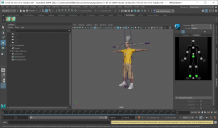
Third, after using the bridge to Maya, I made some adjusments to place the objects in the correct positions, followed by using the Constrain> Parent option in the Animation tab - I have learned through this process, that I should select the parent first, then the child, followed selecting Constrain> Parent
The result is that the objects now move along with the character - see attached screenshot
BTW, does anyone know how to make the shirt fit with the pants' waist/pelvic area without the pants poking through? I know that I could probably use the mesh grabber to fix it, but there should be some kind of uniform solution to this - maybe I will try to finally learn how to do clothing simulation
Is your figure morphed? If so you need, when using the Transfer utility, set the Source Shape correctly and then enable the Reverse Source Shape from Target option.
@Richard Haseltine
Thanks for replying
Can you give me some screenshots, so that I can follow along with what you are describing?
Are the clothes modelled around a version of the figure with morphs, or a pose applied, or both?