

Great teasers! I'm especially interested in more info on the Traveler.
It's always nice to have something to look forward to, it makes getting up in the morning easier.
All I can say is that IT is an explorer from another world, equipped with an exoskeleton packed with every gadget you can imagine, including a gun that shoots black holes for when things really go south.
Hi there! Just enough time to create an outfit worthy of the strongest princess, and Zuna for Genesis 9 will be ready to go. And this time she returns fiercer than ever, enhanced photorealism, a more balanced athletic body, dedicated auto-morphs, and customizable skin effect combinations including dirt, wetness, and stunning tribal tattoos.
Meanwhile, two strange new characters are on their way, ready to bring chaos to the kitchen!
Hi, first of all, love every single one of your products (it needs to be said and repeated). There's an issue with Beverly 9, though: the JCMs trigger even when she's at 0%. I've uninstalled her for the moment, but she's a really nice shape to add to the genepool, and I would like to know if there's a fix planned. Thanks for everything!
Hello! As you may have noticed, Beverly 9 includes many JCMs, so I’ll need to ask which specific JCM you’re referring to. I haven’t been able to reproduce any issue, and no problems were found during the testing phase either, which I can assure you was carried out thoroughly. Therefore, I believe that if the defect exists, it may have arisen during the upload process to the store or as a result of some package update.
If, on the other hand, you’re referring to the parameters labeled KEY and are concerned that they remain active even when Beverly’s morphs are disabled, please note that these are neither JCMs nor do they contain any morph data. The KEY parameters simply convert the numeric rotation values of the limbs into values ranging from 0 to 1. That’s all they do. At the same time, the JCMs that use these KEY values already include an internal multiplicative control that activates only when Beverly’s body or head morphs are enabled. So if that’s your concern, you can rest assured.
Multiplicative controls were not added to the KEY parameters themselves in order to avoid introducing redundant constraints, which could slow down character animation or, in worse cases, create conflicts.
Anyway, thank you for bringing it to my attention, and for you appreciation too ;)
Hi, first of all, love every single one of your products (it needs to be said and repeated). There's an issue with Beverly 9, though: the JCMs trigger even when she's at 0%. I've uninstalled her for the moment, but she's a really nice shape to add to the genepool, and I would like to know if there's a fix planned. Thanks for everything!
Hello! As you may have noticed, Beverly 9 includes many JCMs, so I’ll need to ask which specific JCM you’re referring to. I haven’t been able to reproduce any issue, and no problems were found during the testing phase either, which I can assure you was carried out thoroughly. Therefore, I believe that if the defect exists, it may have arisen during the upload process to the store or as a result of some package update.
If, on the other hand, you’re referring to the parameters labeled KEY and are concerned that they remain active even when Beverly’s morphs are disabled, please note that these are neither JCMs nor do they contain any morph data. The KEY parameters simply convert the numeric rotation values of the limbs into values ranging from 0 to 1. That’s all they do. At the same time, the JCMs that use these KEY values already include an internal multiplicative control that activates only when Beverly’s body or head morphs are enabled. So if that’s your concern, you can rest assured.
Multiplicative controls were not added to the KEY parameters themselves in order to avoid introducing redundant constraints, which could slow down character animation or, in worse cases, create conflicts.
The issue I have with Beverly is these parameters are littered throughout all my save files. When one of the parameters becomes non-zero they all get added to the save of every G9 figure in the scene, bloating all the file's size and slowing loads and saves of the files. Since uninstalling Beverly, my loads and saves are noticably quicker. That, and Beverly always shows up as "used" in MikeD's List of All Products for any scene with any G9 figure.
Okay, the situation is clearer to me now.
I'm sorry for the inconvenience, but as you know, Beverly 9 is a unique character that required more controllers than my other characters in order to provide the most natural animation experience possible while preventing body part intersections. Because of this, Beverly 9 is inherently more demanding, and its performance is also influenced by the hardware being used.
The issue is that if I were to add even more controllers on top of the existing ones, the software would have to process even more information in real time. While this could make saved scenes lighter, it would also make the character itself heavier during use, potentially causing slower and less responsive movement.
For this reason, I'd like to propose a customizable solution, so each user can decide whether or not to apply these changes based on their own needs.
What I propose is creating a simple ON/OFF boolean control that allows you to manually enable or disable the KEY values whenever needed.
The process is straightforward:
1) Load a standard Genesis 9 figure into the scene.
2) In the Parameters pane options, select Preferences, then enable Show Hidden Properties.
3) Right-click anywhere inside the Parameters pane and select Edit Mode.
4) Right-click the General group in the Parameters pane and select Create New Property.
5) Create the new property as shown in the image. It will immediately appear under the General path.
6) Right-click the new property (Beverly KEYs ON/OFF) and select Show in Property Hierarchy.
7) A new panel will open listing all available properties (controllers), with the new Beverly KEYs ON/OFF property highlighted. Expand it until you can see the 2nd Stage under Sub-Components.
8) Navigate to Hidden > People > Beverly9 > Keys in the Parameters pane, then select all Beverly 9 Keys by holding down the Shift key and clicking the first and last Key in the list.
9) Drag and drop the selected Keys into the 2nd Stage under Sub-Components, as shown in the image. This makes all of the Keys dependent on the Beverly KEYs ON/OFF toggle.
10) Select the Genesis 9 model, then navigate to File > Save As > Support Asset > Modifier Asset(s) and save the Keys and the new property back to the same installation path where Beverly 9 is installed, as shown in the image.
11) Remember to deactivate the Edit Mode.
Now you can turn off the Beverly’s Key values whenever you need. I hope it helps solve the problem.
but probably wouldn't have purchased her if another vendor had publisher her without the promo asset pack listed. Because it was listed, I knew that I had almost all of the items needed to replicate the character's look and feel so I grabbed her and the additonal couple of items I was missing and came up with my version for my "Punk Rocker, Robot Fighter" character (inspired by the old Gold Key comic hero, Maguns: Robot fighter") that I published a still image for a few weeks ago.
I had an hour today, so I did a quick AI animation showing her in action. Little rough, but it was less than an hour of me having fun:
but probably wouldn't have purchased her if another vendor had publisher her without the promo asset pack listed. Because it was listed, I knew that I had almost all of the items needed to replicate the character's look and feel so I grabbed her and the additonal couple of items I was missing and came up with my version for my "Punk Rocker, Robot Fighter" character (inspired by the old Gold Key comic hero, Maguns: Robot fighter") that I published a still image for a few weeks ago.
I had an hour today, so I did a quick AI animation showing her in action. Little rough, but it was less than an hour of me having fun:
PS: I list the items used on my Deviantart posts, as well as accredit the main design of the character to Mechasar.
Thanks a lot, I'm really flattered. For me, listing the assets used isn't just about giving useful information to people who want to recreate the character exactly as they see it, it's also a way of showing respect to the other artists, who deserve to be credited for their work.
I had the chance to check out your work. The way you've brought Zuna and Neva to life through comics, animations, and the stories you've told is nothing short of amazing. You've also captured what I believe is the true purpose of using AI in art: it should enhance and streamline the creative process, never replace it. Seriously, great job!
I'd also like to take this opportunity to let all Zuna fans know that the Genesis 9 version is finally complete, and the journey to the store has officially begun!
I decided this guy needed a hat. Then I decided he couldn't just be floating in the air. He looks a little worried. I think his condiments might slide off.
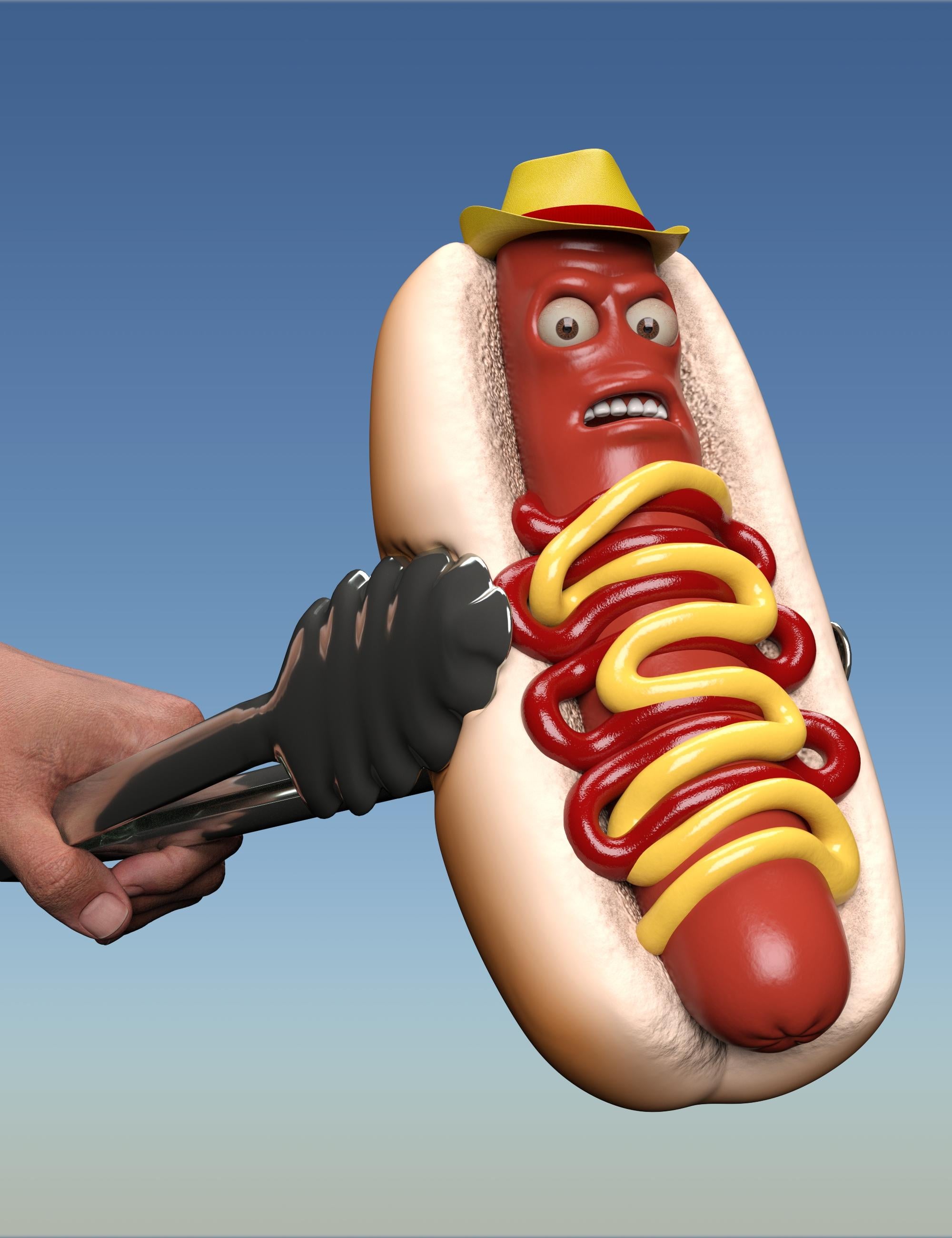
Nice XD I see you also added deformation to the bun. Here's another idea that could be interesting: the hot dog mesh uses separate surfaces, which means you can hide individual pieces. By hiding the bun, the sauces, and the limb parts of the Genesis model using floating gloves and shoes instead, you've got another character with a Rayman-style body.
Comments
Sorry but I had to
It was supposed to be done ;)
And with today's character, we're up to 4 ladies in a row! Yva for Genesis 9 is in the store!
Grabbed her as soon as she showed up, thanks. Which hair is that? It's familiar and I probably have it but it's drawing a blank.
Glad you liked her, thanks :) These are the hair you're looking for:
https://www.daz3d.com/dforce-bixie-cut-hair-for-genesis-9
Thanks, it was familiar because I do own it but haven't used it yet. I will now, though!
Hi there! Here are two new characters created for this new year. The little devil is first on the list. Hope you like them, stay tuned! :D
Great teasers! I'm especially interested in more info on the Traveler.
It's always nice to have something to look forward to, it makes getting up in the morning easier.
All I can say is that IT is an explorer from another world, equipped with an exoskeleton packed with every gadget you can imagine, including a gun that shoots black holes for when things really go south.
Well, that only makes me more interested!
Credit card standing by...
Wow, I'm so excited for these new releases! Fingers crossed for an update of Madam Wickd or another witch/hag character down the line...
Here's the latest Little Devil and Accessories for Genesis 9 teaser poster :)
Little Devil is now in the store!
Hot Stuff! Looks great, he's in the cart.
Hi there! Just enough time to create an outfit worthy of the strongest princess, and Zuna for Genesis 9 will be ready to go. And this time she returns fiercer than ever, enhanced photorealism, a more balanced athletic body, dedicated auto-morphs, and customizable skin effect combinations including dirt, wetness, and stunning tribal tattoos.
Meanwhile, two strange new characters are on their way, ready to bring chaos to the kitchen!
Hi, first of all, love every single one of your products (it needs to be said and repeated). There's an issue with Beverly 9, though: the JCMs trigger even when she's at 0%. I've uninstalled her for the moment, but she's a really nice shape to add to the genepool, and I would like to know if there's a fix planned. Thanks for everything!
Hello! As you may have noticed, Beverly 9 includes many JCMs, so I’ll need to ask which specific JCM you’re referring to. I haven’t been able to reproduce any issue, and no problems were found during the testing phase either, which I can assure you was carried out thoroughly. Therefore, I believe that if the defect exists, it may have arisen during the upload process to the store or as a result of some package update.
If, on the other hand, you’re referring to the parameters labeled KEY and are concerned that they remain active even when Beverly’s morphs are disabled, please note that these are neither JCMs nor do they contain any morph data. The KEY parameters simply convert the numeric rotation values of the limbs into values ranging from 0 to 1. That’s all they do. At the same time, the JCMs that use these KEY values already include an internal multiplicative control that activates only when Beverly’s body or head morphs are enabled. So if that’s your concern, you can rest assured.
Multiplicative controls were not added to the KEY parameters themselves in order to avoid introducing redundant constraints, which could slow down character animation or, in worse cases, create conflicts.
Anyway, thank you for bringing it to my attention, and for you appreciation too ;)
The last two promo renders from Fool Foods for Genesis 9 are just *chef kiss*
I can't imagine using these characters. But I love that they exist.
They go right along with Evil Carrot and Evil Onion, which I used several times recently.
Thank you! I hope you enjoy them :)
The issue I have with Beverly is these parameters are littered throughout all my save files. When one of the parameters becomes non-zero they all get added to the save of every G9 figure in the scene, bloating all the file's size and slowing loads and saves of the files. Since uninstalling Beverly, my loads and saves are noticably quicker. That, and Beverly always shows up as "used" in MikeD's List of All Products for any scene with any G9 figure.
Amazing set. Well done. Much more than what was available so far.
https://www.daz3d.com/fool-foods-for-genesis-9
Same here.
Thank you all for your warm appreciation! :D
Okay, the situation is clearer to me now.
I'm sorry for the inconvenience, but as you know, Beverly 9 is a unique character that required more controllers than my other characters in order to provide the most natural animation experience possible while preventing body part intersections. Because of this, Beverly 9 is inherently more demanding, and its performance is also influenced by the hardware being used.
The issue is that if I were to add even more controllers on top of the existing ones, the software would have to process even more information in real time. While this could make saved scenes lighter, it would also make the character itself heavier during use, potentially causing slower and less responsive movement.
For this reason, I'd like to propose a customizable solution, so each user can decide whether or not to apply these changes based on their own needs.
What I propose is creating a simple ON/OFF boolean control that allows you to manually enable or disable the KEY values whenever needed.
The process is straightforward:
1) Load a standard Genesis 9 figure into the scene.
2) In the Parameters pane options, select Preferences, then enable Show Hidden Properties.
3) Right-click anywhere inside the Parameters pane and select Edit Mode.
4) Right-click the General group in the Parameters pane and select Create New Property.
5) Create the new property as shown in the image. It will immediately appear under the General path.
6) Right-click the new property (Beverly KEYs ON/OFF) and select Show in Property Hierarchy.
7) A new panel will open listing all available properties (controllers), with the new Beverly KEYs ON/OFF property highlighted. Expand it until you can see the 2nd Stage under Sub-Components.
8) Navigate to Hidden > People > Beverly9 > Keys in the Parameters pane, then select all Beverly 9 Keys by holding down the Shift key and clicking the first and last Key in the list.
9) Drag and drop the selected Keys into the 2nd Stage under Sub-Components, as shown in the image. This makes all of the Keys dependent on the Beverly KEYs ON/OFF toggle.
10) Select the Genesis 9 model, then navigate to File > Save As > Support Asset > Modifier Asset(s) and save the Keys and the new property back to the same installation path where Beverly 9 is installed, as shown in the image.
11) Remember to deactivate the Edit Mode.
Now you can turn off the Beverly’s Key values whenever you need. I hope it helps solve the problem.
Just stopping in to say "thanks" to Mechasar for his awesome charactes, and moreso for taking the time to list the assets used in the promos.
I loved Neva:
https://www.daz3d.com/neva-for-genesis-9
but probably wouldn't have purchased her if another vendor had publisher her without the promo asset pack listed. Because it was listed, I knew that I had almost all of the items needed to replicate the character's look and feel so I grabbed her and the additonal couple of items I was missing and came up with my version for my "Punk Rocker, Robot Fighter" character (inspired by the old Gold Key comic hero, Maguns: Robot fighter") that I published a still image for a few weeks ago.
I had an hour today, so I did a quick AI animation showing her in action. Little rough, but it was less than an hour of me having fun:
So, again, my thanks!
If clicking on the button above doesn't work, go to https://sterdan.com/wp-content/uploads/2026/07/Punk-Rocker-Robot-Fighter-01-SD-480p.mov
PS: I list the items used on my Deviantart posts, as well as accredit the main design of the character to Mechasar.
Thanks a lot, I'm really flattered. For me, listing the assets used isn't just about giving useful information to people who want to recreate the character exactly as they see it, it's also a way of showing respect to the other artists, who deserve to be credited for their work.
I had the chance to check out your work. The way you've brought Zuna and Neva to life through comics, animations, and the stories you've told is nothing short of amazing. You've also captured what I believe is the true purpose of using AI in art: it should enhance and streamline the creative process, never replace it. Seriously, great job!
I'd also like to take this opportunity to let all Zuna fans know that the Genesis 9 version is finally complete, and the journey to the store has officially begun!
I decided this guy needed a hat. Then I decided he couldn't just be floating in the air. He looks a little worried. I think his condiments might slide off.

Nice XD I see you also added deformation to the bun. Here's another idea that could be interesting: the hot dog mesh uses separate surfaces, which means you can hide individual pieces. By hiding the bun, the sauces, and the limb parts of the Genesis model using floating gloves and shoes instead, you've got another character with a Rayman-style body.