Question about how to apply skin settings to V7
 Serene Night
Posts: 17,705
Serene Night
Posts: 17,705
It was suggested in the Victoria 7 thread, that because I didn't like the settings for v7's skin that I could apply and use the ones for characters I liked who were v6.
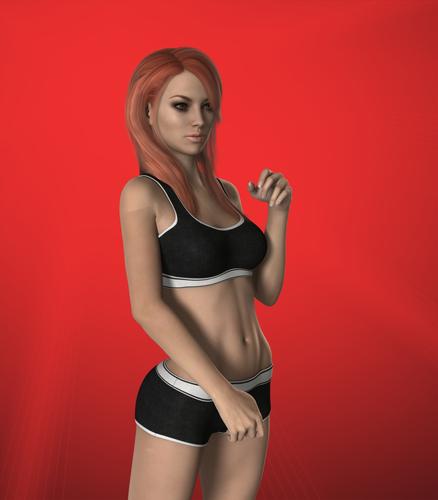
I have done this before in older generations, but I'm having trouble with the arms accepting the settings. (Image 1)
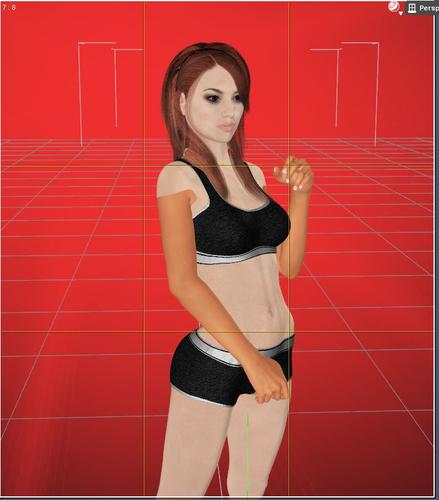
So, Image 2, I went in to try to get the settings from the arms to match via manual method, but there is something slightly off.
Anyone have any suggestions on how to do the arms to match the rest of the body?

Daz 3D is part of 
Connect
DAZ Productions, Inc.
7533 S Center View Ct #4664
West Jordan, UT 84084
Licensing Agreement | Terms of Service | Privacy Policy | EULA
© 2026 Daz Productions Inc. All Rights Reserved.
Comments
So to be clear, you copied over settings and of course parts didn't work since it is V7. Because of this you manually went into the arms and set the material settings up to match the torso but they still aren't correct? Or did I read that wrong?
Two things I would check are to make sure the settings are really the same. And make sure they are using the same shader type.
Do they both look the same in the DAZ viewport, or are they still looking very different? If they look different in the viewprt I bet the arms are using a different shader than the rest. If they look close, its more likely a small difference.
but I am guessing a bit.
What I did was load V7, then choose a v6 skin which Was Cassia, which was an excellent suggestion by the way. =-)
I clicked on V6 Cassia. While holding the Ctrl key while V7 was loaded. I got the "Material Preset Loading Options."
Instead of using Replace, I chose surfaces: All and images: ignore
It seemed to work ok, for every part of V7, but her two arms. Which for some reason the Preset loader failed to alter material settings for.
So I went to the newly altered v7 torso and manually made sure each setting on the arm matched the setting on the torso which was somewhat laborious since there are so many settings. Unfortunately, there is an ugly seam.
I can probably get around it by clothing v7 a bit more, but the seam and the inability to load the material settings automatically on the arms seems weird.
I'll double check the settings, because my vision isn't as awesome as it should be and I could've missed something.
I'm not sure how to check the shader type.
Oh, and it looks great in the viewport. I thought I nailed it.
Okay, I have figured out a workaround. It seems faster to apply your skin settings to v7, copy the texture settings of a leg to the arm and just correct the tiffs used for various maps on the arms than to do it all manually. This seemed to correct my problem.
Thanks Lars!
glad you figured it out. the method you choose in the end is a reliable, if tedious method. but now be sure to save that preset to your library so you wont have to do it again. you should have no issues if you try to apply it to V7 in the future. And the shift click method to keep textures should also work without a hitch going forward.
In the Surface tab select a skin area that looks good. Save as a Shader Preset instead of a material preset. Select all the skin areas and apply the shader preset using the Ctrl/Cmd trick to ignore the textures.