• Daz 3D
  • Shop
  • 3D Software
    • Daz Studio Premier
    • Daz Studio
    • Install Manager
    • Partnerships
    • AI Training data
    • Exporters
    • Daz to Roblox
    • Daz to Maya
    • Daz to Blender
    • Daz to Unreal
    • Daz to Unity
    • Daz to 3ds Max
    • Daz to Cinema 4D
  • 3D Models
    • Genesis 9
    • Genesis 8.1
    • Free 3D Models
  • Community
    • Gallery
    • Forums
    • Blog
    • Press
    • Help
  • Memberships
    • Daz Premier
    • Daz Plus
    • Daz Base
    • Compare
  • Download Studio
ADVANCED SEARCH
  • Menu
  • Daz 3D
ADVANCED SEARCH
Add image
  • Shop
  • 3d Software
    • Daz Studio Premier
    • Daz Studio
    • Install Manager
    • Partnerships
    • AI Training data
    • Exporters
    • Daz to Roblox
    • Daz to Maya
    • Daz to Blender
    • Daz to Unreal
    • Daz to Unity
    • Daz to 3ds Max
    • Daz to Cinema 4D
  • 3D Models
    • Genesis 9
    • Genesis 8.1
    • Free 3D Models
  • Community
    • Our Community
    • Gallery
    • Forums
    • Blog
    • Press
    • Help
  • Memberships
    • Daz Premier
    • Daz Plus
    • Daz Base
    • Compare

Notifications

You currently have no notifications.

Loading...
    • Categories
    • Recent Discussions
Daz 3D Forums > 3rd Party Software > Cinema 4D Discussion

My model when imported it become original black male model.

kylepham214kylepham214 Posts: 7
June 2022 in Cinema 4D Discussion

I'm stuck at this step after export from daz to cinema4d , after I clicked to imported model from daz it only show original male model in black . I have try it several times to install and uninstall the plug in but it didn't work. 

Before that I was worry because my daz studio don't have script to use ( daz to cinema4d bridge ) then I saw your very new post , I follow exactly the video but it still didn't work. 

Hope you can help me with this. Thank you 
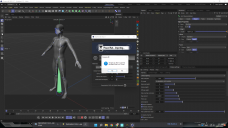
Screenshot (2).png
1920 x 1080 - 440K

Comments

  • Richard HaseltineRichard Haseltine Posts: 107,857
    June 2022

    Please put the Daz Studio Viewport in Smooth Shaded Drawstyle before taking a screenshot of a nude figure.

  • danielbui78danielbui78 Posts: 333
    June 2022

    kylepham214 said:

    I'm stuck at this step after export from daz to cinema4d , after I clicked to imported model from daz it only show original male model in black . I have try it several times to install and uninstall the plug in but it didn't work. 

    Before that I was worry because my daz studio don't have script to use ( daz to cinema4d bridge ) then I saw your very new post , I follow exactly the video but it still didn't work. 

    Hope you can help me with this. Thank you 

    Hi Kyle,

    I posted a new bugfix that is not yet on Daz Central yet, so you will have to manually download and install it: https://github.com/daz3d/DazToC4D/releases/tag/2022.1.8

    It should fix problems for people with custom Documents folders, as long as you are using Cinem4D R23 and above.  (Currently working on adding support for older versions that use Python 2.)

  • kylepham214kylepham214 Posts: 7
    June 2022 edited June 2022

    Richard Haseltine said:

    Please put the Daz Studio Viewport in Smooth Shaded Drawstyle before taking a screenshot of a nude figure.

    My bad. Will do it next time , thank you to remind me.

    Post edited by Richard Haseltine on June 2022
  • kylepham214kylepham214 Posts: 7
    June 2022

    danielbui78 said:

    kylepham214 said:

    I'm stuck at this step after export from daz to cinema4d , after I clicked to imported model from daz it only show original male model in black . I have try it several times to install and uninstall the plug in but it didn't work. 

    Before that I was worry because my daz studio don't have script to use ( daz to cinema4d bridge ) then I saw your very new post , I follow exactly the video but it still didn't work. 

    Hope you can help me with this. Thank you 

    Hi Kyle,

    I posted a new bugfix that is not yet on Daz Central yet, so you will have to manually download and install it: https://github.com/daz3d/DazToC4D/releases/tag/2022.1.8

    It should fix problems for people with custom Documents folders, as long as you are using Cinem4D R23 and above.  (Currently working on adding support for older versions that use Python 2.)

    Thank you so much for your help . I think I have try this with manually install ( throuhgt your tutorials on youtube )  but it still have them same problem when import from c4d. Is it possible if you can update full step by step from insallation daz studio to importing model in cinema4d , I have follow the step carefully and I have try multiple ways  but it doesn't work .

  • kylepham214kylepham214 Posts: 7
    June 2022

    I have try the new bug fix file , and following exactly the steps but I'm not sure why it's still not working. Please check theo video I posted. I try to upload video here but it take quite long so I upload in vimeo: 

    Thank you

Sign In or Register to comment.
Adding to Cart…

Daz 3D is part of Tafi

Connect

DAZ Productions, Inc.
7533 S Center View Ct #4664
West Jordan, UT 84084

HELP

Contact Us

Tutorials

Help Center

Sell Your 3D Content

Affiliate Program

Documentation Center

Open Source

Consent Preferences

JOIN DAZ

Memberships

Blog

About Us

Press

Careers

Bridges

Community

In the Studio

Gallery

Forum

DAZ STORE

Shop

Freebies

Published Artists

Licensing Agreement | Terms of Service | Privacy Policy | EULA

© 2025 Daz Productions Inc. All Rights Reserved.
