Copy/paste blend shapes
 linoge8888
Posts: 102
linoge8888
Posts: 102
Hello,
I've been trying to solve this by myself for 3 days and now I know I won't make it alone. First of all, here is my workflow :
OPTION A :
I import a genesis 8 character with non ARkit blendshapes via DAZ bridge.
I rename a few compatible morphs with the ARKit standards.
I copy/paste : the animation works on the renamed non-ARkit blendshapes, but of course it's totally biased.
OPTION B :
If I export from DAZ a genesis 8.1 or a genesis 8 character with ARKit morphs and no animation :
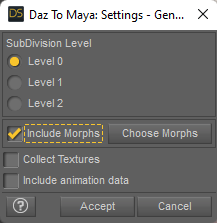
The copy/paste won't work. All the blendshapes remains on 0. If I try to modify them mnually, the error message "attributes locked or connected" shows up. If I unlock or disconnect, I can change the morphs values but it still won't change the animation at all. Note that the attributes won't show up in the graph editor.
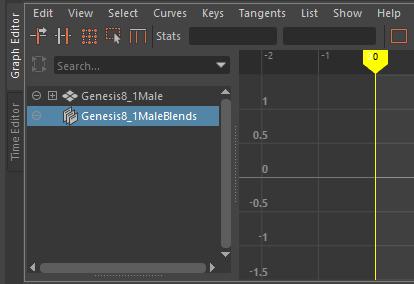
OPTION C :
If I export from DAZ a genesis 8.1 or a genesis 8 character with ARKit morphs and animation data is ticked :
The copy/paste work. The blendshapes value are the same between rokoko and genesis BUT it won't be animated. As you can see in this pic, the genesis face is still despite all the morphs data (should be smiling like the rokoko face).


Daz 3D is part of 
Connect
DAZ Productions, Inc.
7533 S Center View Ct #4664
West Jordan, UT 84084
Licensing Agreement | Terms of Service | Privacy Policy | EULA
© 2026 Daz Productions Inc. All Rights Reserved.
Comments
It's ok, I was exporting a genesis 8.1 character with ARkit facemojo morphs, which are incompatible with Maya. Just had to export regular Gen 8.1 facial morphs and disconnect them in Maya.
Hey @linoge8888
I know that your last post was from April, but I hope you can help me.
As you suggested, I have exported just the regular face morphs - see attached screenshot
I can see the blends appear in Maya - see attached screenshot
However, when I try to copy & paste connect, just like the following YT - https://www.youtube.com/watch?v=b9MrOMWNd3U
No frames are copied
I take it that the key to your post is "disconnect them in Maya" - sorry, but what do you mean by that? "select all of them and Break Connections" - see attached screenshot
Thanks in advance
BTW, I have to leave for the lunch shift, so please forgive me if I am late to responding, but I will check for your answer when I return home. Screenshots would be great and thanks once more
@linoge8888
In case someone else is going through the issues of face blendshapes for G8M and using Rokoko face fbx files, I thought I would document a solution for them
While I could not make this work in Maya 2022, I was able to make it work in Maya 2020, with the help of Laylo3d Genesis 8 for Maya scripts.
With the use of Laylo3d Genesis 8 for Maya, within Daz, I would favorite the 52 blendshapes to be exported.
All of the 52 blendshapes can be found under Parameters> Gen 8> Actor> Face Mojo> FACS Morphs (I think I have these parameters because I also purchased the Face Mojo plugin for G8M/G8F). By favoriting the 52 blendshapes, you inform the plugin of what morphs you want to export, along with the character.
Export to whatever filename you wish, in this case, I kept it at the default name Genesis8Male.fbx
I installed the Laylo3d scripts in the same plugins that both Maya 2022 and Maya 2020 use, but it does not load in Maya 2022, showing the following errors:
With that said, I do not experience these errors in Maya 2020. This is probably due to the fact that the script/plugin was created before the changes in Maya 2022 were made
Nevertheless, import the file using the Laylo3d script within Maya 2020, which opens a dialog box to change the name, which I changed mine to default.
Once you can see the 52 blendshapes, then the import was successful - that was the big bottleneck right there. Without this, you have nothing.
Import the face fbx that was created in Rokoko. I watched a tutorial which they changed the color of the Rokokofaceroot from limegreen to grey and, I agree with them, that it makes it easier to view the various changes in the face when you use a grey texture - open Hypershade to make the changes
Select all the keys from the Rokokofaceroot, followed by using the "Paste connect" on the G8M blendshapes. "Paste connect" is not the same as just "Paste"
When you see the same keys appear in the timeline, then it was a success. For some reason, maybe because this was a long animation, but my keys took a minute or so to show up. At first I thought, it didn't work - after all that and still nothing - along with some expletives, but it did worked
I spent days and days on this and I gave up. I bought the rokoko face app just to find out I was unable to get it working. I simply import the mocap data into DAZ and add a facial animation with FaceMojo. Daz and Rokoko, a true nightmare fuel.