• Daz 3D
  • Shop
  • 3D Software
    • Daz Studio Premier
    • Daz Studio
    • Install Manager
    • Partnerships
    • AI Training data
    • Exporters
    • Daz to Roblox
    • Daz to Maya
    • Daz to Blender
    • Daz to Unreal
    • Daz to Unity
    • Daz to 3ds Max
    • Daz to Cinema 4D
  • 3D Models
    • Genesis 9
    • Genesis 8.1
    • Free 3D Models
  • Community
    • Gallery
    • Forums
    • Blog
    • Press
    • Help
  • Memberships
    • Daz Premier
    • Daz Plus
    • Daz Base
    • Compare
  • Download Studio
ADVANCED SEARCH
  • Menu
  • Daz 3D
ADVANCED SEARCH
Add image
  • Shop
  • 3d Software
    • Daz Studio Premier
    • Daz Studio
    • Install Manager
    • Partnerships
    • AI Training data
    • Exporters
    • Daz to Roblox
    • Daz to Maya
    • Daz to Blender
    • Daz to Unreal
    • Daz to Unity
    • Daz to 3ds Max
    • Daz to Cinema 4D
  • 3D Models
    • Genesis 9
    • Genesis 8.1
    • Free 3D Models
  • Community
    • Our Community
    • Gallery
    • Forums
    • Blog
    • Press
    • Help
  • Memberships
    • Daz Premier
    • Daz Plus
    • Daz Base
    • Compare

Notifications

You currently have no notifications.

Loading...
    • Categories
    • Recent Discussions
Daz 3D Forums > 3rd Party Software > Cinema 4D Discussion

Character facial features are different with FBX import

gm.rogier.thegm.rogier.the Posts: 0
February 2022 in Cinema 4D Discussion

Hi guys,

I made a character in DAZ 3D and I have exported it to a FBX, however when I import it in Cinema 4D, the facial features and morphs are not there anymore, it looks almost like a plain face. 

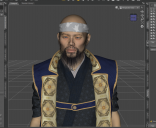
Pease see the screenshot attached,  I madea samurai type of character in DAZ 3D and when imported in Cinema 4D it almost looks like a regular genesis character, all the asian face features have dissapeared 


I am doing something wrong during exporting? I also attached my export settings

I would appreciate any help, thanks!

 

settings.png
694 x 772 - 409K
daz3d.png
1128 x 923 - 933K
rendered.png
1398 x 789 - 1M

Comments

  • GordigGordig Posts: 10,582
    February 2022 edited February 2022

    FBX exports at base resolution, so it's possible that the character you're exporting relies heavily on subD to look the way it does. Set the character to base resolution in DS and see how similar it looks to your imported character in C4D.

    Post edited by Gordig on February 2022
  • GordigGordig Posts: 10,582
    February 2022 edited February 2022

    Here, I did it for you:

    As you can see, it loses a lot of detail. Maybe you could export Daiji at full resolution as an OBJ and drop an LOD modifier on the FBX you imported?

    Daijibase.png
    1200 x 1600 - 2M
    Post edited by Gordig on February 2022
  • gm.rogier.thegm.rogier.the Posts: 0
    February 2022

    Gordig said:

    Here, I did it for you:

    As you can see, it loses a lot of detail. Maybe you could export Daiji at full resolution as an OBJ and drop an LOD modifier on the FBX you imported?


    Hi @gordig, thanks so much for your help and apolagies on my late reply. Could you please explain me how to set character to base resolution in DS? what do you exactly mean with DS, quite new to this all! 

    Also with  LOD modifier do you mean LOD object in Cinema 4D?


    Thanks again! 

  • GordigGordig Posts: 10,582
    February 2022

    gm.rogier.the said:

    Could you please explain me how to set character to base resolution in DS? what do you exactly mean with DS, quite new to this all! 

    DS is Daz Studio, in case that was unclear. To change mesh resolution, you would go into the parameters pane, under General -> Mesh Resolution. There, you can toggle between base and high resolution in the drop-down menu, and change the viewport and render subD. FBX exports at base resolution, and I'm not sure if there's any way around that. If you've already animated in DS and just want to export to C4D for rendering, you could try exporting as Alembic, particularly using the free Sagan exporter by @themysteryisthepoint 

    Also with  LOD modifier do you mean LOD object in Cinema 4D?

    Yes, that's what I meant. I've only dabbled with that, and after further consideration, I don't think just dropping a higher-resolution OBJ in the LOD object would actually work because you'd have to transfer all the weights over to it, but I'd be happy to be wrong about that.

  • gm.rogier.thegm.rogier.the Posts: 0
    March 2022

    @gordig

    Changing it to base via parameter tab worked perfect, thank you very much! 

Sign In or Register to comment.
Adding to Cart…

Daz 3D is part of Tafi

Connect

DAZ Productions, Inc.
7533 S Center View Ct #4664
West Jordan, UT 84084

HELP

Contact Us

Tutorials

Help Center

Sell Your 3D Content

Affiliate Program

Documentation Center

Open Source

Consent Preferences

JOIN DAZ

Memberships

Blog

About Us

Press

Careers

Bridges

Community

In the Studio

Gallery

Forum

DAZ STORE

Shop

Freebies

Published Artists

Licensing Agreement | Terms of Service | Privacy Policy | EULA

© 2025 Daz Productions Inc. All Rights Reserved.