• Daz 3D
  • Shop
  • 3D Software
    • Daz Studio Premier
    • Daz Studio
    • Install Manager
    • Partnerships
    • AI Training data
    • Exporters
    • Daz to Roblox
    • Daz to Maya
    • Daz to Blender
    • Daz to Unreal
    • Daz to Unity
    • Daz to 3ds Max
    • Daz to Cinema 4D
  • 3D Models
    • Genesis 9
    • Genesis 8.1
    • Free 3D Models
  • Community
    • Gallery
    • Forums
    • Blog
    • Press
    • Help
  • Memberships
    • Daz Premier
    • Daz Plus
    • Daz Base
    • Compare
  • Download Studio
ADVANCED SEARCH
  • Menu
  • Daz 3D
ADVANCED SEARCH
Add image
  • Shop
  • 3d Software
    • Daz Studio Premier
    • Daz Studio
    • Install Manager
    • Partnerships
    • AI Training data
    • Exporters
    • Daz to Roblox
    • Daz to Maya
    • Daz to Blender
    • Daz to Unreal
    • Daz to Unity
    • Daz to 3ds Max
    • Daz to Cinema 4D
  • 3D Models
    • Genesis 9
    • Genesis 8.1
    • Free 3D Models
  • Community
    • Our Community
    • Gallery
    • Forums
    • Blog
    • Press
    • Help
  • Memberships
    • Daz Premier
    • Daz Plus
    • Daz Base
    • Compare

Notifications

You currently have no notifications.

Loading...
    • Categories
    • Recent Discussions
Daz 3D Forums > 3rd Party Software > Blender Discussion

Blender Addon: Daz For Blender Bridge: Everything from DTB 2022 + 14 more features

butaixianranbutaixianran Posts: 161
January 2022 edited October 2022 in Blender Discussion

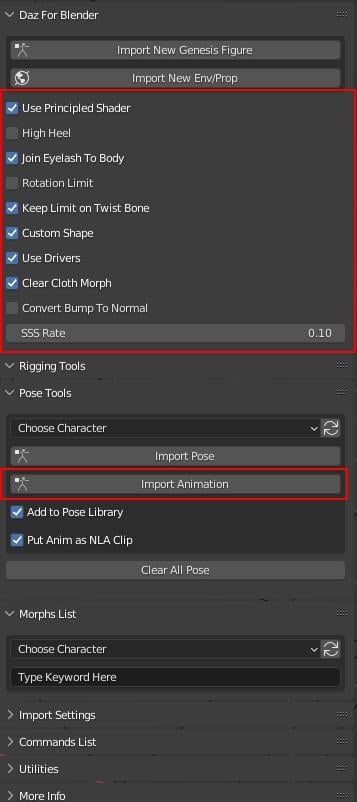
There are a lot of problems hiding in the DTB 2022's blender addon. So, I merged it into this one, with 14 new features and 3 bug fixing.

And, I change addon name from DTB to DFB (Daz For Blender), so it can be used with Official DTB 2022 together.


Key new features:

  • It converts Daz Shader to Blender's default Principled Shader . So, you can export Daz model from Blender with all textures correctly. Then, you can use Blender as a Daz Bridge for all 3D tools.
  • Changed addon name to "Daz For Blender"(DFB), so you can use it with Official DTB 2022 together.
  • Import animation
  • Handle tiled material
  • It fixed an important bug so you can import pose file correctly.
  • Handle High Heel. I believe every Daz user need this.
  • Merge eyelashes into body mesh, so you can export morphs from blender to other 3D tools.
  • Convert Bump to Normal Map when importing, so you can export your character to game engine.
  • Everything official DTB 2022 Blender addon has, is merged into this one.


Check  it here:

https://github.com/butaixianran/DazToBlender
 

Update:

Now you can import Genesis 9 without error. 

Custom shape does not work on G9. You have to wait for Offcial DTB 2022's update. I won't waste my time on that just because Daz changes Genesis's bone name again.  
 

addon_screenshot.jpg
357 x 802 - 51K
Post edited by butaixianran on October 2022
«12»

Comments

  • talpozio_52de69a8eftalpozio_52de69a8ef Posts: 3
    February 2022

    butaixianran said:

    I fixed the break of Daz to Blender Bridge for blender 3.0, also fixed a big issue stops you from importing pose, and with some new feature, which will let you export Daz model from Blender correctly, so you can use Blender as a Daz Bridge for all 3D tools

    https://github.com/butaixianran/DazToBlender


    Also created a pull request to its main repo.


  • opppoe_c02b0d86opppoe_c02b0d86 Posts: 59
    March 2022

    Thank you for your contribution, how do I install it?

    As written in README.md, I did not find "DTB.zip"

    The github distribution seems to be an old version(2.4)

  • PadonePadone Posts: 3,995
    March 2022

    Thank you @butaixianran for this excellent work.

  • brainmuffinbrainmuffin Posts: 1,267
    March 2022

    Wow! Very nice.

  • nonesuch00nonesuch00 Posts: 18,714
    March 2022

    opppoe_c02b0d86 said:

    Thank you for your contribution, how do I install it?

    As written in README.md, I did not find "DTB.zip"

    The github distribution seems to be an old version(2.4)

    Just right click & use the built in Windows 11 zip function in the context menu to zip up the DTB folder and then you can install via Blender's "install" addon by browsing to the zip file you just made.

  • marblemarble Posts: 7,500
    March 2022

    Does it import a figure with geo-grafts into Blender? I mean third party add-ons, not DAZ only.

  • PadonePadone Posts: 3,995
    March 2022 edited March 2022

    @marble That is a tool intended to export to game engines, so you don't have advanced features as iray materials or geografts. But you can fix the geografts yourself with some editing in blender.

    Post edited by Padone on March 2022
  • wabby_1e43ec937awabby_1e43ec937a Posts: 19
    March 2022 edited March 2022

    Hello and thank you for your efforts, but I understand nothing on your installation notes concerning Blender 3.x ...

    Post edited by wabby_1e43ec937a on March 2022
  • marblemarble Posts: 7,500
    March 2022

    Padone said:

    @marble That is a tool intended to export to game engines, so you don't have advanced features as iray materials or geografts. But you can fix the geografts yourself with some editing in blender.


    I take it you mean DAZ Studio -> Blender -> Game Engine? Otherwise why would it be called Daz to Blender Bridge? Maybe I misunderstand the whole thread - I thought it was about the "offical" DAZ to Blender Bridge which has now been updated by the OP? Anyhow, I am not into Gaming or rendering in Game Engines (so far), so it probably has little to offer such as myself.

  • PadonePadone Posts: 3,995
    March 2022 edited March 2022

    @marble Yes, it is a custom version of the bridge intended for daz > blender > fbx, as such it introduces limits to fit the fbx specifications. Very useful to export to game engines.

    Post edited by Padone on March 2022
  • opppoe_c02b0d86opppoe_c02b0d86 Posts: 59
    March 2022

    nonesuch00 said:

    opppoe_c02b0d86 said:

    Thank you for your contribution, how do I install it?

    As written in README.md, I did not find "DTB.zip"

    The github distribution seems to be an old version(2.4)

    Just right click & use the built in Windows 11 zip function in the context menu to zip up the DTB folder and then you can install via Blender's "install" addon by browsing to the zip file you just made.

    thanks 

  • opppoe_c02b0d86opppoe_c02b0d86 Posts: 59
    March 2022 edited March 2022

    sorry for another problem

    After DAZ export,
    Blender pressing Import New Genesis Figure Supports Genesis3, 8, and 8.1 displays "Appropriate FBX does not exist!"

    C:\Users\c\Documents\DAZ 3D\Bridges\Daz To Blender\Exports\FIG\FIG0
    There are four files such as B_FIG.fbx and FIG.obj


    Post edited by opppoe_c02b0d86 on March 2022
  • opppoe_c02b0d86opppoe_c02b0d86 Posts: 59
    March 2022

    prop can be exported, but only the first group (ENV0) can be exported
    And python will report an error, see the figure below
    Rendering materials are all turned into metal

    (DAZ4.20→blender3.0)

  • butaixianranbutaixianran Posts: 161
    March 2022 edited March 2022

    opppoe_c02b0d86 said:

    sorry for another problem

    After DAZ export,
    Blender pressing Import New Genesis Figure Supports Genesis3, 8, and 8.1 displays "Appropriate FBX does not exist!"

    C:\Users\c\Documents\DAZ 3D\Bridges\Daz To Blender\Exports\FIG\FIG0
    There are four files such as B_FIG.fbx and FIG.obj


    It looks like there is something wrong with your installation.

    In this addon, there is a Global.py file in it. Every time when your opening blender, it will run a getRootPath() function, to get your model's folder path. 

    Seems in your installation, it does not run at all.

    So, you better try to re-install it.  

    The best way to install this addon in blender, is copy DTB folder into:

    C:\Users\Your User Name\AppData\Roaming\Blender Foundation\Blender\3.0(your blender version)\scripts\addons

    Then go to this DTB folder, delete "__pycache__" folder.


    Post edited by butaixianran on March 2022
  • butaixianranbutaixianran Posts: 161
    March 2022 edited March 2022

    opppoe_c02b0d86 said:

    prop can be exported, but only the first group (ENV0) can be exported
    And python will report an error, see the figure below
    Rendering materials are all turned into metal

    (DAZ4.20→blender3.0)


    hi, I'm not sure how this happen, I tested with 4 groups, there is no error. Also, your error message says, error happens at line 1031. But line 1031 is empty, no code.

    So, you must use an old version of this addon.

    Since I can't get any error on my side with multiple groups, I can only fix it by taking a guess. 

    Every material, will need a normal map node in blender. This is created by Blender automatically. But  your error says there is no normal map node in this material.  

    I'm not sure how this could happen, since my blender 3.0 and 3.1 both works fine. Any way, I add some code to prevent this case. Try the new version.

    Post edited by butaixianran on March 2022
  • melgone22melgone22 Posts: 3
    March 2022

    Quick question, but I have the blender bridge installed, but I can't seem to find it anywere in DAZ itself. Is this a common error, or are there any extra steps I have to do in order for it to show up?

  • opppoe_c02b0d86opppoe_c02b0d86 Posts: 59
    March 2022

    butaixianran said:

    opppoe_c02b0d86 said:

    sorry for another problem

    After DAZ export,
    Blender pressing Import New Genesis Figure Supports Genesis3, 8, and 8.1 displays "Appropriate FBX does not exist!"

    C:\Users\c\Documents\DAZ 3D\Bridges\Daz To Blender\Exports\FIG\FIG0
    There are four files such as B_FIG.fbx and FIG.obj


    It looks like there is something wrong with your installation.

    In this addon, there is a Global.py file in it. Every time when your opening blender, it will run a getRootPath() function, to get your model's folder path. 

    Seems in your installation, it does not run at all.

    So, you better try to re-install it.  

    The best way to install this addon in blender, is copy DTB folder into:

    C:\Users\Your User Name\AppData\Roaming\Blender Foundation\Blender\3.0(your blender version)\scripts\addons

    Then go to this DTB folder, delete "__pycache__" folder.


     Thank you very much for your reply, I downloaded the code you updated on github yesterday and put it in the folder, now the characters can be imported, but there will be some errors, the material is still metal. Hope your code gets better and better.

  • opppoe_c02b0d86opppoe_c02b0d86 Posts: 59
    March 2022

    butaixianran said:

    opppoe_c02b0d86 said:

    prop can be exported, but only the first group (ENV0) can be exported
    And python will report an error, see the figure below
    Rendering materials are all turned into metal

    (DAZ4.20→blender3.0)


    hi, I'm not sure how this happen, I tested with 4 groups, there is no error. Also, your error message says, error happens at line 1031. But line 1031 is empty, no code.

    So, you must use an old version of this addon.

    Since I can't get any error on my side with multiple groups, I can only fix it by taking a guess. 

    Every material, will need a normal map node in blender. This is created by Blender automatically. But  your error says there is no normal map node in this material.  

    I'm not sure how this could happen, since my blender 3.0 and 3.1 both works fine. Any way, I add some code to prevent this case. Try the new version.

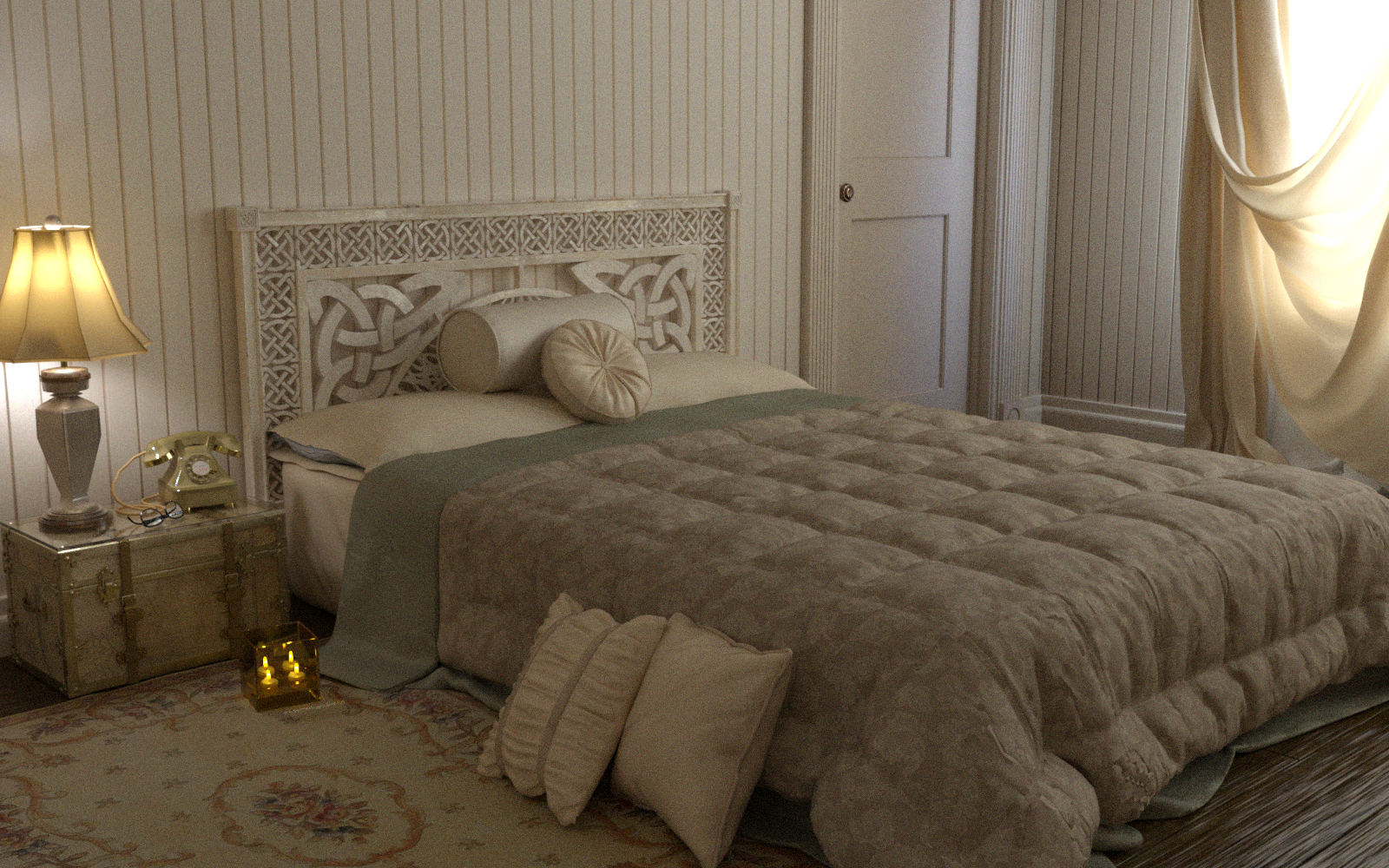
     In terms of objects, the error is gone. But there are some shifts, such as the phone, the wall is missing, the material performance is good, and I look forward to the material performance of the character's skin.

    daz:
  • opppoe_c02b0d86opppoe_c02b0d86 Posts: 59
    March 2022

    This is an older asset. After testing, there are still errors and incorrect materials.

  • butaixianranbutaixianran Posts: 161
    March 2022

    opppoe_c02b0d86 said:

     Thank you very much for your reply, I downloaded the code you updated on github yesterday and put it in the folder, now the characters can be imported, but there will be some errors, the material is still metal. Hope your code gets better and better.


    That error says, it can not get Base_Color_Effect. But Base_Color_Effect should already be exported from Daz Studio. There is some thing wrong with your model's material. Anyway, I add a quick check to avoid this case. check the new version.

  • butaixianranbutaixianran Posts: 161
    March 2022 edited March 2022

    opppoe_c02b0d86 said:

    This is an older asset. After testing, there are still errors and incorrect materials.


    This DTB bridge only works on Iray standard shader. Any other kind of shaders won't work. You need to convert your model's material to iray shader in Daz

    Post edited by butaixianran on March 2022
  • butaixianranbutaixianran Posts: 161
    March 2022

    opppoe_c02b0d86 said:

    butaixianran said:

    opppoe_c02b0d86 said:

    prop can be exported, but only the first group (ENV0) can be exported
    And python will report an error, see the figure below
    Rendering materials are all turned into metal

    (DAZ4.20→blender3.0)


    hi, I'm not sure how this happen, I tested with 4 groups, there is no error. Also, your error message says, error happens at line 1031. But line 1031 is empty, no code.

    So, you must use an old version of this addon.

    Since I can't get any error on my side with multiple groups, I can only fix it by taking a guess. 

    Every material, will need a normal map node in blender. This is created by Blender automatically. But  your error says there is no normal map node in this material.  

    I'm not sure how this could happen, since my blender 3.0 and 3.1 both works fine. Any way, I add some code to prevent this case. Try the new version.

     In terms of objects, the error is gone. But there are some shifts, such as the phone, the wall is missing, the material performance is good, and I look forward to the material performance of the character's skin.

    daz:

    Well, I tried some props, no such problem. So, could you tell me which product are you using here? 

  • niemerskiniemerski Posts: 0
    March 2022

    Can someone please explain how I can install it? Which file do I need to zip? Download all of them and zip them to DTB? Thanks for your help!

  • butaixianranbutaixianran Posts: 161
    March 2022

    melgone22 said:

    Quick question, but I have the blender bridge installed, but I can't seem to find it anywere in DAZ itself. Is this a common error, or are there any extra steps I have to do in order for it to show up?


    This is a update based on Official DTB bridge. So, you need to know how to install the official one. This addon is coming with 2 parts:  a Blender addon  and 4 daz script.

    You need to view the "How to Install to Daz Studio" part of the readme document, to install the daz script.


  • opppoe_c02b0d86opppoe_c02b0d86 Posts: 59
    March 2022

    butaixianran said:

    opppoe_c02b0d86 said:

    This is an older asset. After testing, there are still errors and incorrect materials.


    This DTB bridge only works on Iray standard shader. Any other kind of shaders won't work. You need to convert your model's material to iray shader in Daz

     It's an iray shader indeed, "The Pool House Iray", I can send you this IM package if you need it.
    I also found a problem, that is, there is only one tree left on the shore. It was originally a row. It is speculated that it should be a problem of cloning.

  • opppoe_c02b0d86opppoe_c02b0d86 Posts: 59
    March 2022 edited March 2022

    butaixianran said:

    opppoe_c02b0d86 said:

    butaixianran said:

    opppoe_c02b0d86 said:

    prop can be exported, but only the first group (ENV0) can be exported
    And python will report an error, see the figure below
    Rendering materials are all turned into metal

    (DAZ4.20→blender3.0)


    hi, I'm not sure how this happen, I tested with 4 groups, there is no error. Also, your error message says, error happens at line 1031. But line 1031 is empty, no code.

    So, you must use an old version of this addon.

    Since I can't get any error on my side with multiple groups, I can only fix it by taking a guess. 

    Every material, will need a normal map node in blender. This is created by Blender automatically. But  your error says there is no normal map node in this material.  

    I'm not sure how this could happen, since my blender 3.0 and 3.1 both works fine. Any way, I add some code to prevent this case. Try the new version.

     In terms of objects, the error is gone. But there are some shifts, such as the phone, the wall is missing, the material performance is good, and I look forward to the material performance of the character's skin.

    daz:

    Well, I tried some props, no such problem. So, could you tell me which product are you using here? 

    “Woodman House Bedroom”  Private message if you want.

    I also found some issues with the glass and light materials, it might be a bit nitpicky, but I hope he's better.

    Post edited by opppoe_c02b0d86 on March 2022
  • opppoe_c02b0d86opppoe_c02b0d86 Posts: 59
    March 2022

    butaixianran said:

    opppoe_c02b0d86 said:

     Thank you very much for your reply, I downloaded the code you updated on github yesterday and put it in the folder, now the characters can be imported, but there will be some errors, the material is still metal. Hope your code gets better and better.


    That error says, it can not get Base_Color_Effect. But Base_Color_Effect should already be exported from Daz Studio. There is some thing wrong with your model's material. Anyway, I add a quick check to avoid this case. check the new version.

    I checked and there is no Base Color Effect property, Base Color is there.


    There is also "convert bump map to normal map", what about the normal map in the original DAZ?

  • butaixianranbutaixianran Posts: 161
    March 2022 edited March 2022

    opppoe_c02b0d86 said:

    I checked and there is no Base Color Effect property, Base Color is there.


    There is also "convert bump map to normal map", what about the normal map in the original DAZ?


    Base Color Effect is the option for Scatter & Transmit. For a character's material, it should be there. You can find it on default Genesis 8 character.

    Anyway, like I said last time, I've already added a quick fix for this case. Just check the new version.

    If there is a normal map from Daz then it won't convert bump map to normal map.


    Post edited by butaixianran on March 2022
  • butaixianranbutaixianran Posts: 161
    March 2022 edited March 2022

    opppoe_c02b0d86 said:

    “Woodman House Bedroom”  Private message if you want.

    I also found some issues with the glass and light materials, it might be a bit nitpicky, but I hope he's better.


    OK, I tried a similar stage with more than 10 props and with figure props. Here is the problem:

    If a prop comes with bones, this bridge won't treat it as Env prop. It need to be exported as a figure. I think that's what happened for the missing walls.

    Also, there are some props gonna be exported as zero position. I have no idea why that happens. It is a problem in the Daz's exporting script, not a problem of the blender addon.

    Daz exporting script is the official's work, since it is just a prop and you can easily move its position, I won't pay my time to read their code and fix it.


    Post edited by butaixianran on March 2022
  • HonzoHonzo Posts: 193
    March 2022

    The bridge doesn't seem to export a rig to blender 3.x, and the option to 'go rigify' doesn't appear. Is anyone having any success with this?


«12»
Sign In or Register to comment.
Adding to Cart…

Daz 3D is part of Tafi

Connect

DAZ Productions, Inc.
7533 S Center View Ct #4664
West Jordan, UT 84084

HELP

Contact Us

Tutorials

Help Center

Sell Your 3D Content

Affiliate Program

Documentation Center

Open Source

Consent Preferences

JOIN DAZ

Memberships

Blog

About Us

Press

Careers

Bridges

Community

In the Studio

Gallery

Forum

DAZ STORE

Shop

Freebies

Published Artists

Licensing Agreement | Terms of Service | Privacy Policy | EULA

© 2025 Daz Productions Inc. All Rights Reserved.

