selecting 2nd collision object
 notretsam
Posts: 74
notretsam
Posts: 74
Try to keep this short, I want to lay the duvet over the top of the model and the bed, but I can only select one collision item in the duvet params, it be so much easier if I could select the bed and model. Then once dforce has done its thing, I can readjust the duvet from there.
I tried to find some help online but kept finding how to dforce 2 models at one time instead of what I'm trying to do.
l read online that dforce would synchronize to all items in the scene but it's just the model, even when I select bed as collision item in duvet params.
Clearly, I'm missing something here and it's most likely obvious but HELP!!!!
Also, I'm wondering about a way to morph the duvet so I can pull down covers halfway or diagonally from either side, nothing in adjustments within the asset itself to do it.

Daz 3D is part of 
Connect
DAZ Productions, Inc.
7533 S Center View Ct #4664
West Jordan, UT 84084
Licensing Agreement | Terms of Service | Privacy Policy | EULA
© 2026 Daz Productions Inc. All Rights Reserved.
Comments
One option is to export the bed and figure as a single object. Re-import, then set all surfaces of the combined imported obj as invisible (ie 0% opacity). Use this as the collision object for the duvet, and it will do as you request.
Wait? You are using dForce? There is no need for selecting any collision item. DForce uses everything in the scene for collision by default. The "collision object " parameter is for use with the smoothing modifier. Or am I misunderstanding what you are tying to do?
TD
It takes some trial and error and a lot of practice, but you can get different effects by angling the blanket before simulating instead of starting it flat.
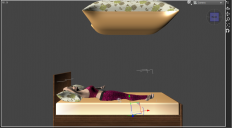
As you can see the duvet collides with the model but not the model + bed, I want the duvet to lay on top of the bed and model.
I would've thought you could select what items you want it to collide with, why I looked at collision param.
Have you tried running the sim to see what happens? If the duvet isn't colliding with the figure and the bed when you simulate, it could be a geometry issue (as others said, the collision setting where you select one object is for smoothing collisions, not dForce). I don't know about this particular bed, but some furniture objects use very few polygons to define large flat surfaces like the top of a bed. Simulated objects can tend to fall right through those types of flat surfaces in a dForce sim if they don't have many polygons.
If that it what is happening, I would create a primitive cube with a lot of divisions and match its position and dimensions to the object I want to collide with. Then after the simulation just make the cube invisible or get rid of it.
I tried this and the same thing you see in my screenshots in the thread happened. Unless there is a specific way you have to export that I'm missing, this sadly didn't work but thank you.
I still to give this a go but I do remember when using dforce to get the duvet laying on the mattress, I had to use a plane and drape the duvet onto the plane, then move to the mattress. I did, however, already try having a model on a plane but the same thing happened, I'll try with a cube but not too hopeful. thank you
yeah, this sounds like it beyond what I'm capable of doing and take too long to learn, I sorta figured this, thank you
I'm starting to think I just have her lay on top of the duvet and open a window, so it shows it warm and why she lying on top of covers instead of under.
Looking at the image, I think your problem might be the lack of geometry in the bed model. Too few plolygons. Have a look at the wireframe view and post that image. If that is the case you can fix it by subdividing the bed model. Which bed model are you using?
TD
Sometimes, for stuff like that, I set a flat plane primitive with dimensions that are slightly larger than the top of the bed (or chair or whatever).
I don't really want it to collide with the bed. In those cases, it often simulates so that pieces of the cloth fall below the surface of the bed (or whatever). I want it to LOOK LIKE it is colliding with the bed. Relying on the bed object itself to do that can be problematic.
That's a distinction that is pretty fine, but it covers a lot of work in Daz, IMO. Reliance on "realistic" events in software tends to fall short of realism, IMO.
Maybe so but I don't actually know how to add more polygons via I presume the geometry editor. I can see the mattress surface has a count of 332.
Daz Studio can't add more polygons that way - but as suggested, you could use a plane or cube primitive (Create>New Primitive) with a higher number of divisions (try 25) scaled to overlap the bed. Set it, via the Display group in Parameters, to not be visible in rende.
Although 332 does sound a respectable number of polygons, if they are evenly distributed it's only about 7 * 7 for the each face.
Maybe the simulation visibility of the bed is not active?
Bed, couch, floor - whatever, I always use a primitive for collision. I can choose as many polygons as I like and I just make it invisible after the sim. So easy. Before I got into that habit I used to look at the wireframe of a mattress or something and think - yeah, plenty of poygons and it would still go through the surface. A plane primitive works every time.
I did try a plane and a cube but neither worked, it's my weekend, so go back to this tomorrow and I'll do what Richard suggested and try again. if it doesn't work this time, then I'll just pose her on top of the duvet.
P.S visible in simulation is selected
You need to create the plane or cube with lots of divisions, not subdivide it after creation. Dforce works only with the base mesh and ignores SubD. Another option is to use subD on the object, export as obj, then reimport. The object base geometry now has more polygons. This is useful for shapes that are more complex, but still don't have enough polys for a good Dforce sim.
yup, divisions was the issue, first image attached is 25 divisions on a plane and the second image is 50 divisions, I previously had 10 divisions.
I need to play around with the width/height of the plane as it is slightly bigger than duvet and see how it look on the bed.
Now got something to work from though, appreciate all the help everyone, thank you.
Obviously, I need to slightly raise the duvet as some parts of the model is peeking through, that was expected as had the same issue with the duvet on top of the mattress in past.
Yeah - the crucial point I forgot to mention, of course. I usually choose something like 100 or 150 divisions but I really have no idea whether that's overkill ... it just works.
Something I really hope Daz will include in the next version of DS is the ability to change the parameters of primitives after creation. Create a plane with 48 division and find out that it's not enough for a good simulation? Just go into the plane's parameters and bump up the number of divisions. If you need more divisions on the sides of a cube than the top and bottom, you should be able to change that as well.
Yep, that's something I grumble to myself about often. Seems so obvious that it is hard to believe it is not there somewhere.