Problem with rig after import in Maya
 polimorphick
Posts: 0
polimorphick
Posts: 0
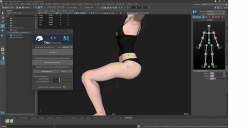
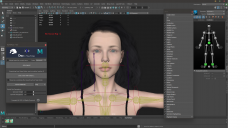
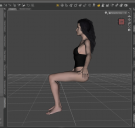
Using the Daz2Maya bridge, I get a rig different from the rig in Daz. What am I doing wrong ? And how do you fix it? The face rig is still missing ..
Problem.png
2088 x 1078 - 455K
Problem2.png
2088 x 1078 - 904K
Problem3.png
1073 x 1017 - 278K
Post edited by polimorphick on

Daz 3D is part of 
Connect
DAZ Productions, Inc.
7533 S Center View Ct #4664
West Jordan, UT 84084
Licensing Agreement | Terms of Service | Privacy Policy | EULA
© 2026 Daz Productions Inc. All Rights Reserved.
Comments
Hello. Plugins already doesn't contain any facial control rig system. If you want to see joints, go to Outliner window and click + icon with press shift. You will see all of the hierarchy. Find head joint and press H (So unhide it.)
And secondly, the upper leg problem is about your character's clothes or hair. If you can change as a another cloth problem can solve. You probably used a different cloth for different character. It can broke sometimes.
Thanks for the answer. I only imported the model without hair and clothes, but the problem with the legs remained. I tried other models and there is the same problem. I tried different versions of Maya 2018-2022 and it didn't solve the problem.
Just forget the Bridge. I've never used it, pointless. Export as FBX, select export with the morphs and animation; just create own expresion for each keyframe in DAZ, like "eyes closed at 1" etc. That's gonna give you every blendshape you want.
Do not use the Maya human setup, again, waste of time, unless you know what you are doing.
Not a noob here, doing this stuff at our own small studio; bunch of games released as indie. Also do note, the rigging goes fine till Maya; in any game engine you are going to will face the volume loss; bend to extreme and you can see how the linear bone binding differs from the quaterninion one.
NSFW (Sample video; DAZ to Maya to Unity; https://static.citor3.com/fd2/video/snacc_V1_FHD.mp4)
Motion data purchased, rest from DAZ to Maya to Unity. Cloth; own.
Addenum; https://www.daz3d.com/forums/discussion/277271/tutorial-import-fbx-animation-to-daz-studio-pro-copy-it-to-the-g3-character