• Daz 3D
  • Shop
  • 3D Software
    • Daz Studio Premier
    • Daz Studio
    • Install Manager
    • Partnerships
    • AI Training data
    • Exporters
    • Daz to Roblox
    • Daz to Maya
    • Daz to Blender
    • Daz to Unreal
    • Daz to Unity
    • Daz to 3ds Max
    • Daz to Cinema 4D
  • 3D Models
    • Genesis 9
    • Genesis 8.1
    • Free 3D Models
  • Community
    • Gallery
    • Forums
    • Blog
    • Press
    • Help
  • Memberships
    • Daz Premier
    • Daz Plus
    • Daz Base
    • Compare
  • Download Studio
ADVANCED SEARCH
  • Menu
  • Daz 3D
ADVANCED SEARCH
Add image
  • Shop
  • 3d Software
    • Daz Studio Premier
    • Daz Studio
    • Install Manager
    • Partnerships
    • AI Training data
    • Exporters
    • Daz to Roblox
    • Daz to Maya
    • Daz to Blender
    • Daz to Unreal
    • Daz to Unity
    • Daz to 3ds Max
    • Daz to Cinema 4D
  • 3D Models
    • Genesis 9
    • Genesis 8.1
    • Free 3D Models
  • Community
    • Our Community
    • Gallery
    • Forums
    • Blog
    • Press
    • Help
  • Memberships
    • Daz Premier
    • Daz Plus
    • Daz Base
    • Compare

Notifications

You currently have no notifications.

Loading...
    • Categories
    • Recent Discussions
Daz 3D Forums > 3rd Party Software > 3ds Max Discussion

Daz to 3d Max 2022 Bridge almost everything black

phibbephibbe Posts: 0
October 2021 in 3ds Max Discussion

When I use Daz to 3d Max bridge (with 3ds Max2022)  only the face of the Genisis 8 people has a texture. The rest is just black. Any ideas what is going wrong ?

Video:
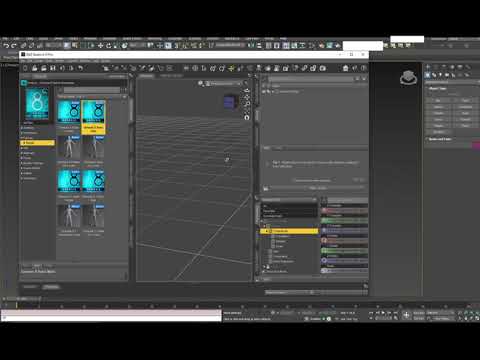


black.png
309 x 277 - 52K

Comments

  • tysoe_c1fec8e832tysoe_c1fec8e832 Posts: 8
    January 2022 edited January 2022

    Yeah. I just came back to 3D after a 8 year hiatus. Thought I'd try this Daz to Max pipeline. I was getting super frustrated too and I'm a bit rusty so I can't say for sure. But I dug in and did some troubleshooting.
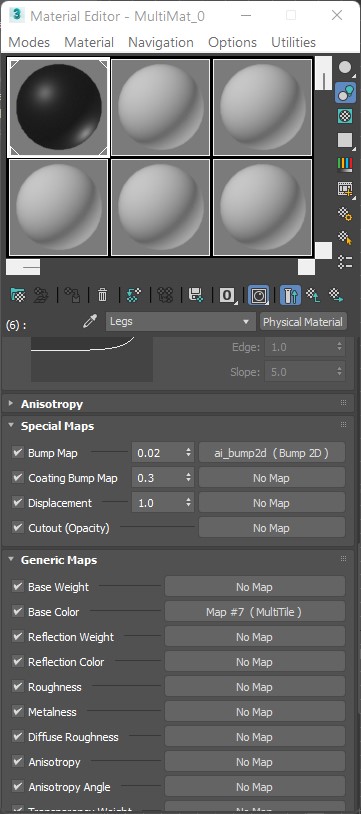
    I think there is a bug in the exporter.It creates a multi material with several map channels. And creates 10 physical materials. For some reason it creates a MultiTile texture in each Base Color texture slot instead of a simple bitmap and just renders a black texture. If you go through the materials and change the MultiTile to a bitmap texture then it works. Only problem is its a pain to do it for all 10 materials assigned to the Daz Character.

    I guess something went wrong with a recent update, or max changes some material ID/flag.number in code and the programmers didn't notice. So the exporter isn't creating the correct type of bitmap in the materials it exports.

    That's what I'm guessing. I'm pretty new to all this and only spent a couple of hours with it so far. 


    You have to change the map type where it say MultiTile to bitmap and it will work fine.Only it's tedious to do it almost 10 times, the UI is quite slow so it will take a few minutes for each character.

    Post edited by tysoe_c1fec8e832 on January 2022
Sign In or Register to comment.
Adding to Cart…

Daz 3D is part of Tafi

Connect

DAZ Productions, Inc.
7533 S Center View Ct #4664
West Jordan, UT 84084

HELP

Contact Us

Tutorials

Help Center

Sell Your 3D Content

Affiliate Program

Documentation Center

Open Source

Consent Preferences

JOIN DAZ

Memberships

Blog

About Us

Press

Careers

Bridges

Community

In the Studio

Gallery

Forum

DAZ STORE

Shop

Freebies

Published Artists

Licensing Agreement | Terms of Service | Privacy Policy | EULA

© 2025 Daz Productions Inc. All Rights Reserved.
