how do I put the main work screen back in the main box?
 Toobis
Posts: 993
Toobis
Posts: 993
in The Commons
not sure what I did but somehow I dragged my main viewport into the viewport box. how do I put it back to normal please. (pic)
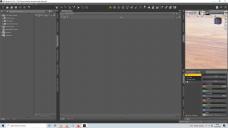
rsa.jpg
1920 x 1080 - 232K

Daz 3D is part of 
Connect
DAZ Productions, Inc.
7533 S Center View Ct #4664
West Jordan, UT 84084
Licensing Agreement | Terms of Service | Privacy Policy | EULA
© 2026 Daz Productions Inc. All Rights Reserved.
Comments
Check if docking is unlocked for your workspace. Just drag the Viewport tab beside the Render Library tab. Then lock the tabs again and save your workspace style.
K im confused now I got this...
You dragged the Viewport tab inside the Render Library pane. Drag the Viewport beside the Render Library tab at the top.
Gottit. Thankyou :)