Is it possible to rearrange my script menu?
 Joltrast
Posts: 208
Joltrast
Posts: 208
I'd like to tidy up my quick access script menu. Is there a way to do that please? Thanks!
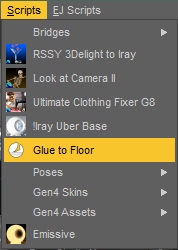
script menu.png
178 x 250 - 10K
Post edited by Joltrast on

Daz 3D is part of 
Connect
DAZ Productions, Inc.
7533 S Center View Ct #4664
West Jordan, UT 84084
Licensing Agreement | Terms of Service | Privacy Policy | EULA
© 2026 Daz Productions Inc. All Rights Reserved.
Comments
Absolutely. Menu -> (ed.) Window -> Workspace -> Customize (or just F3). On the right panel, select the Menus tab. Expand the Main Menu Bar entry to get to the Scripts entry. Expand that one, and so on, to show the items. Click and drag the entries into the order you want. You can add sub-menus to group similar functions together. The GUI might be hard to see, mine highlights source and target areas as I drag over them (didn't use to do that), but there is a line the follows your cursor (mine is white on a bright yellow highlight, but it is there).
ETA: corrected menu path...
Yep, found it, thanks. It's a bit hidden and not 100% intuative, but eventually I got it working. Thanks!