• Daz 3D
  • Shop
  • 3D Software
    • Daz Studio Premier
    • Daz Studio
    • Install Manager
    • Partnerships
    • AI Training data
    • Exporters
    • Daz to Roblox
    • Daz to Maya
    • Daz to Blender
    • Daz to Unreal
    • Daz to Unity
    • Daz to 3ds Max
    • Daz to Cinema 4D
  • 3D Models
    • Genesis 9
    • Genesis 8.1
    • Free 3D Models
  • Community
    • Gallery
    • Forums
    • Blog
    • Press
    • Help
  • Memberships
    • Daz Premier
    • Daz Plus
    • Daz Base
    • Compare
  • Download Studio
ADVANCED SEARCH
  • Menu
  • Daz 3D
ADVANCED SEARCH
Add image
  • Shop
  • 3d Software
    • Daz Studio Premier
    • Daz Studio
    • Install Manager
    • Partnerships
    • AI Training data
    • Exporters
    • Daz to Roblox
    • Daz to Maya
    • Daz to Blender
    • Daz to Unreal
    • Daz to Unity
    • Daz to 3ds Max
    • Daz to Cinema 4D
  • 3D Models
    • Genesis 9
    • Genesis 8.1
    • Free 3D Models
  • Community
    • Our Community
    • Gallery
    • Forums
    • Blog
    • Press
    • Help
  • Memberships
    • Daz Premier
    • Daz Plus
    • Daz Base
    • Compare

Notifications

You currently have no notifications.

Loading...
    • Categories
    • Recent Discussions
Daz 3D Forums > 3rd Party Software > 3ds Max Discussion

FBX Importing problem from DAZ (mesh deformation)

aekazminaekazmin Posts: 0
May 2021 in 3ds Max Discussion

Its result of importing fbx from daz3d, whith obj its ok, but it hasn't morphs and skin. Is anybody know solution of that problem?
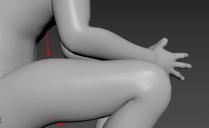
1111.jpg
1067 x 652 - 38K

Comments

  • LamabyteLamabyte Posts: 23
    June 2021 edited June 2021

    The built-in FBX exporter does not export the corrective morphs. You have to set it up yourself with the Skin Morph modifier, but it's a tedious and time-consuming process, since you have to do all the bones and morphs yourself.

    Post edited by Lamabyte on June 2021
  • robertgsolizrobertgsoliz Posts: 0
    July 2021

    I have had similar issues with Daz. What I Do is export them, import them into 3dsMax, and resave them. 3dsMax will find issues and correct them on import. Of course, you need the program…
    Also when you export from Daz and if you I have had similar issues with Daz. What I Do is export them, import them into 3dsMax, and resave them. 3dsMax will find issues and correct them on import. Of course, you need the program…
    Also when you export from Daz and if you can, exclude any cameras, props, animations that you do not need.can exclude any cameras, props, animations that you do not need.

Sign In or Register to comment.
Adding to Cart…

Daz 3D is part of Tafi

Connect

DAZ Productions, Inc.
7533 S Center View Ct #4664
West Jordan, UT 84084

HELP

Contact Us

Tutorials

Help Center

Sell Your 3D Content

Affiliate Program

Documentation Center

Open Source

Consent Preferences

JOIN DAZ

Memberships

Blog

About Us

Press

Careers

Bridges

Community

In the Studio

Gallery

Forum

DAZ STORE

Shop

Freebies

Published Artists

Licensing Agreement | Terms of Service | Privacy Policy | EULA

© 2025 Daz Productions Inc. All Rights Reserved.
