Is there anyway to fix G3 Steampunk boots distorsion?

[Is there anyway to fix G3 Steampunk boots distorsion?]

I tried to hide the feet but the  result is the same. Is there anyway to make the shoes stop following the morph of the foot?
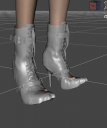
Untitled.png
622 x 743 - 225K

Comments

  • SevrinSevrin Posts: 6,314

    Have you tried bending the toes of the character so they don't stick up like that?

  • Altar_boyAltar_boy Posts: 91

    Sevrin said:

    Have you tried bending the toes of the character so they don't stick up like that?

     Yes and its the same. The model is custom made and it has some morph problems on the feet , some kind of residual weight. But I was wondering if I could still make the shoes to work properly.

    feet issue.jpg
    596 x 698 - 56K
  • felisfelis Posts: 6,192

    You somehow need to remove the character morph from the feet.

    Maybe the character has a dedicated morph for the feet, then you can dial that out.

    If not then try to dial out the character morph from the boots.

  • Altar_boyAltar_boy Posts: 91

    felis said:

    You somehow need to remove the character morph from the feet.

    Maybe the character has a dedicated morph for the feet, then you can dial that out.

    If not then try to dial out the character morph from the boots.

    Hello sadly this model has only head and body morphs and no separate feet morps to what i know. Can you tell me how to  dial out the character morph from the boots? I'm a beginner.

  • BlueFingersBlueFingers Posts: 922
    edited April 2021

    I guess your trying G3 boots on a G8? I found this video from Sickleyield helpful. It fixed a few but not all G3 boots for me:


    Post edited by BlueFingers on
  • felisfelis Posts: 6,192

    If you select the boots in the scene tab and then open Parameters.

    Then click the burger menu (3 horizontal lines, select preferences and check 'Hidden properties'.

    Then in the parameter list if you expand that (the triangle) there should be an area named Actor. In there should be the dialed in morphs, which you then can change to 0.

  • Altar_boyAltar_boy Posts: 91
    edited April 2021

    hans_nikolas said:

    felis said:

    You somehow need to remove the character morph from the feet.

    Maybe the character has a dedicated morph for the feet, then you can dial that out.

    If not then try to dial out the character morph from the boots.

    Hello sadly this model has only head and body morphs and no separate feet morps to what i know. Can you tell me how to  dial out the character morph from the boots? I'm a beginner.

    No, my model is converted from G8 to G3 and the boots are g3 which basically should work fine.. I have other shoes and work fine but it seems shoes with thick high heels are a problem.

    Post edited by Richard Haseltine on
  • Altar_boyAltar_boy Posts: 91

    felis said:

    If you select the boots in the scene tab and then open Parameters.

    Then click the burger menu (3 horizontal lines, select preferences and check 'Hidden properties'.

    Then in the parameter list if you expand that (the triangle) there should be an area named Actor. In there should be the dialed in morphs, which you then can change to 0.

    I see thank you. If I hide the feet it looks better now!

    better .jpg
    613 x 695 - 71K
  • FSMCDesignsFSMCDesigns Posts: 12,852

    hans_nikolas said:

    hans_nikolas said:

    felis said:

    You somehow need to remove the character morph from the feet.

    Maybe the character has a dedicated morph for the feet, then you can dial that out.

    If not then try to dial out the character morph from the boots.

    Hello sadly this model has only head and body morphs and no separate feet morps to what i know. Can you tell me how to  dial out the character morph from the boots? I'm a beginner.

    No, my model is converted from G8 to G3 and the boots are g3 which basically should work fine.. I have other shoes and work fine but it seems shoes with thick high heels are a problem.

    It's been my experience that while clothing transfers well from G8 to G3, footwear with heels does not and i stopped trying to make that work.

  • GuyGenesisGuyGenesis Posts: 143

    hans_nikolas said:

    [Is there anyway to fix G3 Steampunk boots distorsion?]

    I tried to hide the feet but the  result is the same. Is there anyway to make the shoes stop following the morph of the foot?

    Something I've done before is parent the shoe instead of fit-to. If the item loads as a pair, I load a second set and hide the opposite un-needed shoes.

Sign In or Register to comment.
