Disappearing camera dimension/white frame
 N-RArts
Posts: 1,609
N-RArts
Posts: 1,609
Something happened to my installation of Daz Studio on my PC. I've been having quite a few problems with an external HDD, and, it was playing up the day that I lost my layout of Daz Studio.
Daz loaded in, but there was no viewport, no panes, no tabs. I could only add to the layout, half of what I had on there in the first place (I just couldn't remember what I had showing before the "wipe").
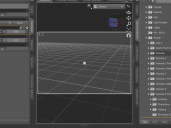
Anyway, the biggest feature (if you can call it that) that I'm missing is the white frame that appears in the viewport when you use a camera (dimensions). I can't find a way to make it reappear. So, I'm hoping someone here might know. I've included a screenshot, to show what I'm talking about.
The screenshot is from my other computer (which I have no problems with), but I don't use it to render.

Daz 3D is part of 
Connect
DAZ Productions, Inc.
7533 S Center View Ct #4664
West Jordan, UT 84084
Licensing Agreement | Terms of Service | Privacy Policy | EULA
© 2026 Daz Productions Inc. All Rights Reserved.
Comments
Click the lined/hamburger button in the top-right corner of the Viewport and enable the Aspect Frame.
Wonderful! I was worried that I'd have to uninstall, and start from scratch.
Thank you!