Texture Compression in Advanced Render settings
 Petra
Posts: 1,157
Petra
Posts: 1,157
I have mine at default.
To set those higher, would that result in better render quality for textures?
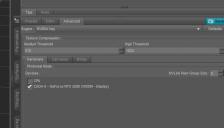
Texture Compression.JPG
678 x 387 - 33K
Post edited by Petra on

Daz 3D is part of 
Connect
DAZ Productions, Inc.
7533 S Center View Ct #4664
West Jordan, UT 84084
Licensing Agreement | Terms of Service | Privacy Policy | EULA
© 2026 Daz Productions Inc. All Rights Reserved.
Comments
I wonder if anyone knows what this compression thing does
On one forum I found an idea that it resamples textures depending on the camera distance
But I doubt that it will improve quality if you disable compression it is not like it can be noticed anyway
Thank you for the quick reply, onix :)
Medium Threshold:
Every texture image with a resolution lower than what is set there gets no compression.
Medium Threshold to High Threashold:
Every texture image with a resolution between medium and high gets medium compression
Every texture image with a resolution above High Threshold gets max compression.
This is a functionality to reduce GPU vram usage. As long as there are textures falling into the thresholds they will be compressed to use less vram. E.g. if you set min. and max. to 8200 then only textures above that resolution will get compression. Because most textures are not "bigger" than 8192 pixels that means you more or less get no compression at all. In my tests I noticed better quality of hair textures with no compression - but the difference is not that big. On the other hand, without compression the vram consumption increases significantly and in heavy scenes causes the render to either fail or fallback to CPU:
This is self-evident but what triggers that compression anyway?
The image size, that's what the threshold values are for.
The image size or the texture resolution?
How are those different?
For me, the image size is what I set it to in the render settings ...
OK, I mean the size of the texture image, not the final render image. It's the maps passed to the renderer, those which are above a threshold get that compression type before being passed over.
Yep, I thought so but just wanted to make sure that the final image size had no bearing on what's being discussed here.
Is this feature obsolete now? I cannot find "Advanced" Pane in my Daz Studio 4.24.
It has been moved to Render > Optimization
Since DS 4.22, Advanced page is split into three pages: Hardware, Canvases and Bridge... almost no change in terms of functionality but Texture Compression relevance is moved to Editor tab > Optimization.
Got it! Thank you, guys!
See
http://docs.daz3d.com/doku.php/public/software/dazstudio/4/change_log_4_23_0_1#4_22_1_40
http://docs.daz3d.com/doku.php/public/software/dazstudio/4/change_log_4_23_0_1#4_22_1_53
nVida made a change, https://raytracing-docs.nvidia.com/iray/manual/index.html#iray_photoreal_render_mode#rendering-options-iray ,
which led to Daz moving the setting, and making it saveable with the scene.
There is probably a dev in NVidia who knows what it does but maybe he or she no longer works there. I concur that it does not seem to be documented. If I were the dev there would be three things I would consider:
1) If I get a compressed texture I don't uncompress it, I keep it as is and use built in decompression in the graphics card as required. As a dev I **always** do this, it's obvious, yet it is curious how many devs insist on uncompressing things then are amazed at how much memory has been consumed...
2) If not (1) I would compress using a target-appropriate compression method. Apart from the note Richard quotes (which just says it is really dumb to compress normal maps as though they are photographs) which implies that the devs in NVidia have woken up to the fact that the different texture maps need different compression for purely colour data (not bump maps, not normal maps, not transmission maps, etc) I would probably go for JPEG-XL ATM.
3) If I got really desparate I might consider downsampling; I'd do it right so you wouldn't notice but I'd still feel guilty.
Yet, as you say, if the darn'ed texture is so far away that _its_ pixels aren't as big as the _render pixels_ then it gets downsampled regardless. It would be criminally dumb to do otherwise, even if I have to use sinc to solve the objections of the programme managers.