Daz 4.14 not using GPU

I just updated to 4.14 and projects I was working on before don't use the GPU to render anymore. I switch off CPU fallback to confirm and the render would fail. (I closed all other programs) I tried testing a small scene with a single character and it failed. I tried reloading with a different character and it worked. But then I simply changed the camera angle and it failed. I have a 5 month old 2080 ti and it works perfectly with everything except for DAZ since I load 4.14. I am desperate. Attached is some info.


gpu error 1.JPG
639 x 1939 - 77K
gpu error 2.JPG
1016 x 905 - 129K
gpu error 3.JPG
496 x 162 - 19K

Comments

  • What does the log say after rendering (Help>Troubleshooting>View Log File)? Does the scene contain a section plane, or did an earlier scene in that session contain a section plane?

  • GalaxyGalaxy Posts: 562
    edited November 2020

    Try this link

    https://www.nvidia.com/Download/index.aspx?lang=en

    Download Studio Driver after selecting correct parameters

    and then select Clean Install.

    Post edited by Galaxy on
  • faisanfaisan Posts: 600

    I just updated to 4.14 and projects I was working on before don't use the GPU to render anymore. I switch off CPU fallback to confirm and the render would fail. (I closed all other programs) I tried testing a small scene with a single character and it failed. I tried reloading with a different character and it worked. But then I simply changed the camera angle and it failed. I have a 5 month old 2080 ti and it works perfectly with everything except for DAZ since I load 4.14. I am desperate. Attached is some info.
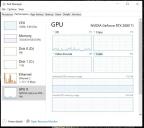
     

    Same problem! And I've installed the recent Nvidia Drivers. Really Daz Studio has a lot of failures! 

  • I just updated to 4.14 and projects I was working on before don't use the GPU to render anymore. I switch off CPU fallback to confirm and the render would fail. (I closed all other programs) I tried testing a small scene with a single character and it failed. I tried reloading with a different character and it worked. But then I simply changed the camera angle and it failed. I have a 5 month old 2080 ti and it works perfectly with everything except for DAZ since I load 4.14. I am desperate. Attached is some info.
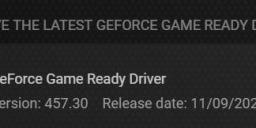
     

    Me too! I update NvidiaDriver(457.30 studio). But Daz 4.14 not using GPU.

  • Same to me, first it used 100% CPU, after installation of 457.30 (this ist a game ready, not a studio) it now uses around 30% CPU and 1% GPU. Think we have to wait for a fix by DAZ.

  • fastbike1fastbike1 Posts: 4,079

    And yet I render fine, GPU only on both Release 4.14.0.8 and Beta 4.14.0.10, with Nvidia studio Driver 457.30.

  • VoxxaVoxxa Posts: 68
    edited January 2021

    I have the exact same problem. I have a Nvidia Quadro K6000 GPU with 12GB VRAM. When I uncheck the CPU options, DAZ Studio refuses to even start rendering. All I get is a pitch black screen as a result. 4.14 either neglects older GPU's or it may be a programmer's error. So, my money was wasted in buying this Graphics Card. It worked all the way until early versions of 4.12 or late 4.11. After that, it only renders via the CPU. I believe, without a shred of doubt, it has to do with the programming of DAZ Studio. I can stretch as far as to include the software updates from Nvidia has a share in the problems as well. But - isn't that a task the developers of Daz Studio should keep a close watch at?!? I mean, I see people buying more and more expensive equipment just in order to get this software from Daz to even start working. I purchased more RAM this fall from 32 GB to 64. Didn't matter at all. DAZ Studio just bit off even a bigger chunk after. Somethings doesn't seem to be thoroughly developed when it comes to DAZ Studio. Or even keeping a parallell development with all the rest of the computer industry. 

    Post edited by Voxxa on
  • SevrinSevrin Posts: 6,313

    Voxxa said:

    I have the exact same problem. I have a Nvidia Quadro K6000 GPU with 12GB VRAM. When I uncheck the CPU options, DAZ Studio refuses to even start rendering. All I get is a pitch black screen as a result. 4.14 either neglects older GPU's or it may be a programmer's error. So, my money was wasted in buying this Graphics Card. It worked all the way until early versions of 4.12 or late 4.11. After that, it only renders via the CPU. I believe, without a shred of doubt, it has to do with the programming of DAZ Studio. I can stretch as far as to include the software updates from Nvidia has a share in the problems as well. But - isn't that a task the developers of Daz Studio should keep a close watch at?!? I mean, I see people buying more and more expensive equipment just in order to get this software from Daz to even start working. I purchased more RAM this fall from 32 GB to 64. Didn't matter at all. DAZ Studio just bit off even a bigger chunk after. Somethings doesn't seem to be thoroughly developed when it comes to DAZ Studio. Or even keeping a parallell development with all the rest of the computer industry. 

    What driver are you using?

  • Wicked OneWicked One Posts: 220
    edited January 2021

    Sevrin said:

    Voxxa said:

    I have the exact same problem. I have a Nvidia Quadro K6000 GPU with 12GB VRAM. When I uncheck the CPU options, DAZ Studio refuses to even start rendering. All I get is a pitch black screen as a result. 4.14 either neglects older GPU's or it may be a programmer's error. So, my money was wasted in buying this Graphics Card. It worked all the way until early versions of 4.12 or late 4.11. After that, it only renders via the CPU. I believe, without a shred of doubt, it has to do with the programming of DAZ Studio. I can stretch as far as to include the software updates from Nvidia has a share in the problems as well. But - isn't that a task the developers of Daz Studio should keep a close watch at?!? I mean, I see people buying more and more expensive equipment just in order to get this software from Daz to even start working. I purchased more RAM this fall from 32 GB to 64. Didn't matter at all. DAZ Studio just bit off even a bigger chunk after. Somethings doesn't seem to be thoroughly developed when it comes to DAZ Studio. Or even keeping a parallell development with all the rest of the computer industry. 

    What driver are you using?

    Doesn't matter what driver. The K6000 is a kepler GPU, and iray stopped supporting kepler cards in the 4.12 update.

    Post edited by Wicked One on
  • Ghosty12Ghosty12 Posts: 2,080
    edited January 2021

    Nvidia have updated their drivers they are now at 460.89 for both game and studio versions..  So may want to download and install them it may fix your issue..

    Post edited by Ghosty12 on
Sign In or Register to comment.

