Is the product there or not?
 dannagiusy64
Posts: 477
dannagiusy64
Posts: 477
in The Commons
Hi, I hope someone can help me. I have purchased this product but cannot use it.
https://www.daz3d.com/legendary-blades
As if it wasn't installed there, but it is there. I tried to uninstall and reinstall it but it won't give it to me. The same goes for the materials
I am attaching some screenshots for you to see.
Thank you all
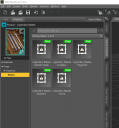
legendary.png
568 x 609 - 80K
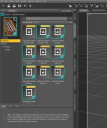
legendary1.png
725 x 866 - 137K

Daz 3D is part of 
Connect
DAZ Productions, Inc.
7533 S Center View Ct #4664
West Jordan, UT 84084
Licensing Agreement | Terms of Service | Privacy Policy | EULA
© 2026 Daz Productions Inc. All Rights Reserved.
Comments
What do you mean exactly by "cannot use it"? Do you get an error message when loading one of the props?
It seems to be working properly and the icons show up for me. Have you tried uninstalling and then reinstalling the product?
It looks like it's just not showing up in Smart Content for you. Did you try loading them from the Content Library (Content Library Tab >> Props folder >> Legendary Blades folder)?
I have had this happen many times too. I've had varying success in fixing it.
Go into DIM and locate the item in the installed panel. Right click on it and select show installed files. You may need this information later.
Now here is what I have tried in the past. Between each step restart Studio and see if it worked:
1. Use DIM to uninstall and reinstall the item.
2. Use DIM to uninstall, then use that "Show Installed Files" to locate any missed files and manually delete them.
3. Use DIM to uninstall and then reinstall to a new, preferably temporary install directory.
4. Use DIM to uninstall. Go into DS. Right click the item in Smart Content and tell it to uninstall. Reinstall with DIM.
From what I have been able to determine there is a file that gets stuck in the Studio product database. This makes Studio think the product is installed and nothing you do will get it to change its mind until the offending file is removed.
Do not do what I did... Don't try using the database commands. That just creates more trouble.
Yes, it gives me an error, I tried to load it on stage both from the library, from smart contact, and from products, nothing to do. Yet I installed them correctly
Yes, I've done it several times
no way. I uninstalled and installed but it's the same. I also tried it manually but it doesn't work. Here's what it gives me
What does the log say?
the log file? I don't know how to read
however I noticed that even if uninstalled the product is always there on smart content
Uninstall with Connect (inside DazStudio) and see if it still shows the DIM version installed. As long as DS thinks it's installed with Connect it will ignore the DIM version.
I was unable to uninstall with connect. I have deleted the folders from the various folders but the product is still there unusable
I had that problem come up when trying to install products on a new PC. It was due to using incorrect custom paths in DIM. Check in DIM that the download/install paths are default.
the path is correct. Also because I bought other products and they installed correctly. Some I have to check. I bought them but haven't used them yet